POS solutions provider Lightspeed has launched a new variation on food ordering in a bid to revitalize the restaurant sector. Order Ahead is billed as a cost-efficient online ordering management system, which will help restaurants to offer takeout food and accept payment via a completely contactless dining experience.
Lightspeed is already well known for its innovative point of sale technology and associated systems. As the company continues to expand, it has announced the immediate availability of Order Ahead, which will integrate with its eCom for Restaurant product and allow food and beverage outlets to avoid third-party fees by managing their own deliveries.
Restaurant and hospitality businesses that already use the Lightspeed POS will be able to accept orders made online. Customers will be able to submit their food and drink choices via desktop or mobile and the Order Ahead system will deliver real-time updates to restaurant owners. This will let them prioritise orders in a prep queue ready for their kitchen to process.
Adding appeal for consumers is the way that restaurant owners can use the Lightspeed system to send hungry customers status updates on their orders, via text message. The move is designed to offer a dynamic start-to-finish insight on any orders placed. In addition, customers can pick from several options when it comes to pick-up and delivery when orders are ready to go.
Order Ahead
Business owners using the Lightspeed and Order Ahead POS tools will be able to customize the system with their branding as well as adjust hours of opening, preparation times and other settings to suit their individual circumstances.
The rollout of Order Ahead already seems to be hitting the spot with restaurant owners. “COVID-19 has changed how we run our business, and we knew we needed a technology partner that was fully integrated with delivery platforms. Lightspeed and the Order Ahead integration is simple to use and keeps my staff safe,” says Juliana Carlucci, owner of Happy Burger in Toronto, Ontario.
“We now know we can generate income in the coming months, even if the pandemic keeps dining rooms closed.”
Microsoft has released a new universal build of its Office 2019 beta for Macs that will work with the recently-released Apple Silicon hardware.
The news will come as a relief to Office fans that were worried about possible compatibility issues with Apple's latest releases.
Back in June Apple confirmed during its WWDC event that it would be transitioning its Macs away from Intel processors to its own internal versions, called Apple Silicon. The first Apple Silicon processor will be known as the Apple M1 chip and will be included in the upcoming MacBook Air, MacBook Pro and Mac mini devices.
Speaking ahead of the release, Microsoft’s principal software engineer for Apple products, Erik Schwiebert, tweeted that while there remains no public date for a final release of the software, the beta should serve as “an initial peek for customers to test on hardware they may be acquiring this week.”
All change
After the excitement over the new hardware had faded, Mac fans began to wonder what the change might mean in terms of using their favorite software. Microsoft’s recent announcement indicates that Office 2019 should function correctly – once any bugs discovered during the beta testing have been ironed out.
When Apple announced its transition to M1-powered Macs, it confirmed that its own Rosetta software should enable apps that were built for the old Intel processors to work with the new Apple Silicon hardware, but that was probably only intended as a temporary solution.
Because Microsoft’s Office 2019 beta announcement refers to a ”universal” build, it means that it should work for both Intel-powered Macs and those created for Apple Silicon hardware.
Anyone that wants to take part in the beta testing of the new release can look into joining the Office Insider program here.
Apple is close to officially releasing macOS Big Sur, its next operating system for Macs and MacBooks. At its recent 'One More Thing' event, Apple announced that the general public will be able to download the full version of macOS 11 on Thursday, November 12.
The new macOS Big Sur is bringing some pretty major – not to mention, exciting – improvements to the operating system that powers the best Macs. Where its predecessor, macOS Catalina, only had minor improvements over macOS Mojave, macOS 11 Big Sur should bring in the biggest changes to Apple's operating system in years.
Chief among these changes is the migration to Apple-designed silicon. This will finally bring support for every iOS and iPad app to the Mac operating system. Apple also promises that it will lead to greater efficiency and power.
Better yet, according to Craig Federighi, Apple's senior VP of Software Engineering, macOS Big Sur is built from its 'core' to take advantage of and run pretty well on Apple's new M1 chip. Thanks to this new chip, owners of the new Macs can run iPhone and iPad apps directly on their Mac.
With the new MacBook Air (2020), new Mac mini and new MacBook Pro 13 (2020) all available to buy right now, these new Macs are powered by the new M1 chip, and come with macOS 11 Big Sur installed, so they are expected to be real showcases for what Big Sur, and the M1 chip, can do.
In addition, the macOS 11 Big Sur is bringing in a massive redesign in the look of native macOS apps – on top of delivering some stability improvements. Apple is finally giving apps like Messages, Mail, Photos, Calendar and even Finder a fresh, much more compact and streamlined design. That’s on top of cool new features that are more in line with those on the upcoming iOS 14 and iPadOS 14, with macOS Big Sur bringing widgets. This should make your whole Apple experience a much more harmonious and unified experience.
As macOS 11 Big Sur is the biggest macOS release in years, there’s a lot to talk about. Let’s delve into the most important updates, changes and new features here.
That way, you can decide whether or not it’s a good time for you to upgrade your macOS. Be sure to keep this page bookmarked, and we'll keep it updated with the latest information and features.
Cut to the chase
What is it? macOS 11 Big Sur, successor to macOS 10.15 Catalina
When is it out? November 12, 2020
How much will it cost? Nothing. Apple software updates are always free
Upcoming MacBook Pros could come with macOS 11 already installed.(Image credit: Future)
macOS 11 Big Sur release date
While macOS Big Sur was revealed at WWDC 2020, we had to wait until it's new MacBook event in November to find out the final release date: November 12.
As usual, this will be a free update for everyone with a compatible system. If you're not sure if your Mac or MacBook is compatible, check out the system requirements below.
When will macOS 11 Big Sur be available to download?
While we know macOS 11 Big Sur will be available to download on November 12, we don't know exactly what time.
Previous software updates from Apple have gone live at 10am PT, which is 12pm ET, 6PM GMT, 3AM November 13 AEST, so we think macOS Big Sur will also drop around that time as well.
macOS 11 Big Sur system requirements
If you want to download and install macOS 11 when it becomes publicly available on November 12, you're going to want to make sure your Mac is actually able to run it. And, unfortunately macOS system requirements have gone up.
We went ahead and listed the macOS Big Sur-compatible Mac systems down below.
12-inch MacBook (2015 and later)
MacBook Air (2013 and later)
MacBook Pro (Late 2013 and later)
Mac mini (2014 and later)
iMac (2014 and later)
iMac Pro (all models)
Mac Pro (2013 and later)
macOS 11 Big Sur name
This time around, Apple chose Big Sur to symbolize this release of macOS. Much like the unincorporated coastal area in Northern California, this new macOS is supposed to deliver "unmatched levels of power and beauty."
We expect macOS 11 Big Sur to bring changes to all sorts of Mac computers.(Image credit: Future)
macOS 11 Big Sur features
Safari Safari is the unsung hero of macOS, and some new improvements have made it even faster – now 50% faster than Chrome, according to Apple – along with even more privacy improvements and better battery consumption. But, that's not all. This is supposedly the biggest update the browser has received since it was first introduced.
This new version of Safari will bring a host of new features to the table including Intelligent Tracking that can give you a Privacy Report on each website you visit, Save Passwords to track your passwords and make sure they haven't been compromised, Extensions support for WebExtensions API and a new Extensions category in the App Store, and native translation capabilities.
One cool thing here is that the Home Page will now be extremely customizable so you can change the background image and add/edit sections.
Messages improvements
Messages on macOS has been behind iOS for a while (and kind of still is), but now you can use Pinned Messages, Memoji and the Groups Enhancements that will come with the iOS 14, which is a nice touch. Basically, Messages for Mac will also bring many of the features that its iOS 14 and iPad OS 14 versions will have. It'll also feature a more powerful search, a redesigned photo picker and new messages special effects.
AirPods improvements On top of some pretty cool Spatial Audio support for the AirPods Pro, a pretty major improvement for AirPods support on macOS is here. Rather than fiddling with your Bluetooth settings when you want to use your AirPods with your Mac, they will automatically switch to your Mac when you start using it. AirPods will now seamlessly and intuitively switch between devices without you doing anything.
Sidebar in Mail and Photos The Apple Mail and Photo apps have been out of date for a while now, but Apple has brought new designs to a lot of the biggest Mac Apps, with the most notable ones being the new sidebars in Mail and Photos. The Photos app will have the same look, feel and features as its iOS 14 version.
Control Center on Mac One of the best things about iOS is the super convenient Control Center that lets you change settings at a glance. macOS Big Sur brings that to the Mac, and it's easily accessible in the Menu Bar, so that you can easily change settings without digging through the preferences app.
Widgets in the notifications app Just like iOS 14, macOS 11 Big Sur is getting widgets in the notifications menu, which will make it easier to get important information at a glance, with easy to read interfaces. These widgets can be customized according to your needs and preference.
Mac Catalyst
One of the biggest headline features of macOS Mojave was that it brought some big-name iOS apps to the Mac. However, through Mac Catalyst, new APIs and tools will help app developers bring more iOS apps over to the Mac operating system. Through these tools, you'll get features like resizable windows and keyboard tools, which will make them feel like Mac Apps, rather than iPhone apps.
Mac on ARM
After so many rumors, it's finally happened. Apple has finally announced that Macs will be transitioning to Apple-designed silicon, similar to what we've seen with every other device in its lineup.
However, this isn't quite the death knell for Intel that some might think it is. Tim Cook said during the WWDC keynote that there are several Intel-based devices still in the works at Apple, and that the Cupertino behemoth is "very excited" about them.
Still, this is probably the biggest change to come to Macs in years, as it will allow all iPhone and iPad apps to work natively on Macs for the first time. Plus, thanks to Mac Catalyst, and Rosetta 2, which will translate the source code of all Mac Apps, every Mac App will be able to run on the new ARM-based Macs.
Global technology company Zoho has announced an alliance with Tata Consultancy Services (TCS) to provide customer relationship management, IT Service Management and e-Commerce solutions to solve problems for large businesses.
"Together, Zoho and TCS will drive growth for global organizations through stronger technology alignment with business goals, more transparency across solutions, and greater operational efficiency," Zoho said in a press statement.
This partnership will bring together Zoho's product portfolio and TCS’ decades-long experience and domain expertise in technology-led consulting and business integration services.
Zoho, in alliance with TCS, will allow global enterprise organizations to realize new revenue opportunities, gain operational efficiency, and drive business success from anywhere, whether remote, in-office, or both.
TCS is a trusted consultant and integrator for enterprise businesses, with a vast network of diverse clients. Zoho's portfolio of more than 45 applications is built on one technology stack so that services including AI, unified search, powerful analytics, and many others are inherited across all applications.
"TCS has a business-led approach to consulting and enterprise transformation. Zoho takes the same approach to its technology, offering a vertically integrated platform of leading business applications and services," Sridhar Vembu, Co-founder and CEO of Zoho Corporation was quoted as saying in a press statement.
"We are confident that through TCS' reach and influence in the market across 46 countries, more enterprise organizations globally will experience the benefits of Zoho's deep technology stack and world-class applications."
New revenue opportunities
“Enterprises are adopting best-of-breed product suites for customer service functions, because they provide the digital power and flexibility required to create the right engaging customer experience at the right moment,” Aarti Devi, Global Head - Customer Experience Management, Enterprise Application Services at TCS said.
“We are pleased to partner with Zoho in helping their customers pursue new innovation and growth opportunities.”
Zoho, in alliance with TCS, will allow global enterprise organizations to realize new revenue opportunities, gain operational efficiency, and drive business success from anywhere, whether remote, in-office, or both.
Tata Consultancy Services is an IT services, consulting and business solutions organization that has been partnering with many of the world’s largest businesses.
Zoho, a software company, has 45+ apps in nearly every major business category, including sales, marketing, customer support, accounting and back office operations, and an array of productivity and collaboration tools.
Google Photos, the search giant's popular online image storage and editing platform, has today announced it will no longer provide free, unlimited storage for ‘high quality’ photos and videos. Starting on June 1, 2021, any newly uploaded images will instead count towards the free 15GB of cloud storage that comes with every Google Account.
If you use Google Photos, any ‘high quality’ photos or videos you upload to the service before the June 1 deadline will not count towards that 15GB storage cap, even after the new rules come into play.
There’s no change being made to images or videos uploaded in ‘original quality’, as these are already counted towards an account's 15GB storage cap. The key difference between the two is that ‘original quality’ preserves files in their original resolution, while ‘high quality’ files are processed and compressed automatically by Google Photos to save space.
There is one notable group of users who are exempt from the changes: if you own any Pixel smartphone, from the original through to the brand new Pixel 5, you can continue uploading and storing as many high quality snaps and videos as you’d like without it contributing to your quota.
Google Pixel 4a review: impressive and affordable smartphone snaps
Google Photos: how to back up photos from your phone, tablet or computer
In a blog post, Google Photos says the switch is a necessary step that, “allows us to keep pace with the growing demand for storage”. Still, it’s sure to elicit a reaction from users who have been receiving free, unlimited storage of their memories in for over five years now.
Google estimates that once these changes take effect, around 80% of users should be able to store about three more years worth of photos and videos before they'll hit that 15GB free storage cap. The company also provides a personalized estimate, so you can see how much you have left. Other Google services such as Gmail and Drive also count towards your 15GB.
Once June 1, 2021 rolls around, Google is also introducing a new function that will spot dark or blurry photos, and even large videos, and ask if you want to delete them from your account.
If you find you've reached the 15GB cap, you’ll need to sign up for a Google One account to buy more storage space. Prices start at $1.99 / £1.99 / AU$1.99 per month for 100GB.
Customer service solution provider Zendesk has announced that it will now offer real-time support across all Facebook messaging services: WhatsApp, Messenger and Instagram. The integration will provide customers with the level of service they expect from a modern helpdesk.
In the world of e-commerce, customers are increasingly embracing messaging apps as a way of engaging with their favourite brands and retailers.
Since February, customer engagements taking place across channels like WhatsApp, Facebook Messenger, Twitter direct messages, and SMS have increased by nearly 50%.
Zendesk’s own research has also shown the growing popularity of messaging tools among customers. Insights compiled by Zendesk and market research firm ESG found that 89% of companies offering the best customer experiences invest in offering more communication channels to their customers.
Zendesk has already seen this growing demand first-hand too, with more than 34,000 Zendesk customers adding WhatsApp or Messenger to their support offerings. As part of the integration between Zendesk and Facebook, businesses will be able to take advantage of out-of-the-box messaging capabilities, automate common answers using AI-powered workflows and benefit from a host of customization options.
“Businesses today need to meet their customers where they want to be met -- and that’s increasingly through messaging,” Matt Idema, Chief Operating Officer at WhatsApp, explained.
“More than 175 million people already message a business account on WhatsApp every day to ask questions and get helpful information, and as more conversations shift online during the ongoing pandemic, messaging tools can help businesses of all sizes increase their efficiency and improve customer satisfaction. Through this partnership with Zendesk, we’ll help many more medium-sized businesses get started using messaging to communicate with their customers in a matter of minutes and build new features to make WhatsApp the best way to get business done.”
InterGuard is employee monitoring software that you can use to track the activities of your team members. This stealth monitoring application running on employees’ computers, tablets, and phones relays information back to the server, detailing everything from sent emails to visited web pages.
In our InterGuard evaluation, we investigate whether this tool can help a business increase productivity, secure sensitive data, and prove compliance with data privacy laws.
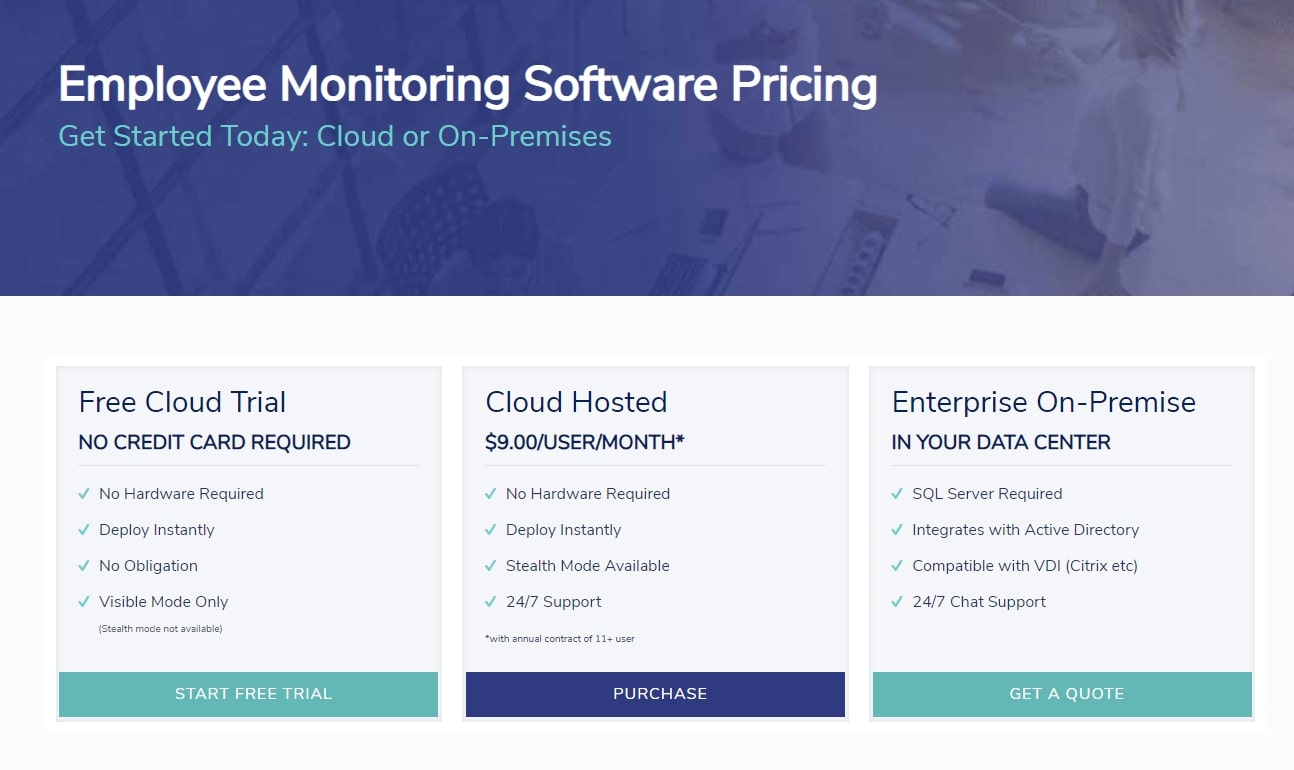
InterGuard has a relatively complex pricing structure. First, you have the choice between a cloud-hosted service and an on-premise installation. You’ll need an SQL server and to contact InterGuard for full pricing details if you’d like to install the software on your premises.
InterGuard’s main cloud-hosted plan is paid annually and has a minimum of two users. If you buy between two and 10 licenses, PC/Mac monitoring costs $156/license/year, Chromebook monitoring costs $60/license/year, and Android/iOS monitoring costs $150/license/year. If you buy between 11 and 25 licenses of each different type of monitoring, there’s a discount of between 10-50%. You must contact the sales team for a quote if you plan on buying more than 25 licenses. You can also choose to pay two years in advance for a 15% discount.
Several upgrades cost extra. Geolocation support is $19/year and web blocking costs $15/year. An Enterprise package for PC ($15.60/year) adds file tracking, print monitoring, and download tracking. Endpoint Lockdown ($60/year) helps you monitor and control a laptop if it’s been lost or stolen. Data Loss Prevention ($133/year) blocks sensitive data sent by email, filled into web forms, or saved to removable media. Do note that these are all separate add-ons for Mac and PC, so if you want them to work on both Macs and PCs, you must buy them both.
There’s a monthly payment plan option, but it feels like an afterthought. If you pay monthly, you can only monitor Windows and Mac computers, so if you need Chromebook, Android, iPhone, or iPad monitoring, you’ll need an annual plan instead. You also can’t buy the various add-ons, like geolocation and web blocking, if you choose the monthly payment plan, and the price per user is more than double the price of the annual plan.
InterGuard is available as a cloud-hosted or on-premise solution(Image credit: InterGuard)
How it works
InterGuard has an online test drive and a 14-day trial that doesn’t require a credit card. During the free trial, the monitoring software will not work in Stealth mode, so users will be aware that it is running.
It’s possible to deploy the monitoring software remotely on computers using InterGuard’s NetDeploy tool, but the easiest way to install the software is by being at the physical location of the endpoint that you want to monitor and downloading the installer from the InterGuard Dashboard. Before installation, you’ll need to add an exclusion for the software to your antivirus program.
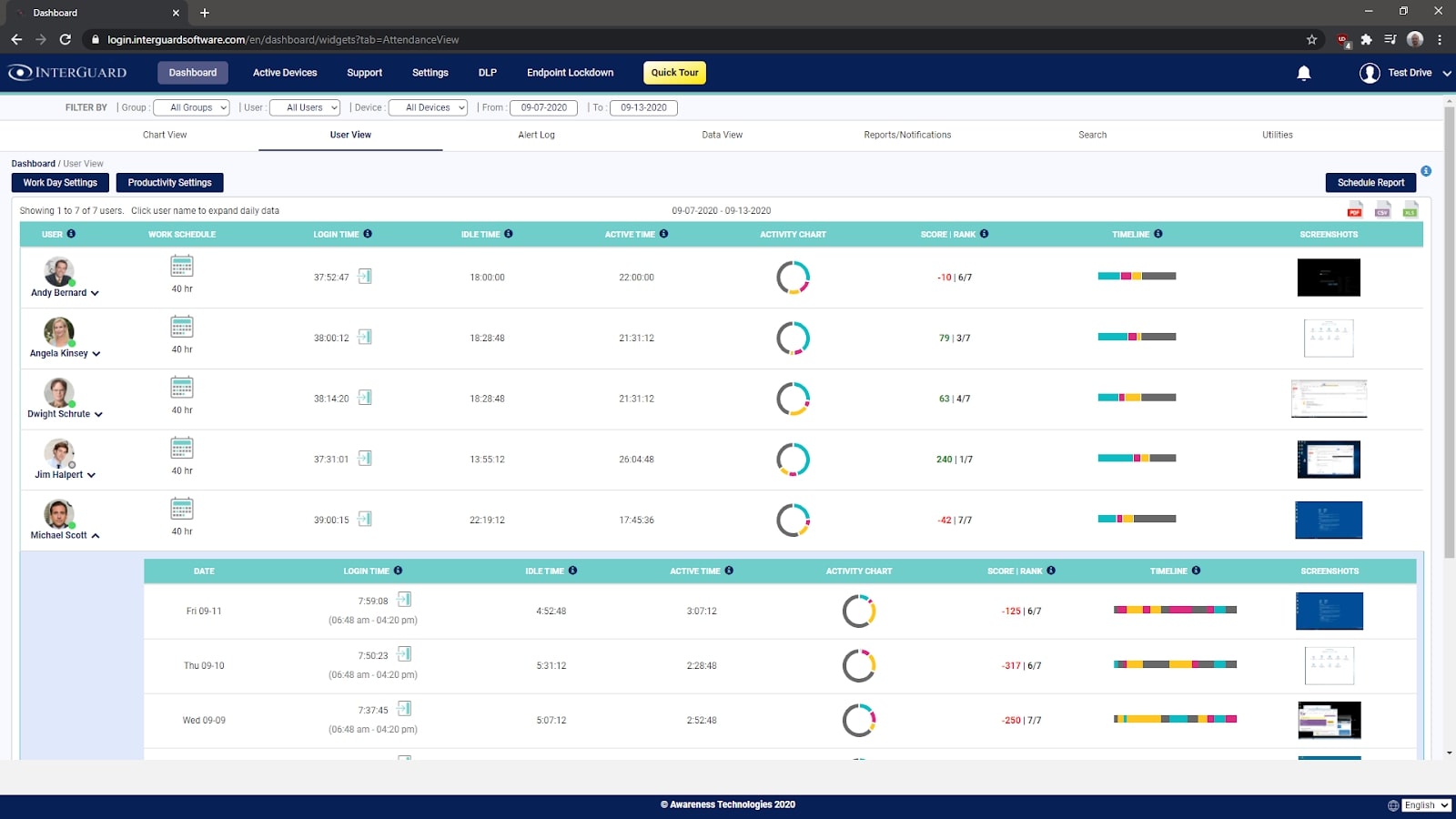
The User View gives you a high-level view of your employees’ activities(Image credit: InterGuard)
Features and services
Once the monitoring program is installed, you’ll typically use the InterGuard web interface to organize employees into groups, decide what you want to record, create alert word categories, and set up automated reports.
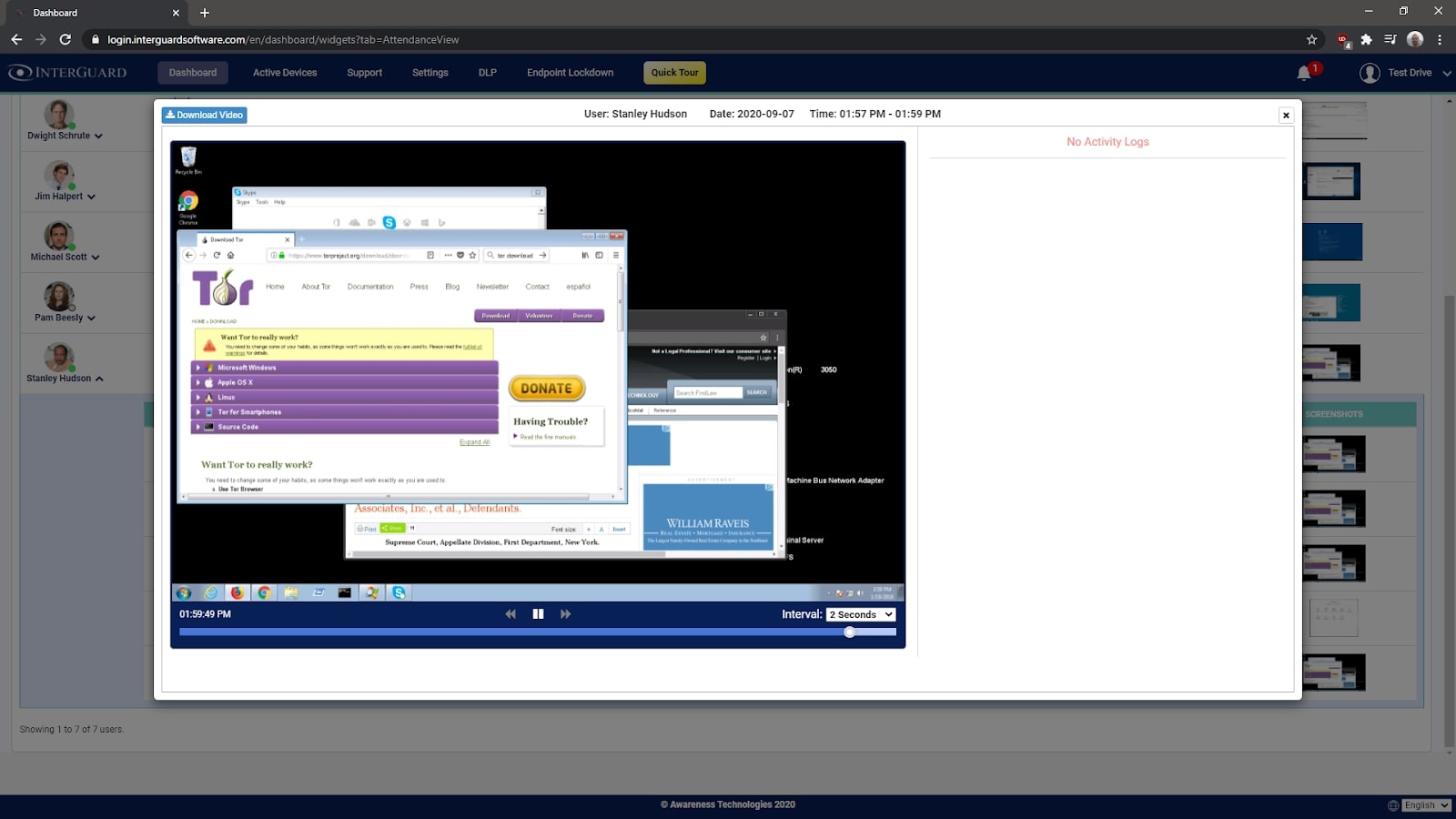
The InterGuard dashboard has six customizable views of your employees’ productivity data. The Chart view is a high-level overview with over 60 chart types that help you spot trends or issues. The User view shows you the team’s workday and who is being the most productive. You can view screenshots of each user’s screen. The Data view is a filterable log of all recorded data, and the Search view allows you to find any activity, perhaps in the case of an investigation.
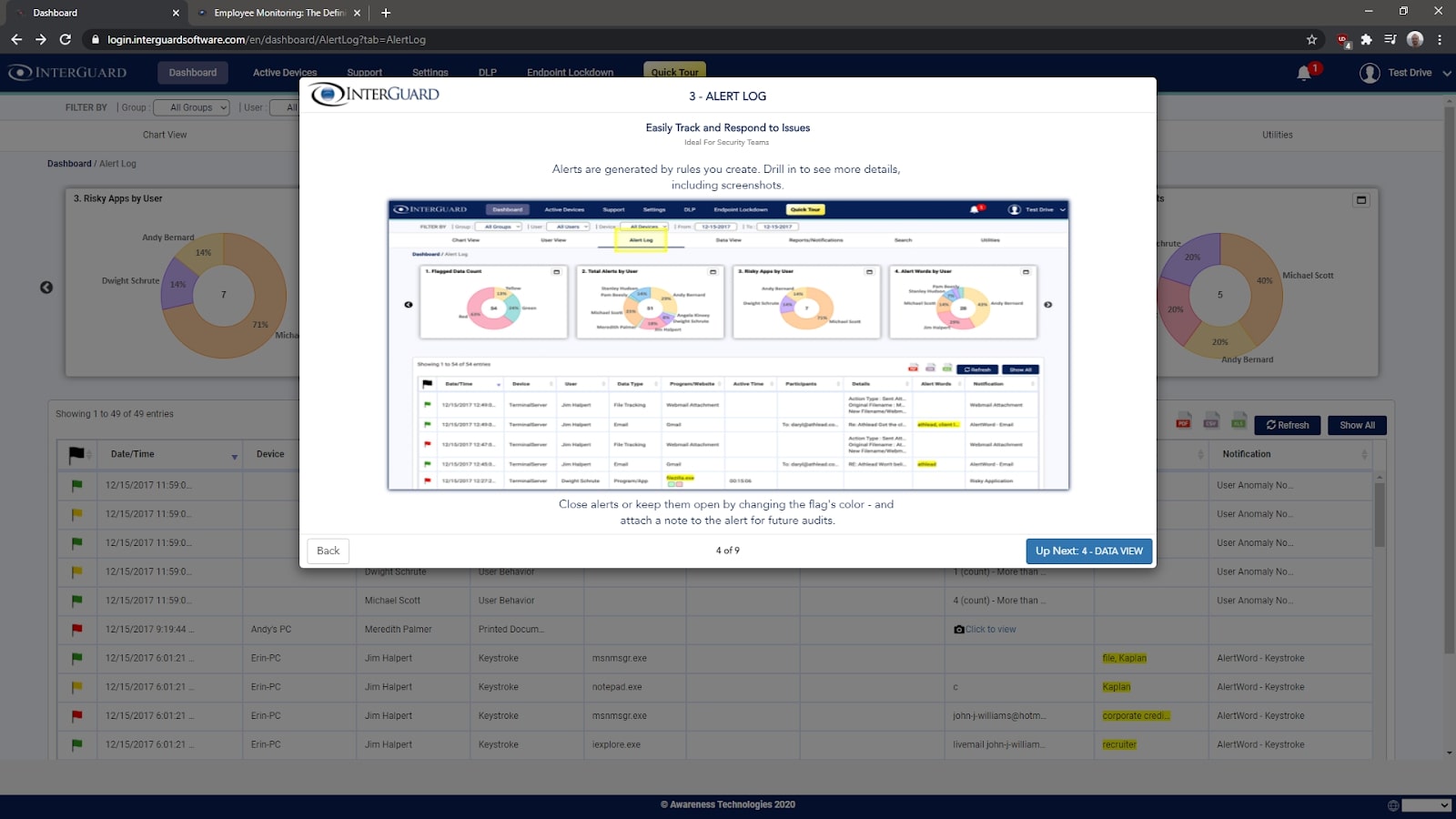
You can create alerts based on rules that you create, and assign them different levels of risk. For example, you could consider the use of a peer-to-peer file-sharing program a high risk and opt to receive an alert in the Alert Log if any employee starts one up. Using the Reports and Notifications wizard, you can get your choice of reports emailed to you daily or weekly.
You can view screenshots taken from employees’ computers(Image credit: InterGuard)
Support and customer care
InterGuard has a small knowledge base with around 30 articles. Most of these are guides on how to get anti-virus software programs to ignore the stealth monitoring application. But all the articles are long, detailed, and accompanied by clear screenshots and useful videos.
Customer support is available via email Monday to Friday, 9 AM to 5 PM EST. The 24/7 live chat support can be accessed within the application. InterGuard specifies that live chat support is only able to help with the most basic account issues. We sent a few emails to InterGuard technical support and received helpful replies within four hours, which is reasonably quick.
After creating an account, you’re taken through a quick tour of InterGuard’s primary screens(Image credit: InterGuard)
The competition
InterGuard may be a pioneer of employee behavior monitoring, but we find Teramind easier to use due to its more modern interface. Teramind also has better templates for automation out of the box; we found that InterGuard’s Alert Word system was prone to flagging false positives when employees visited innocuous websites.
ActivTrak is another top tool for employee monitoring with a stealth agent that runs in the background. At $7.20/user/month, it’s about half the price of InterGuard yet includes all the same salient features for monitoring employees on PCs, Macs, and Chromebooks.
Final verdict
InterGuard is a powerful employee monitoring tool that’s extremely customizable. It has strong keyword tracking and can generate a wealth of reports on your employees’ activities. That said, its interface is somewhat clunky, and its stealth employee monitoring agent takes time to set up, particularly if you run antivirus software.
We recommend InterGuard if you’re interested in monitoring a range of different types of devices. While most employee monitoring software focuses on Windows and Mac, InterGuard has monitoring agents for Android and iOS too, potentially making it a more comprehensive solution for your needs.
As more and more businesses grapple with the complexities of a remote workforce, employee monitoring software providers are growing increasingly important. Ensuring staff members maximize the time they spend out of office during working hours is a key concern for employers with distributed teams.
In this article, we evaluate one of the best employee monitoring software options available, Work Examiner. We take an in-depth look at the software’s price plans, most important features, and customer support, and weigh up how it compares to other leading employee monitoring platforms so you can decide if it’s the right tool for your organization.
There are two subscription options with Work Examiner, one for small businesses (Work Examiner Standard) and another for larger, enterprise clients (Work Examiner Professional).
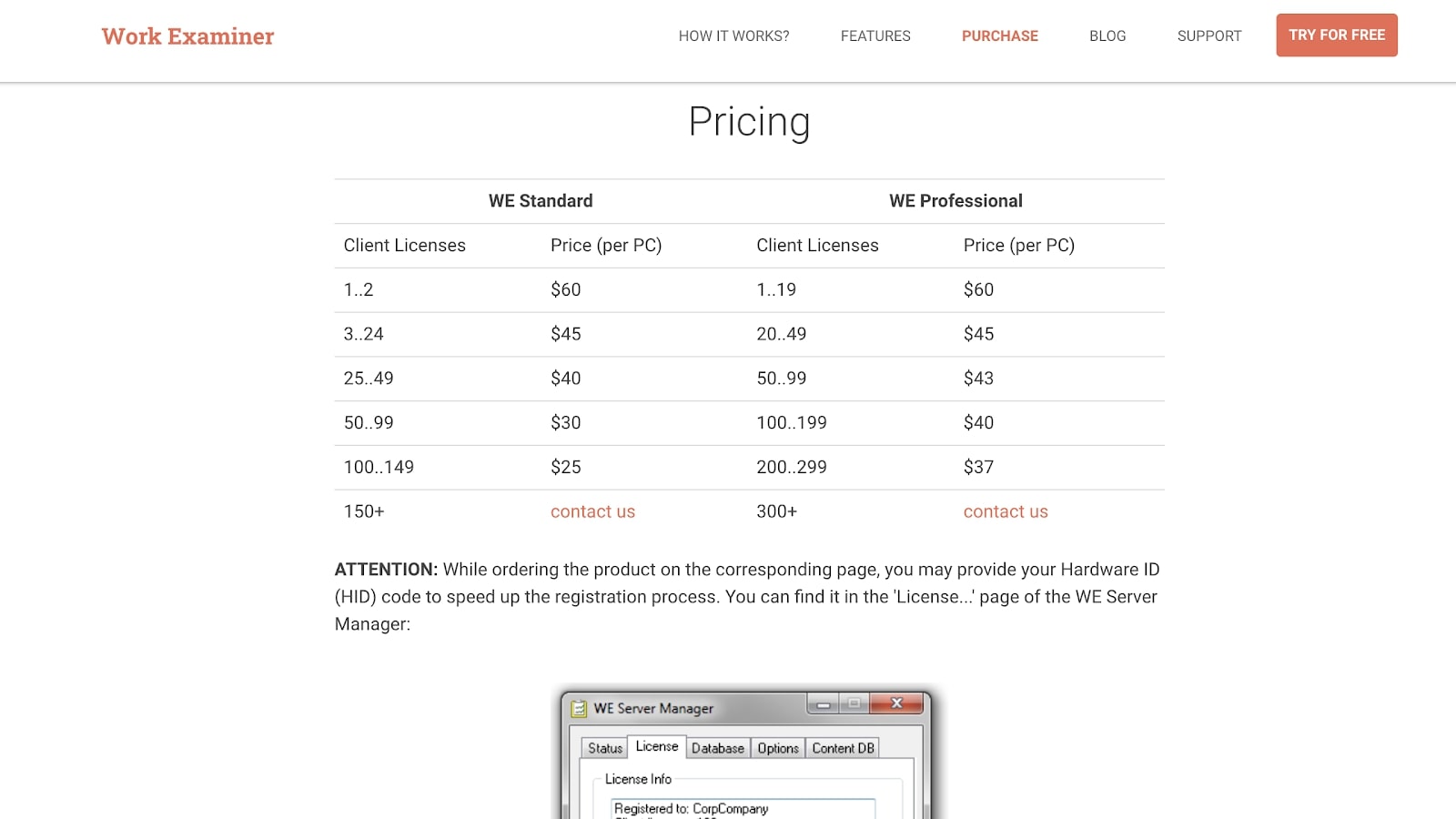
Pricing is a little complicated and decreases the more users you add to your account. Thankfully, Work Examiner includes a payment calculator on its pricing page so it’s easy to work out monthly costs by selecting the plan you wish to subscribe to and the number of licenses you’d like to purchase.
For example, 1–2 Standard licenses—you pay per PC—costs $60 while 50–99 will only cost half this per license. Work Examiner Professional also costs $60 per license to begin with, but the price decrease is more gradual. For example, 50–99 Professional licenses cost $43 per user.
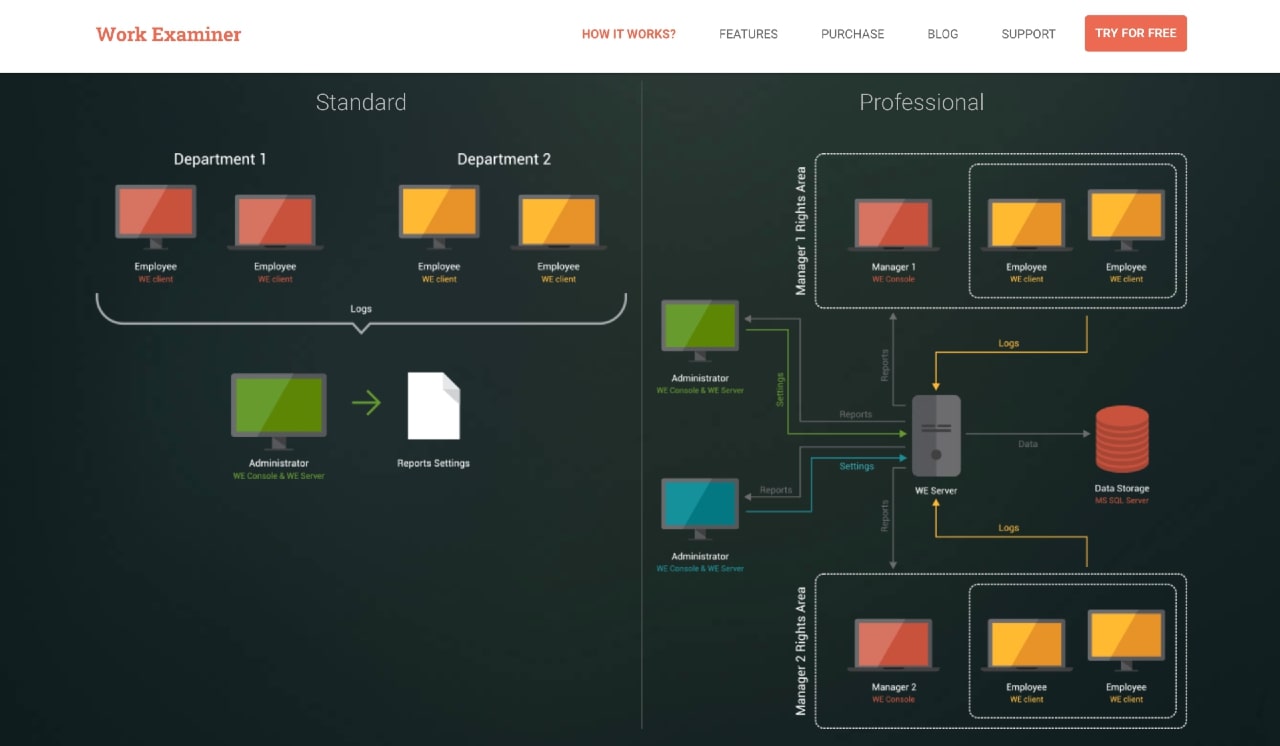
The key difference between the Professional and Standard plans is the way the technology is used. With Work Examiner Standard, logs are sent directly to a single administrator, like an IT manager. Work Examiner Professional works slightly differently with employee logs routed via the Work Examiner server to multiple administrators, from HR executives to management. These reports can then be exchanged across a company’s network.
This advanced infrastructure commands a higher price tag and is aimed at large companies that wish to perform qualitative analysis on all the data collected to develop reports, identify problem areas, and increase efficiency.
All licenses are perpetual and include a year of dedicated support and software updates. You can try Work Examiner for free on a 30-day trial.
The cost of Work Examiner diminishes the more machines you add(Image credit: Work Examiner)
How it works
Work Examiner is a software program and must be installed on each individual employee’s device. It’s up to you how many licenses you wish to purchase and, as we mentioned, the price per license diminishes the more you purchase. According to Work Examiner, the set-up shouldn’t take longer than a few minutes, although some reviews dispute this.
The product can be split into three. Work Examiner Client can be installed remotely by an admin on an employee’s computer and collects and logs data on the user’s daily activity. Work Examiner Server can be installed on any workstation or server that will be tasked with receiving logs from employee computers.
Finally, Work Examiner Console can be installed on Work Examiner Server or if you are using the Professional service, directly onto an admin’s PC. It enables users to monitor activity remotely.
Work Examiner has Standard and Professional options(Image credit: Work Examiner)
Features and services
Work Examiner has fairly straightforward features, but they should be sufficient for most employee monitoring tasks. That said, a focus on data and statistics makes it a useful tool for company-wide analysis and productivity reporting too.
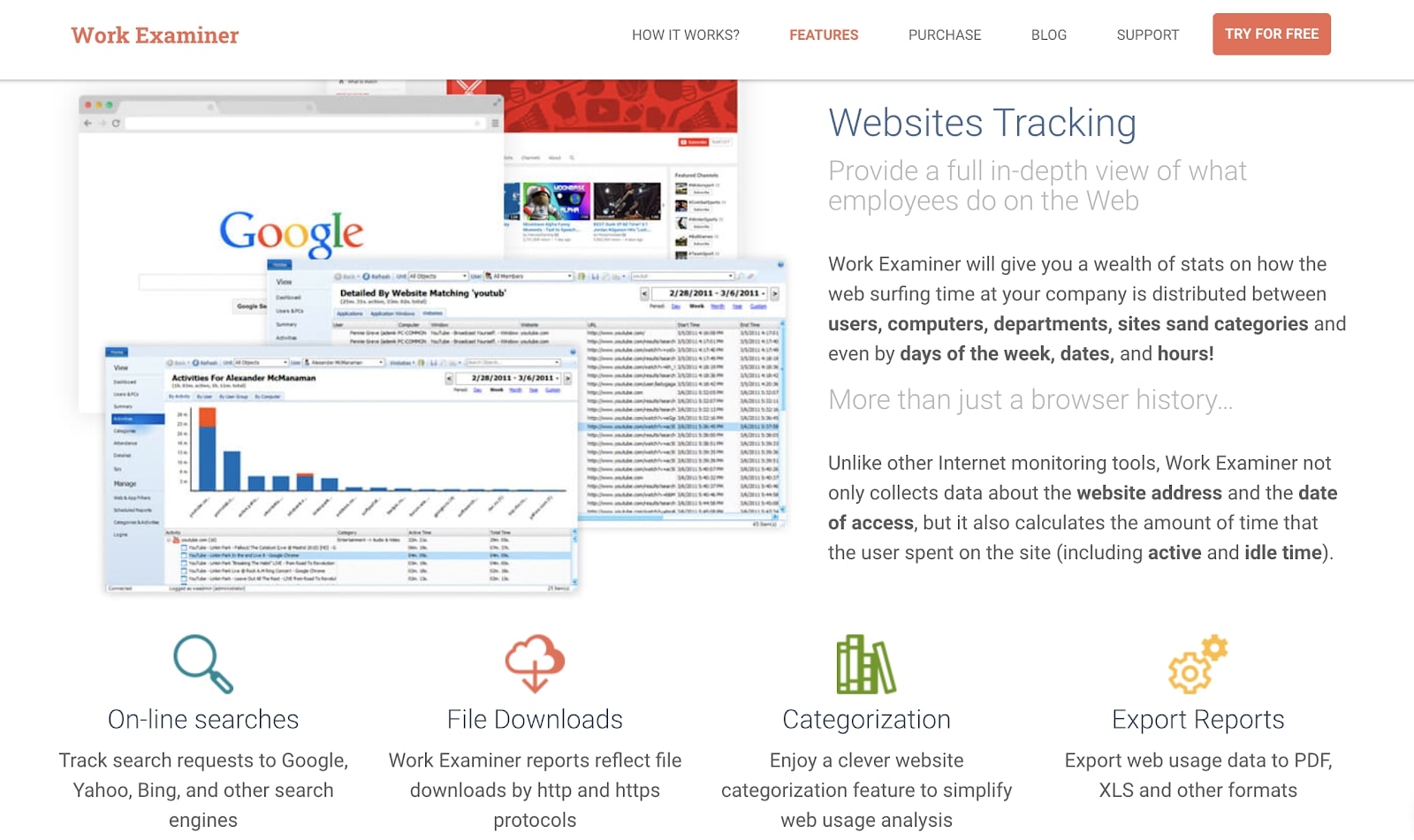
The technology enables admins to track which websites an employee visits and how long they spend on particular sites. Work Examiner also tracks searches on the leading search engines, including Google and Yahoo, and provides information on idle time too.
The software logs file downloads from HTTP and HTTPS sites, categorizes websites for easy tracking, and exports logs as reports in several formats including PDF and XLS.
It’s possible to take screenshots from individual PCs in real-time or refer back to recorded sessions. For analysis purposes, the software can track a particular computer’s activity and compare it with other licensed machines. There is also an instant messaging tracker for messaging tools like Facebook messenger.
Using the Current Activity function, employers can view what a user is working on directly and with the built-in web filter can block or whitelist websites.
Work Examiner can record and track user emails sent or received through many providers including Gmail and Yahoo Mail. The purpose, as stated by Work Examiner, is to prevent data leaks and gain a better understanding of internal employee communication.
Somewhat controversially, Work Examiner includes a keylogging feature. More commonly associated with malicious hackers, the technology enables employers to record every keystroke a user makes.
In general, Work Examiner is cited as an easy-to-use product that offers the basic functionality employers require to monitor remote staff. That said, some reviewers have commented on the installation process being a little complicated.
For example, if you purchase Work Examiner Professional you’ll also need access to Microsoft’s SQL Server to complete the installation process.
One serious limitation is the fact that Work Examiner can only be deployed on Windows machines. This could be a major hindrance for organizations with a distributed workforce, although not so much for companies deploying the technology in-house—providing, of course, their IT setup is Windows-based.
Work Examiner’s features could be seen as a little too invasive(Image credit: Work Examiner)
Support and customer care
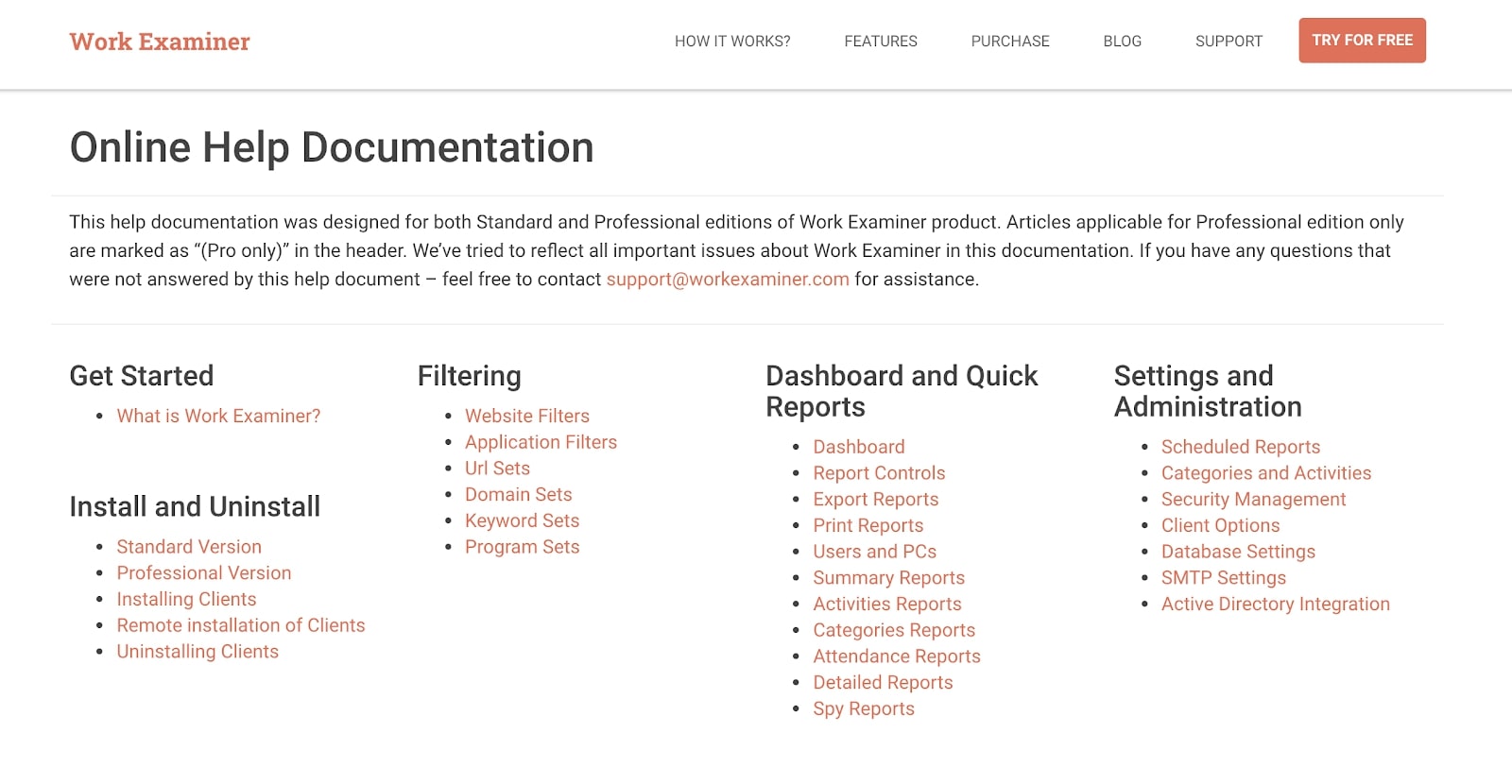
Work Examiner provides an impressive cache of online documentation which should cover any questions you have. It is well-presented and easy to access from the provider’s website. Failing that, you might find the answer you require in the separate FAQ page.
Free support is available via phone and email but remember, this is only available for the first year of activation and following subsequent subscriptions.
All new licenses include a year of updates and free support(Image credit: Work Examiner)
The competition
Time Doctor is perhaps less invasive than Work Examiner, and the GUI dashboard is easier to navigate too. However, for large teams Work Examiner’s professional plan is better suited as the data provided is more comprehensive.
Compared to some of its competitors, Work Examiner is lacking in advanced features too. In its defense, it provides a sturdy monitoring service, but other platforms like Hubstaff include extras like project budgeting and online invoicing tools too.
With this in mind, a platform like Hubstaff might be better suited to employers with a large number of freelancers on the books.
Final verdict
Some users may find the spyware elements in the software a little uncomfortable, but for employers keen to track and record everything a member of staff is up to during work time, Work Examiner is hard to beat.
That said, many employers may prefer software that’s less intrusive and perhaps easier to deploy. At the very least, if you do decide to use this software, make sure your staff know the level to which they can be tracked.
Zoom has promised to revamp its security protocols after the Federal Trade Commission (FTC) found that the video conferencing tool misled users by claiming that its encryption was more robust than it really was.
As the coronavirus pandemic raged across the globe, digital communications tools such as Zoom saw a huge increase in users.
And as competition between platforms heated up, Zoom made claims that the end-to-end encryption it offered made it impossible for anyone to listen in to calls. Zoom has now had to retract those claims as part of a settlement with the FTC.
“In its complaint, the FTC alleged that, since at least 2016, Zoom misled users by touting that it offered ‘end-to-end, 256-bit encryption’ to secure users’ communications, when in fact it provided a lower level of security,” an FTC press release explained.
“End-to-end encryption is a method of securing communications so that only the sender and recipient(s) – and no other person, not even the platform provider - can read the content. In reality, the FTC alleges, Zoom maintained the cryptographic keys that could allow Zoom to access the content of its customers’ meetings, and secured its Zoom Meetings, in part, with a lower level of encryption than promised.”
Misleading claims
The FTC also alleges that Zoom kept recorded meetings unencrypted on its servers for up to 60 days, despite claiming to encrypt all recorded meetings immediately. Zoom’s secret installation of the ZoomOpener web server could also have compromised user security, the FTC claims.
In response to the FTC’s complaint, Zoom has agreed to “establish and implement a comprehensive security program” and is prohibited from misrepresenting its privacy and security credentials. In addition, Zoom must implement a vulnerability management program and deploy safeguards such as multi-factor authentication to protect against unauthorized access to its network.
With rivals like Microsoft Teams and Cisco’s Webex also receiving a huge boost in popularity as a result of the pandemic, it remains to be seen whether Zoom’s tattered security reputation will see its users jump ship to one of its rivals.
WhatsApp for Business, the platform created for e-commerce by owners Facebook, launches its new shopping button today. However, while the button will offer handy one-click access into what businesses have to offer, e-commerce traders look set to be hit by a tiered costing system in order to use it.
Available for Android and iPhone devices, the shopping button will certainly be useful and replaces the existing voice call button. It allows customers to quickly access online shopping catalogs on the WhatsApp Business App.
Users will be able to access the button directly via their chat with your business, enabling customers to talk over and pay for any products or services they're interested in on-the-fly.
As TechRadar Prorecently reported, the move is just one of several changes planned for the e-commerce platform, which already enjoys having around 50 million business customers on its books worldwide. With over 175 million people messaging every day via Whats App Business accounts, the new feature could certainly make sound financial sense for Facebook.
WhatsApp Business
"For the last two years, we’ve provided the WhatsApp Business app and WhatsApp Business API to help businesses of all sizes manage their chats. We’ve listened to feedback on what’s worked and believe WhatsApp can help make messaging the best way for consumers and businesses to connect," WhatsApp said in its recent blog post.
But what is less clear at this point is how much business customers will have to pay for the services being rolled out.
Business customers will need to have an account registered to the WhatsApp Business App in order to be able to use the new button. If your business already has a catalog in operation the shopping button should automatically appear in chats when customers connect with your company.
How much this and other forthcoming new tools will cost, however, seems rather less obvious.
"We will charge business customers for some of the services we offer, which will help WhatsApp continue building a business of our own while we provide and expand free end-to-end encrypted text, video and voice calling for more than two billion people," the company's blog post added.
Windows 10’s search panel is getting some fresh changes, including the ability to be more easily used across different types of devices, along with a visual tweak which may leave some folks scratching their heads.
As you’re doubtless aware, the search box in the Windows 10 taskbar expands to a larger panel when clicked on, but the layout of this panel may not be ideal for those working on, say, a tablet (as opposed to a desktop PC).
As Windows Latest spotted, Microsoft is reportedly now working on making this part of the desktop responsive, so the search panel will scale elements of the UI for portable device users, allowing them to see all the main functions of the panel without having to do any scrolling (such as the Bing screenshot search icon right at the bottom).
Image of the day
Another update for the search tool which is also now rolling out, according to Windows Latest, is the addition of the ‘Bing image of the day’ to the panel.
On the one hand, some folks might be of the opinion that this brings a little visual sparkle to the panel which can’t hurt. The image highlighted will replace the ‘Quick searches’ section of the interface, which offers a swift way to search for common topics such as the latest news or weather. Presumably this function doesn’t see much use considering it’s reportedly being ditched.
Even so, it’s certainly arguable that Bing’s images of the day won’t be of any use, and may even prove distracting for some folks – and that Microsoft could find something better, and more useful, to replace ‘Quick searches’ with.
It does seem rather a case of style over substance, and of course a good way to get in a quick plug for Bing which Windows 10 users will regularly see.
Other changes are coming to the search box as you may be aware, and that includes the introduction of dark mode (or dark theme as Microsoft calls it).
Although in recent times, much of the work around the search function in Windows 10 has been fixing various long-standing bugs which have been plaguing this part of the desktop.
If you feel that 2020 has been the worst year ever then it’s time to indulge yourself in a treat. Tomorrow is Singles Day, a gargantuan shopping event that originally started in China but has since become a worldwide celebration where you get to buy yourself a gift online.
Singles Day 2020 is set to be the biggest yet, and looks like it could be up there with Black Friday in the e-commerce activity stakes.
Home delivery company ParcelHero reckons that Brits alone will be purchasing up to £1.54-billion of gifts this Singles Day, with tomorrow’s event forecast to see £45-billion in online shopping sales globally. British consumers who’ve become smitten with the Singles Day celebration – sort of Valentine’s Day in reverse – will be able to take advantage of dedicated Singles Day online sales from many leading retailers.
Although Black Friday is November’s main online shopping event, closely followed by Cyber Monday, Singles Day is becoming increasingly popular. With 2020 having left many of us down in the dumps, this year’s event will be particularly appealing for consumers looking for an excuse to indulge in a bit of online retail therapy.
Singles Day 2020
“Single’s Day is the flipside of Valentine’s Day,”agrees David Jinks, Head of Consumer Research at ParcelHero. “It’s a chance to buy yourself – rather than anyone else – a present. Singles Day was created in China in 1993 by single male university students to cheer themselves up. The date selected was 11/11, with the repeated number 1 symbolising solo living.
"Globally, Singles Day is now a bigger online shopping event than even Black Friday or Cyber Monday. Following the year we have all experienced, beleaguered Brits have earned the right to buy themselves an online gift to get through Lockdown 2.0. Think of it as a reward for getting through this annus horribilis.”
ParcelHero’s research has revealed that global spend for Singles Day was a huge £34.45bn last year, although a significant chunk of this cash was spent in China. £23.81bn passed through Chinese e-commerce giant Alibaba’s sites alone. Nevertheless, UK Singles Day sales reached £1.29bn last year and are predicated to rise by over 20% this year.
Microsoft brought formal support for Office 2010 to an end last month, meaning that anyone still using the software is in danger of being targeted by new malware exploits. That is unless they sign up to a new security service being offered by 0patch.
0patch “security adopted” Windows 7 and Server 2008 R2 earlier this year when they reached the end of their formal support programs, and has offered micropatches for 21 high-risk vulnerabilities since then. Most notably, 0patch provided a fix for the Zerologon vulnerability that was being exploited by ransomware gangs.
The micropatch service offered by 0patch works by collecting vulnerability information for Office 2010 from a multitude of sources and checking to see if newly discovered bugs affecting later versions of Office still affect the 2010 iteration. At that point, 0patch assesses whether the vulnerability should be classified as high-risk and then gets to work creating a micropatch.
In order to gain accesses to 0patch’s Office 2010 support, individuals and businesses need to sign up to the 0patch PRO subscription, which is priced at €22.95 (plus tax) per computer, per year. Discounts for high volume subscribers are also available.
“So what do you have to do to protect your Office 2010 installations with 0patch? You need to make sure all Office 2010 updates are installed, create a 0patch account in 0patch Central, install 0patch Agent and register it to your account, then purchase a PRO subscription for a suitable number of licenses or ask sales@0patch.com for a free trial,” Mitja Kolsek, co-founder of 0patch, explained. “We will initially provide security patches for Office 2010 for 12 months, and then extend this period if faced with sufficient demand.”
When official support for a piece of software or operating system comes to an end, it can be difficult to move on to a new version – there may be compatibility issues or you simply may prefer the old iteration. Still, using unsupported tech is risky business, so 0patch offered a secure way of sticking with your favourite software solutions.
Businesses have been given another wake-up call when it comes to the need to keep their apps properly updated.
New research from security firm Veracode found that fixing a typical application security flaw takes around six months, meaning organisations could find themselves open to attack for longer than expected.
In many cases, the company found that there is little security teams can do to mitigate such issues, leaving businesses vulnerable unless they up their protection significantly.
Overall, Veracode analysed 130,000 applications and found more than three quarters (76%) had at least one security flaw. However, only 24% were found to have high-severity flaws, meaning they posed a major risk to operations.
Open-source flaws were found to be the fastest-rising concern for businesses, showing that there is work to be done across the technology industry to cut down on such vulnerabilities. 70% of applications were found to inherit at least one security flaw from their open source libraries, with Veracode's report also finding that 30% of applications have more flaws in their open source libraries than in the code written in-house.
“The goal of software security isn’t to write applications perfectly the first time, but to find and fix the flaws in a comprehensive and timely manner,” said Chris Eng, Chief Research Officer at Veracode. “Even when faced with the most challenging environments, developers can take specific actions to improve the overall security of the application with the right training and tools.”
The report advised businesses concerned about their security practices to ensure they up their scanning processes, as frequently scanning applications and faster remediation times can make all the difference to keeping an organisation safe. On the human side, Veracode advised companies to ensure their security teams are equipped with the necessary tools and resources needed, so that the "security debt" found in many organisations does not end up spelling disaster.
A survey report, which sought to understand the behaviour and profile of English (India) and native language (Bharat) social media users, has found that 78% of Bharat engages in social media activity like watch/upload/create content during their leisure time. It further said that 73% of internet users sign into social networking platforms everyday and they are most active between 7 pm and 11 pm.
The study, named ‘Understanding India’s Next Billion Internet Users’ was carried out by ShareChat, one of the leading social media platforms in India, along with Nielsen India as its ‘Knowledge Partner’.
The study, done to understand the overall social media usage, consumption and online behaviour, had 3788 respondents across 81 cities in India, with 40% of respondents coming from Tier 2 and 3 cities.
The study found users spend over 5 hours a week, signing in at least 3 times everyday on social media platforms.
Videos remain their most preferred format, and users spend up to 2 minutes on every video. 49% of users post content daily, images being the highest uploaded format closely followed by videos.
The report said entertainment and networking were the major determinants for people to hop on social media platforms.
Speaking on the findings, Satyajit Deb Roy, Director - Sales, ShareChat said, “(the findings) have indicated a paradigm shift in the online consumption behaviour among ‘Bharat’ audiences and highlighted how Bharat internet users have evolved into a mature internet audience, though they prefer to interact in their native language. Moreover, the report has also suggested that the Bharat users have a higher spending propensity, are comfortable shopping online, and are equally well-versed with investment.”
What are the people spending on?
The study also found that messaging, banking and payment, delivery, and online shopping are the top 4 digital apps used by at least half of all social media users.
Bharat users are more prone towards investments, scoring more than the Indian users in every category. Savings Account and Life Insurance are considered among the top 2 investment instruments by both Bharat and India users.
The report highlighted the fact that nearly 100% of households among the respondents interviewed had a colour television at home. On the other hand, more metro users owned air conditioners, sofa sets, Water Purifiers, Smart/ Android TVs, while more users from Bharat preferred air coolers.
Jio, the preferred telecom service
Data plans have become cheaper across the network, and hence 9 out of 10 use mobile networks to access the internet most of the time. Reliance’s telecom offering, Reliance Jio emerged as the network of choice of Bharat given its affordable data plans.
Bharat consumers seem brand conscious, with Xiaomi and Samsung turning out to be the brand of choice for the majority.
Windows 10 users who are still on the May 2019 Update should be aware that they are about to be forced to upgrade by Microsoft whether they like it or not, because support is soon set to run out for that version of the desktop OS.
The first update of 2019 arrived on May 22, and earlier in 2020, Microsoft let us know that the final cumulative update for the May 2019 Update would arrive on December 8 – and that afterwards, this version would no longer be supported.
That being the case, those who are still using this version are being automatically upgraded to a more recent supported feature update with no choice in the matter, as mentioned.
As Windows Latest reports, Microsoft is now informing users of the necessary imminent upgrade, and over the course of the next month before support expires, May 2019 Update users will be upgraded in waves.
These users will be moved onto the new October 2020 Update or the May 2020 Update, assuming there are no compatibility blocks in place with their particular hardware or software configuration. If there are such blocks, then they will be upgraded to the November 2019 Update instead (which is still supported until May 2021).
Pro tip
As we’ve said, it’s not possible for Windows 10 users to dodge this mandatory upgrade, unless you’re using Windows 10 Pro, in which case you can get around this forced upgrade by tinkering with Group Policy settings. Those with Windows 10 Home don’t have this option.
According to the latest stats we’ve seen, just over 20% of Windows 10 users remain on the May 2019 Update, so that’s a fair few folks who are going to be upgraded.
After announcing the free availability of its own VPN solution last month, Google has now been revealed that Google One subscribers will soon gain access to a greater range of photo editing features. Although details are thin on the ground currently, it does seem as though Google is trying to find new ways to monetize its services.
Now, reports have claimed that lines of code included within the latest Google Photos update suggest that free users may soon have to get used to an inferior experience compared with paid subscribers.
As well as code snippets that say things like, “Get extra editing features with a Google One membership,” it would appear that a small number of Google Photos users are already finding that certain features are behind a Google One paywall.
In response to the reports, Google has reassured free users that they will continue to have access to all of the Photos features that they have grown accustomed to.
However, it does seem that new features, or enhanced versions of existing ones, will soon become exclusively available to Google One members.
All in one
Google One is a paid subscription service that promises more storage, industry-leading security and more complete backup options as part of one shareable plan. It starts at just $1.99 a month, which includes 100GB of cloud storage, but increases to $9.99 for individuals that need as much as 2TB of storage.
Interestingly, Google confirmed last month that subscribers to the 2TB plan would also gain access to a built-in Google One VPN service. While not exactly free, it does provide another incentive for users of Google’s services to sign up for a monthly payment plan.
POS solution provider Lightspeed has announced that it is set to acquire cloud commerce firm ShopKeep in a deal worth approximately $440 million. The deal, which will consist of $145.2 million in cash alongside the issuance of 9.5 million subordinate voting shares, is expected to close before the end of the year.
The acquisition boosts Lightspeed’s offering for businesses looking to modernize their payment processes. In particular, the addition of ShopKeep’s capabilities should reinforce Lightspeed’s ability to meet the rapidly increasing demand for digital solutions brought about by the COVID-19 pandemic.
As the virus has spread, many retail and hospitality businesses have been forced to embrace digital platforms, with cash payments carrying a greater risk of being a vector for the disease. What’s more, many businesses have had to temporarily close their physical outlets, increasing their reliance on e-commerce.
As a result of the ShopKeep acquisition, Lightspeed sees its market share increase markedly, while the firm is also expected to benefit from a number of synergies. In addition, it serves to demonstrate the further consolidation of the POS market, following Lightspeed’s earlier acquisitions of Chronogolf, Kounta and Gastrofix.
"ShopKeep's commitment to enabling independent businesses to dream big and rise above industry and economic challenges is deeply aligned with our own mission to power the future of commerce," Dax Dasilva, Founder and CEO of Lightspeed, commented.
"This acquisition will bring ShopKeep merchants, small and medium-sized businesses that make up the backbone of the US economy, into the Lightspeed family, providing them even more crucial product innovation and world-class support as they drive the reinvention of American commerce."
Although COVID-19 has accelerated a transition towards e-commerce, Lightspeed and its competitors will still undoubtedly be looking forward to seeing the back of the disease. The economic damage to both the retail and hospitality industries is likely to hit demand for digital payment services in the long-run.
A pornography ban that has taken effect in Thailand is driving a massive surge in VPN usage as citizens seek out ways to access their favorite services and preserve their online liberty.
According to Atlas VPN data, VPN installs in the country surged by 644% following the confirmation that 191 adult websites - including popular platform Pornhub - will no longer be available to citizens.
Despite the meteoric growth of the VPN industry in recent years, the privacy service was not particularly popular in Thailand prior to the ban, with only 1.17% of the population downloading a VPN in the first half of 2020.
However, early signs suggest the new policy may drive unprecedented adoption in the territory.
Web censorship
Web censorship is not uncommon in Thailand, but has traditionally revolved around quashing content that is critical of the establishment. The latest move, however, heralds a more stringent attitude towards certain consumer services too.
Confirmation that the country would crack down on pornography and gambling websites, both of which are illegal under its cybercrime laws, sparked an online backlash that saw hashtags #SavePornhub and #HornyPower trend on Twitter.
The protests even spilled out onto the streets of Bangkok, where the same slogans were held aloft on placards by aggrieved citizens.
Thailand is not the only country in which pornography is banned, however; the same is true of both India and China, which have a combined population of more than 2.6 billion.
In all three countries, VPNs are being used to circumvent blocks on pornography and other types of content banned by their respective regimes.
VPNs direct traffic through servers operating in countries in which adult websites are perfectly legal, allowing the user to both access the service and shield their activity from their internet service provider (ISP).
However, in regions that restrict access to certain internet content, it becomes even more important to use a VPN service that does not collect activity logs (e.g. websites visited, connection timestamps, bandwidth usage etc.) that could be incriminating if later seized by authorities.
While many free VPNs claim not to collect logs, these promises are often disingenuous. For this reason, users that want to ensure their browsing habits remain private should opt for a service whose privacy policy has been audited by a trusted third party, such as ExpressVPN or NordVPN.
Windows 10 has another nasty little gremlin that causes a PC to crash with a Blue Screen of Death (BSoD), and as a result some folks have been blocked from upgrading to the May 2020 Update or October 2020 Update (which are the affected versions of the OS).
As described by Microsoft in a support document, the bug happens when the user plugs in an external NVMe SSD into a Thunderbolt port. So obviously, this only affects folks who have the latter connector on their machine, as well as Windows 10’s driver related to said NVMe SSDs.
Microsoft explains: “An incompatibility issue has been found with Windows 10, version 2004 or Windows 10, version 20H2 when using an Thunderbolt NVMe Solid State Disk (SSD).
“On affected devices, when plugging in a Thunderbolt NVMe SSD you might receive a stop error with a blue screen and ‘DRIVER_VERIFIER_DMA_VIOLATION (e6) An illegal DMA operation was attempted by a driver being verified.’
“Affected Windows 10 devices will have at least one Thunderbolt port and any currently available version of the driver file stornvme.sys.”
More widespread?
The error could possibly be a bit more widespread in terms of affected users, at least going by a post on Microsoft’s Answers.com help forum, where a Lenovo laptop owner describes the blue screen error as coming out of nowhere when simply typing in Notepad – although obviously we can’t put too much stock in a single report.
At any rate, Microsoft says it’s working on a resolution for the problem, and the software giant is hopeful that a fix can be delivered later in November. That being the case, the upgrade block will be lifted, and these Windows 10 PCs will be allowed to install the latest update (which is now the October 2020 Update, of course).


Follow Us
Were this world an endless plain, and by sailing eastward we could for ever reach new distances