Affichage des articles dont le libellé est PC & Mac. Afficher tous les articles

HP Omen Obelisk

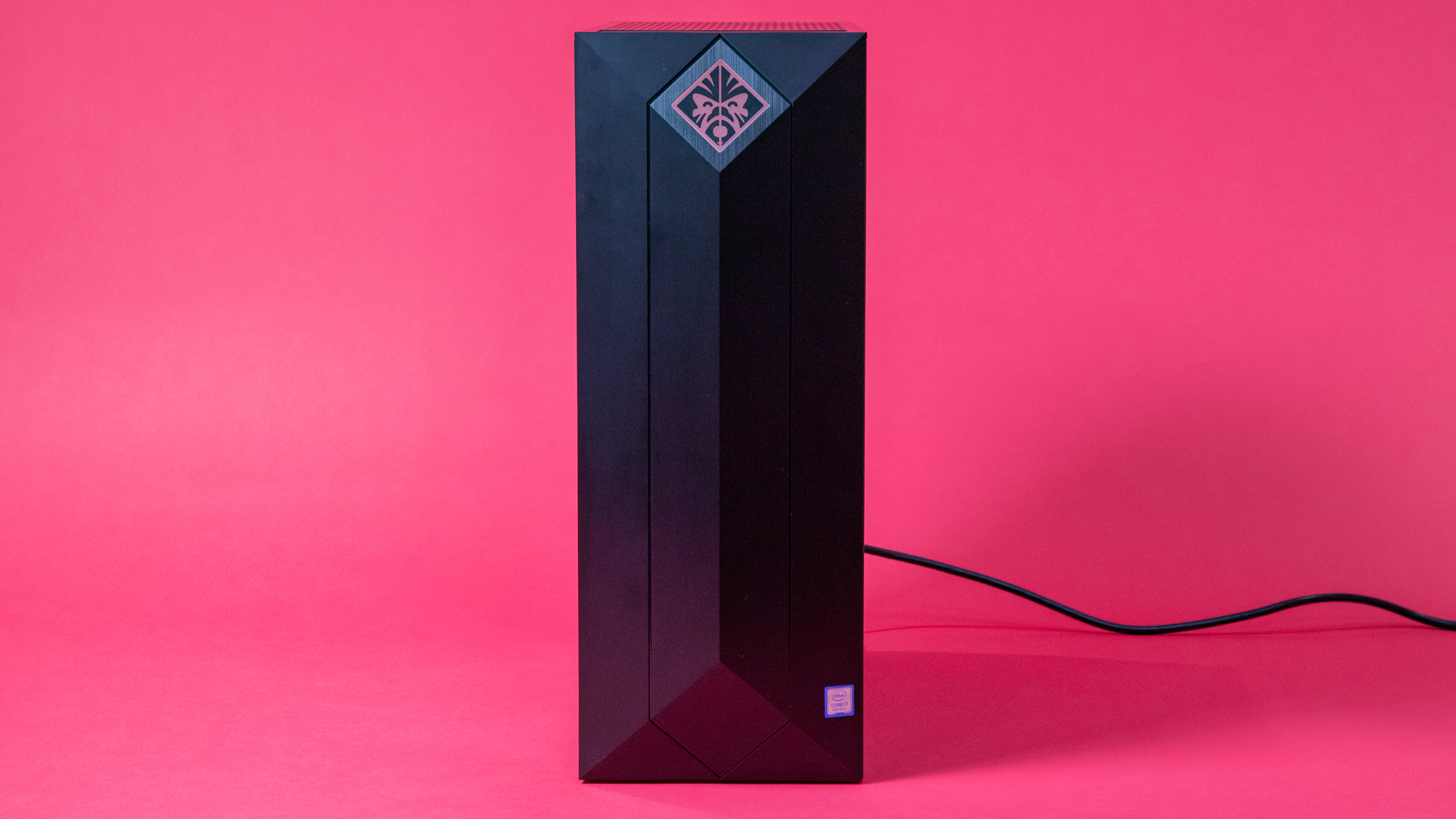
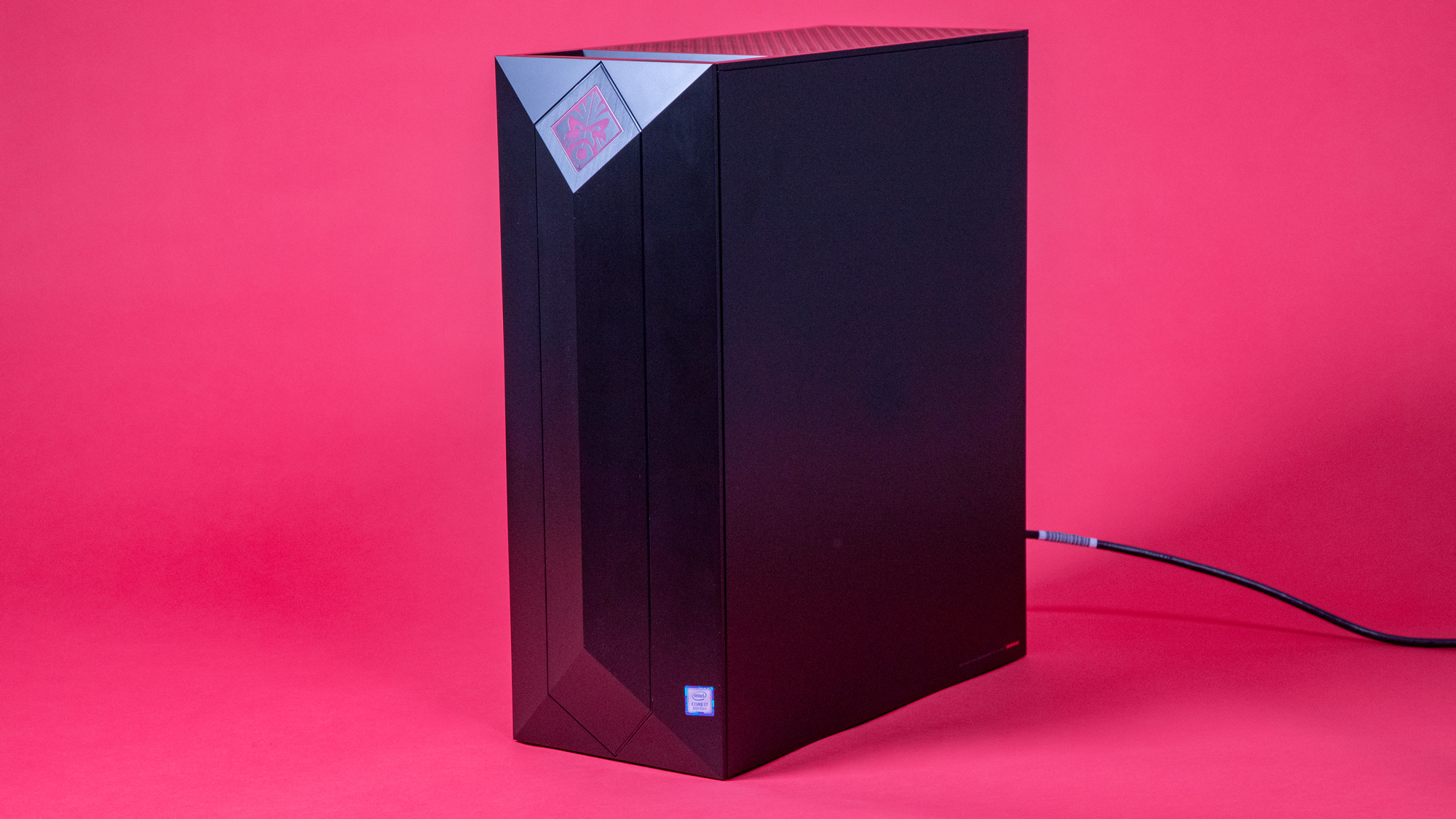
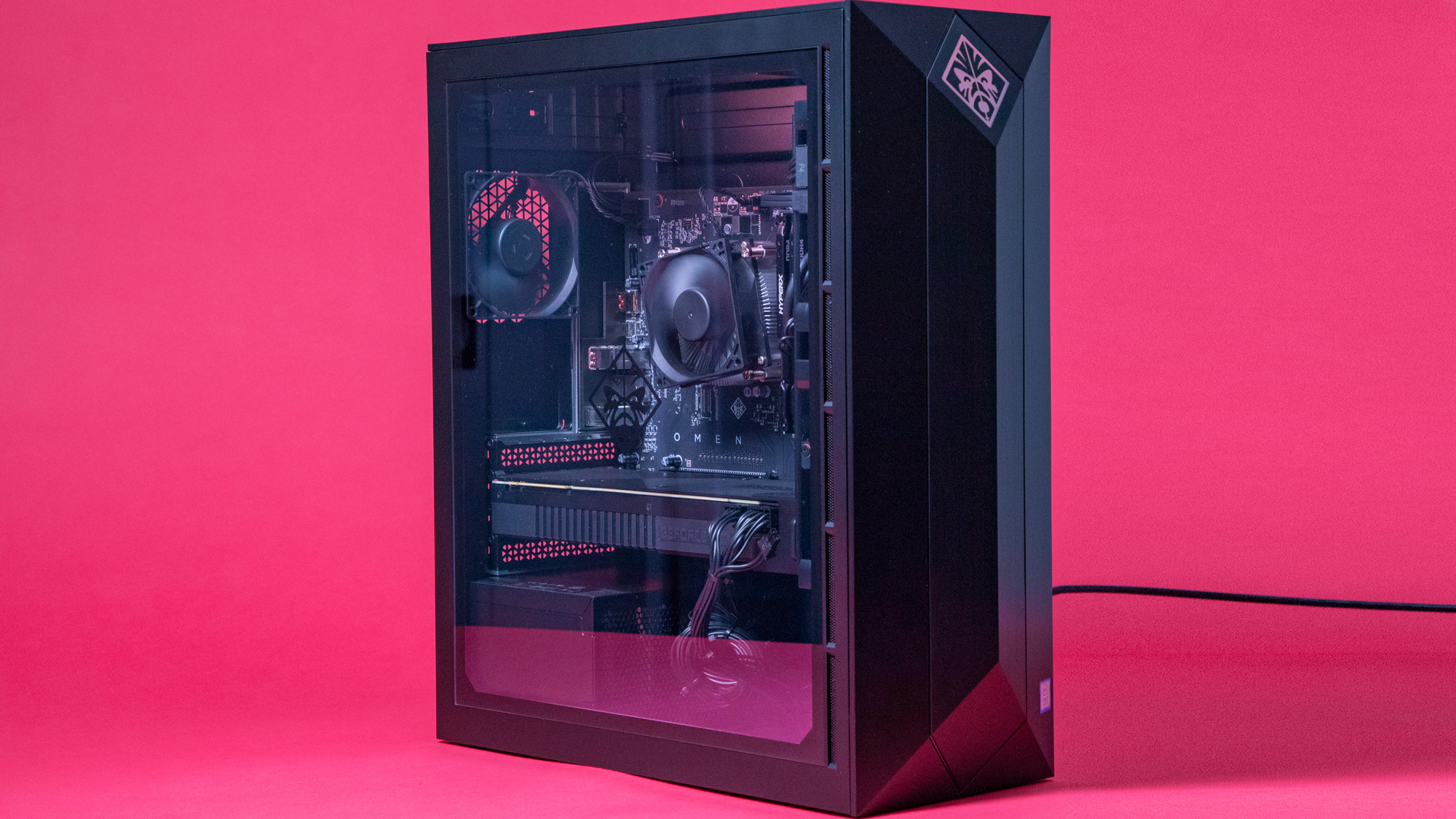
For something so simple, the HP Omen Obelisk is surprisingly attractive. With its glass side window and obelisk-inspired facade trimmed with the renegade Omen logo, it’s got a lot of style in its otherwise straightforward chassis. This is an appealing gaming PC that isn’t so over-the-top in its gaming aesthetic that it ends up looking gaudy.

But, how does it fare against its powerhouse brother, the HP Omen Desktop PC. The Obelisk looks good, for sure, and it fits perfectly on the desktop of a gamer who values elegant design, but a gaming PC can’t just get by on looks alone. Can it match the Omen Desktop’s brute strength when you're playing the best PC games?

Short answer is yes. The long answer… well, it’s more complicated once you look at pricing, specs and its available configurations. The Omen Obelisk plays games like butter, but only if you’ve splurged on its innards. If you only have enough budget for one of the cheaper configurations, it might not be powerful enough.

The good news is the HP Omen Obelisk is expected to get some decent discounts on Black Friday and Cyber Monday. If you're not completely convinced, we recommend waiting until then to hit that buy button until Black Friday and Cyber Monday roll around at the end of November.
HP Omen Obelisk

Spec Sheet

Here is the HP Omen Obelisk configuration sent to TechRadar for review: 

CPU: 8th Generation Intel Core i7-8700 (hexa-core, 12MB cache, up to 4.6GHz)
Graphics: Nvidia GeForce RTX 2080 (8GB GDDR6 dedicated)
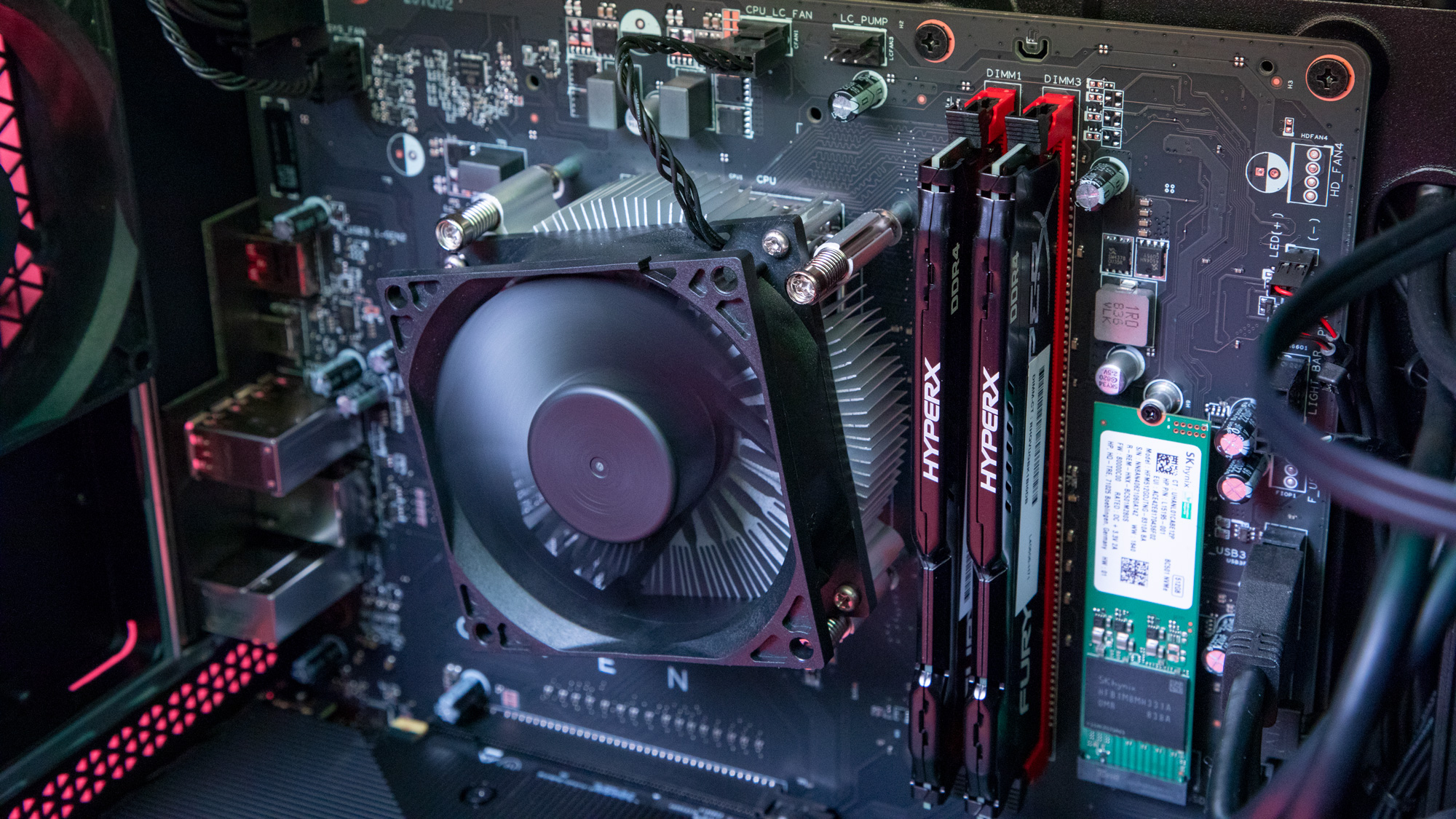
RAM: HyperX 32GB DDR4-2666 SDRAM (2 x 16 GB)
Motherboard: Edoras micro-ATX
Power Supply:  Shadow Black tower with 500W Bronze efficiency power supply and side window
Storage: 512GB PCIe NVMe M.2 SSD / 1TB 7200 rpm SATA
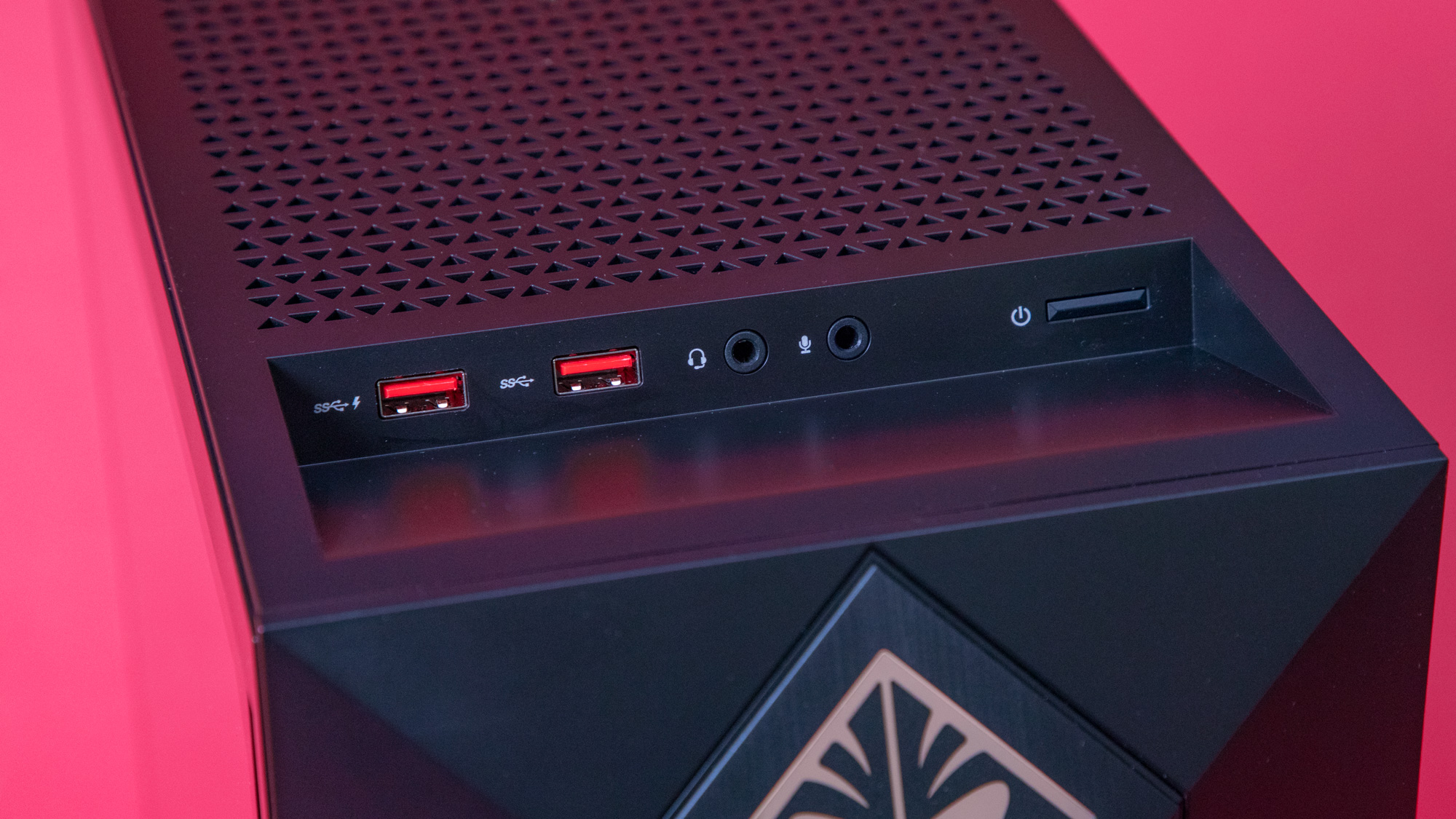
Ports (front): USB 3.1 Gen 1 Type A with fast charge, USB 3.1 Gen 1 Type A, audio combo jack, mic jack
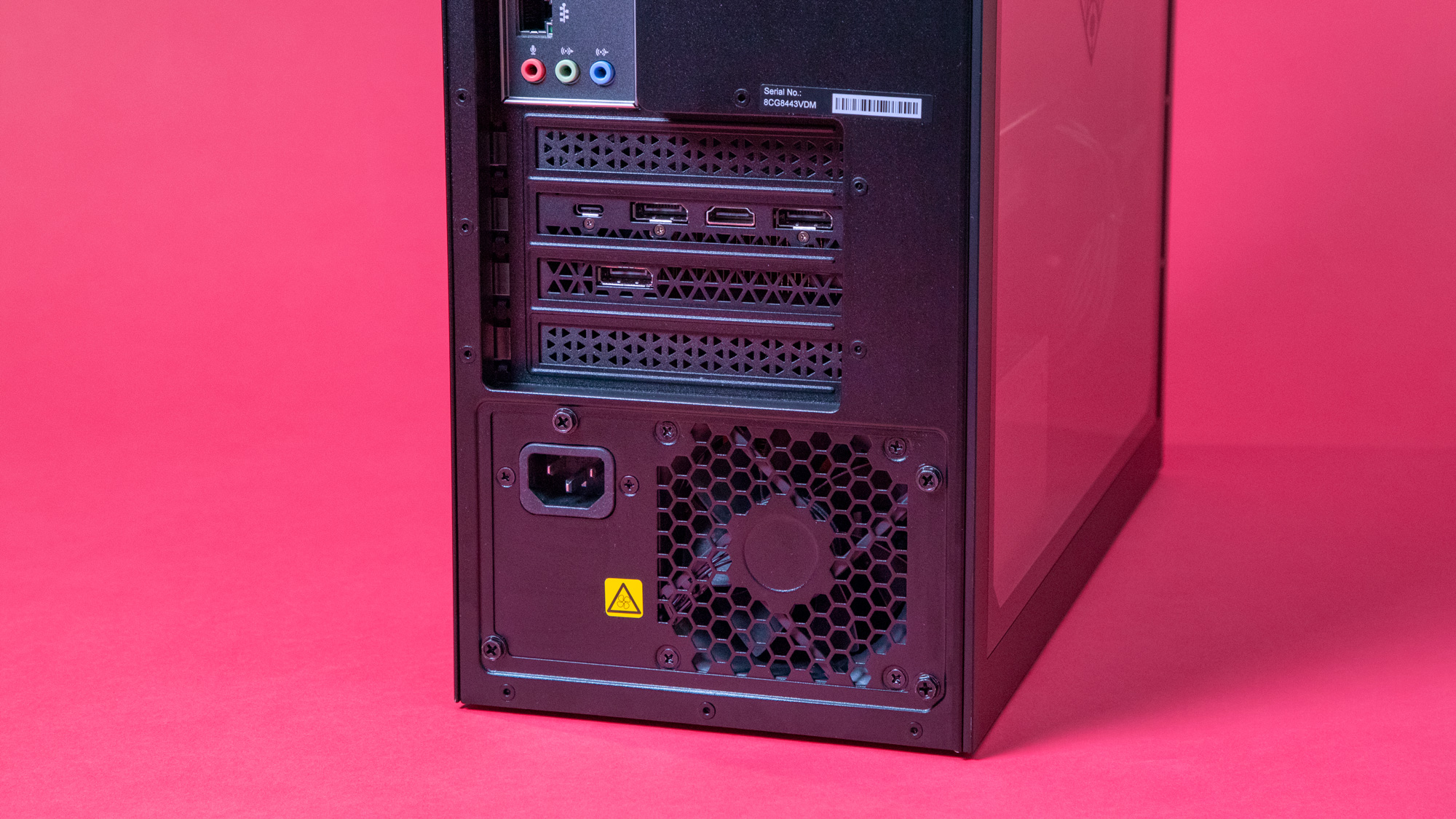
Ports (rear): USB 3.1 Gen 2 Type A, USB 3.1 Gen 2 Type C, 4 x USB 3.1 Gen 1 Type A, RJ-45, 3 x audio outputs, 3 x Displayport, HDMI 2.08, DVI8
Connectivity: 802.11a/b/g/n/ac (2x2) Wi-Fi and Bluetooth 4.2 M.2 combo
Operating System: Windows 10 Home
Weight: 20.28 lb (9.20 kg)
Size: 6.5 x 14.06 x 17.05 in (16.51 x 35.71 x 43.31 cm)

Price and availability

Thundering specs help put our review model of the HP Omen Obelisk on the gaming PC map. It swaggers with an 8th generation Intel Core i7, 32GB RAM, 512GB SSD + 1TB HDD storage and the Nvidia GeForce RTX 2080 – a GPU far superior than the 1080 and has advantages over the 1080 Ti that was in the Omen Desktop we reviewed a while back. This configuration is unsurprisingly expensive at $2284, which includes the glass side window so you can showcase those amazing specs every chance you get. Although, at the time of the review, HP did knock $200 off the price and will most likely do so again.

A similar configuration is on hand in the UK with a couple of differences: it has half the memory, at 16GB, and a storage combo of 256GB SSD + 2TB HDD. That configuration, which is the most expensive in the UK, sets you back £1,899, which makes it more or less $100 pricier than its US counterpart. 

Unfortunately, Australian buyers won’t find a similar configuration. The closest you can get is an HP Omen Obelisk at AU$2,999, with considerably lower specs: AMD Ryzen 7 2700, Nvidia GeForce GTX 1060, 16GB RAM and 256GB SSD+2TB HDD storage. It’s the most expensive option as well as one of the only two configurations available in Australia, the other being featuring an AMD Ryzen 5 2600 CPU, 128GB SSD+1TB HDD storage, along with the same GPU and RAM for AU$2,799.

If you want to completely splurge on the specs in the US, you can kit the HP Omen Obelisk out with an Intel Core i9, 64GB of RAM, 512GB SSD + 3TB HDD + 3TB HDD, and the Nvidia GeForce RTX 2080 Ti for a whopping $3,723.

Going down to the entry-level in the US, and you’ll find a $700 configuration featuring an AMD Ryzen 5 2500X CPU, Nvidia GeForce GTX 1060, 8GB RAM and 1TB of HDD storage. It’s far from being a game-changer. If you want to save some money and still have a quality gaming experience, upgrading this to boast an AMD Ryzen 5 2600 CPU and 16GB RAM will only cost you $190 more and give you solid AAA gaming on medium to high settings.

On the other hand, the entry model in the UK has an Intel Core i5, Nvidia GeForce GTX 1060, 8GB RAM, 128GB SSD+1TB HDD storage and the glass side window. It will set you back £899.
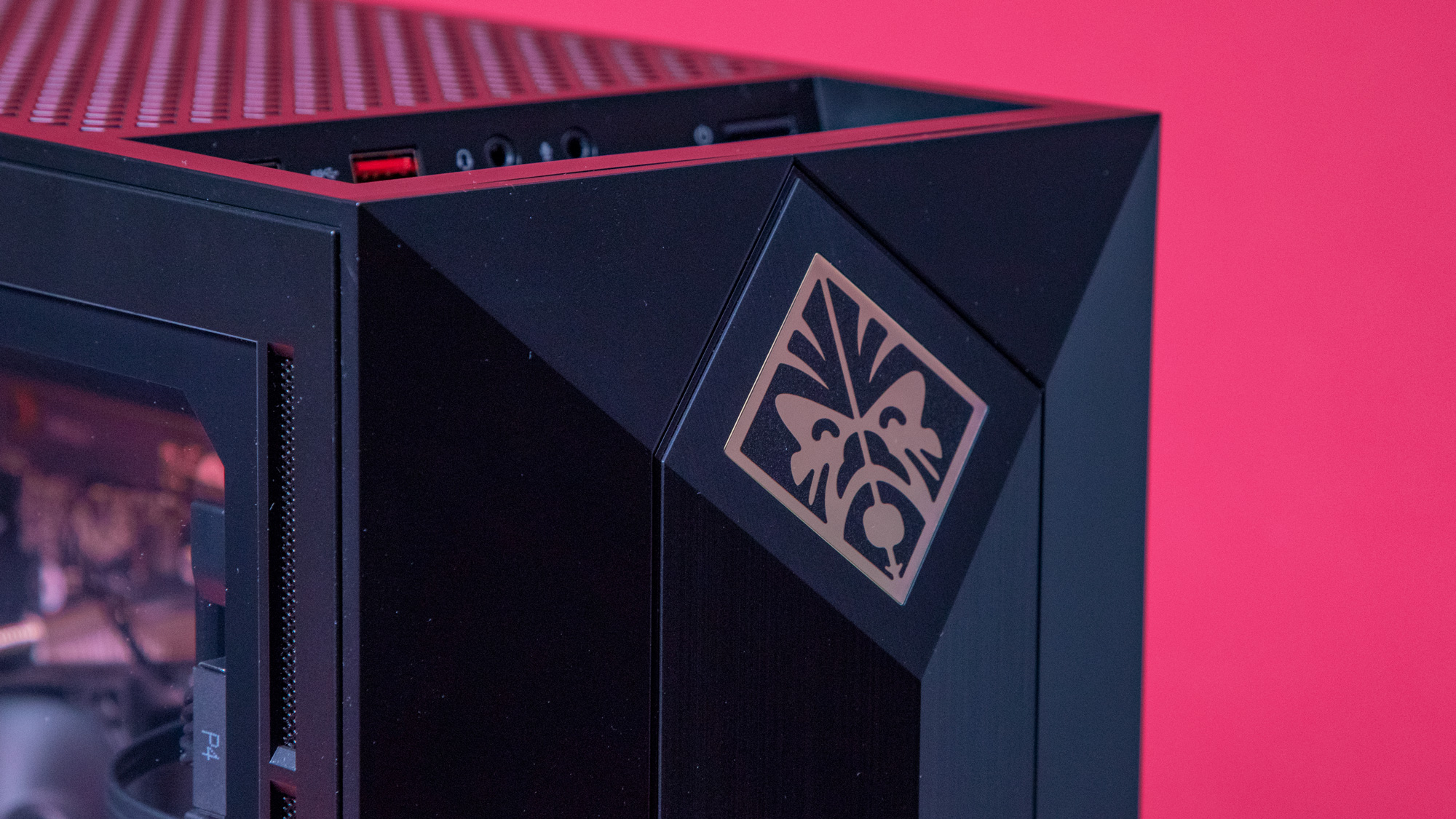
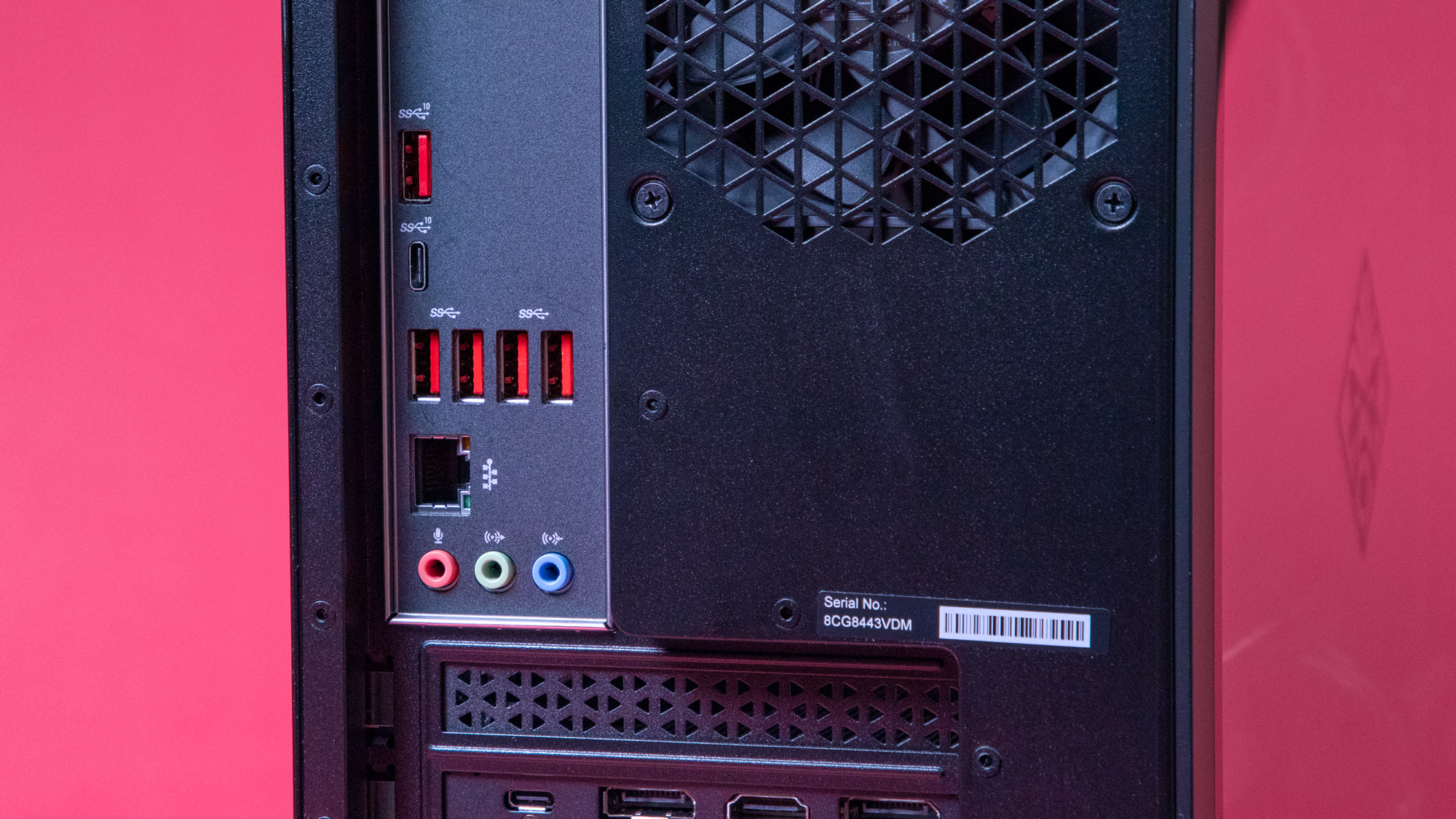
Image 1 of 10

Image 2 of 10

Image 3 of 10

Image 4 of 10

Image 5 of 10

Image 6 of 10

Image 7 of 10

Image 8 of 10

Image 9 of 10

Image 10 of 10

Design

Those who are more partial to over-the-top gaming looks might find the HP Omen Obelisk’s aesthetic a tad underwhelming. Not that it doesn’t have gaming flair of its own – you can upgrade to a glass side panel so you can show off the innards, spotlighted by the RGB lighting on the chassis ceiling. The facade has its upper and lower sections tapered, reminiscent of the type of monument its named after, with the RGB-lit Omen logo etched on the upper section. Finally, the RGB lighting in both spots are customizable via the Omen Command Center software, which we will discuss in detail later.

Beyond that, however, the Omen Obelisk doesn’t have any design frills, which we honestly appreciate. We also like it better than the Omen Desktop’s aggressive Decepticon look. It reminds us of the old towers we use to have in the '90s, in that it’s a straight up rectangular tower – except it’s painted black, it’s classier and has the aforementioned trims for a modern aesthetic. Additionally, unlike the Omen Desktop, it’s slim rather than bulky.

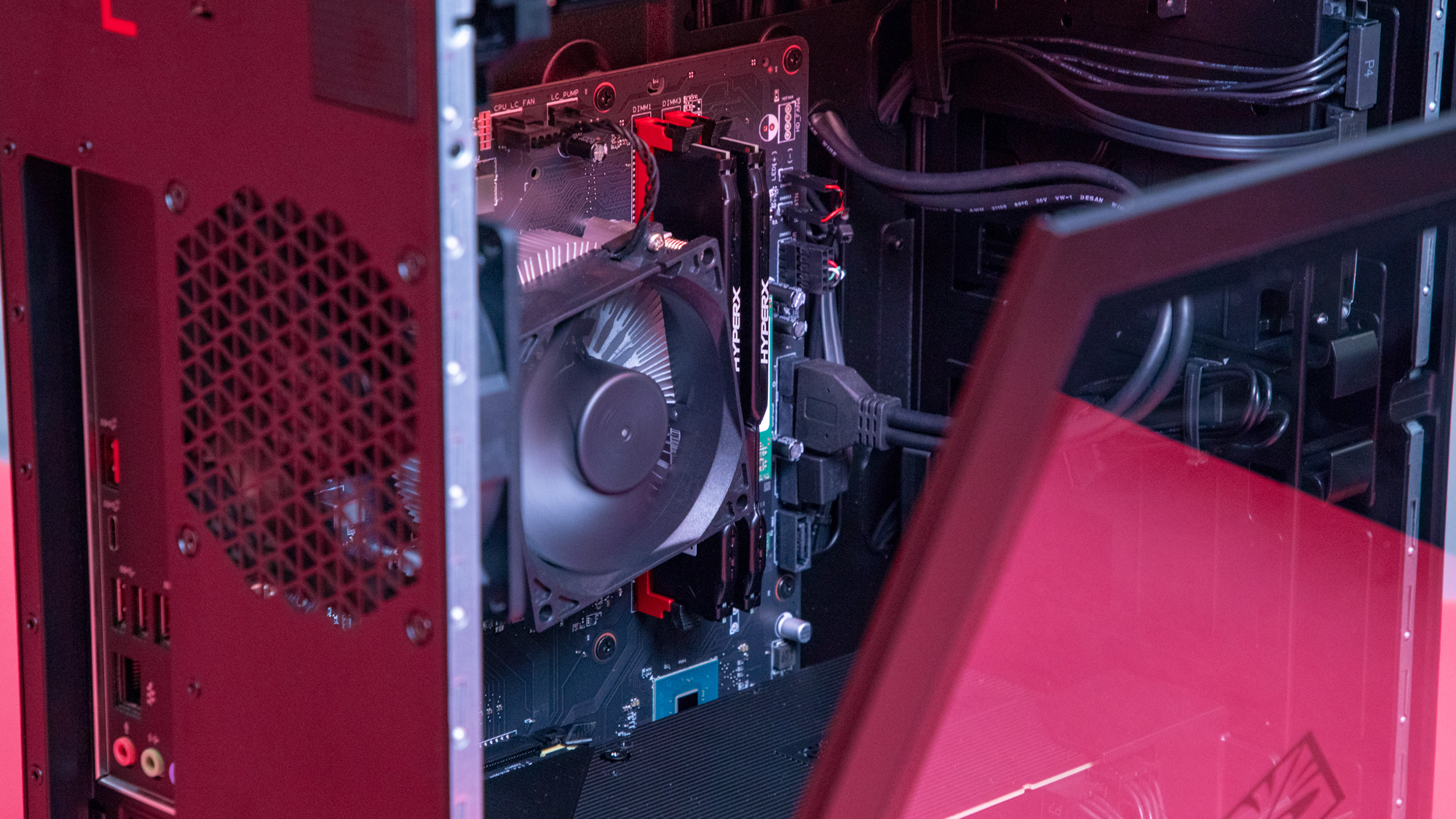
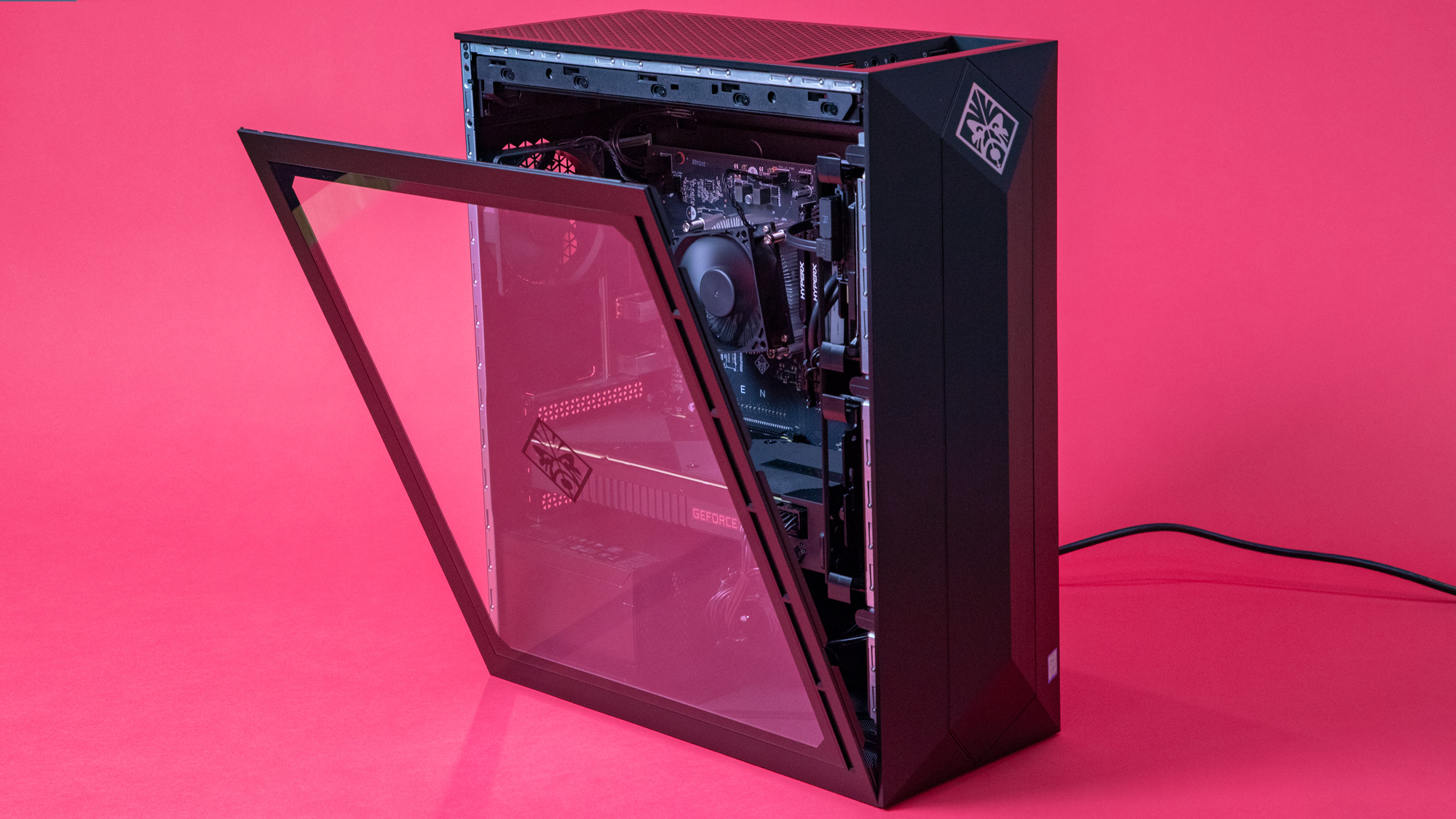
Like the Omen Desktop, it boasts a tool-less design, even if it isn’t as extensive. The side panel pops open effortlessly; all you need to do is press the large, textured button on the back. This gives you easy access to the interior, especially if you’d like to upgrade or customize. The two hard drive bays located behind the front panel use tabs to lock the hard drives in place and pop them out quickly should you need to. In the spirit of upgradability, it’s made to micro-ATX standards so you can easily do so with many aftermarket parts.

The HP Omen Obelisk has a diverse number of available ports, also like the Omen Desktop, with some in the front and a few others in the back so you have several different ways of connecting your different peripherals and devices.

The only thing we don’t like about the Omen Obelisk’s design is the fact that it’s missing the top handle, perhaps to maintain the minimalist aesthetic. This exclusion is a little disappointing, as it makes the PC much harder to pick up and carry around. To do so, you’d have to pick the whole thing up from the bottom.

Our review unit does come with its own keyboard and mouse. They’re definitely not ideal for gaming, but since most, if not all, gamers invest in peripherals specifically designed for gaming, anyway, getting into details about these isn’t necessary.

HP Omen Obelisk

Benchmarks

Here’s how the HP Omen Obelisk performed in our suite of benchmark tests:

3DMark: Sky Diver: 43,317; Fire Strike: 19,600; Time Spy: 9,443
Cinebench CPU: 1,319 points; Graphics: 144.75 fps
GeekBench: 4,728 (single-core); 26,017 (multi-core)
PCMark 8 (Home Test): 4,758 points
Total War: Warhammer II (1080p, Ultra): 64.5 fps; (1080p, Low): 159.6 fps
Shadow of the Tomb Raider (1080p, Ultra): 117 fps; (1080p, Low): 146 fps

Performance

Because the HP Omen Obelisk has three main configurations that are pretty distinct, it’s hard to generalize the performance of this gaming PC. For this review’s sake, therefore, we’ll focus on our review unit, which, while souped up, isn’t the most expensive option available in the US.

One awesome thing about this Omen Obelisk configuration is that it touts the new Nvidia GeForce RTX 2080. This, we want to mention again, is a GPU far superior than the 1080 and has certain advantages over the 1080 Ti that the Omen Desktop has. Not only does it run faster, but its Turing architecture also allows for real-time ray tracing and deep learning supersampling (DLSS), which is an improvement over traditional Temporal Anti-Aliasing.

While ray tracing is not currently being utilized in many games, this functionality does make the RTX 2080 future-proof, as well as a powerhouse when handling demanding, AAA games on Ultra settings and high resolutions.

HP pairs this GPU with an 8th Generation Intel Core i7 and 32GB RAM, both designed to handle very demanding games and applications, to guarantee top-notch gaming performance.

We do see some minor frame drops in Total War: Warhammer II, but it also averages close to 65 frames per second (fps) on Ultra, which is good. There are also a couple of frame drops in Shadow of the Tomb Raider, but it also averages at 117 fps on Ultra.

In other AAA games, however, everything plays like butter. Whether we’re playing Shadow of the Tomb Raider, Final Fantasy XV, The Witcher 3, Sekiro, Far Cry 5, Assassin's Creed Odyssey, Total War: Warhammer 2 or Hitman 2, we run into almost zero issues, even with all maxed out settings. That is, we don’t experience any latency or tearing, only smooth movements and rock-solid performance. Hitman 2 did crash on us just once, but only once. 

Honestly, our only regret is that we can’t test it with the HP Omen 27 Gaming Monitor, which can be overclocked to 165Hz and has G-Sync technology.

HP Omen Obelisk

Upgradability and the Command Center

Not all of the HP Omen Obelisk’s configurations are future-proof, but our review configuration definitely is, as well as some higher end configurations that are not as pricey. It is, however, highly upgradeable, not only because it has a tool-less design, but also because of its micro–ATX compatibility. This allows you to configure and upgrade with aftermarket parts, or at least those that are micro-ATX compatible.

There’s also space for a liquid cooled radiator to help keep CPU thermals in check, making it better for overclocking. And, the HP Omen Obelisk supports up to a 1300W power supply in case you want to upgrade with parts that require more power.

Unfortunately, as far as customizations via the Omen Command Center, there’s not much you can do.The Omen Obelisk only has Lighting Control and Network Booster on hand, the former to let you set the animation and color for the RGB lighting in front and inside the chassis, the latter allowing you to set network priorities and boost bandwidth usage for running programs. 

It doesn’t, however, give access to overclocking, and only displays GPU, CPU and memory utilization for monitoring. It’s missing the Overclocking section that the Omen Desktop has access to.

HP Omen Obelisk

Final verdict

The HP Omen Obelisk configuration reviewed here is an excellent, future-proofed gaming machine that looks good and feels good in-game. Simply put, it’s a powerhouse, capable of running any processor-hungry, graphics-heavy AAA game seamlessly, so that your gaming experience is completely immersive. That applies to similarly-demanding applications like video editing programs.

Yes, you’ll have to shell out more cash than you would if you were looking for a budget gaming PC, but if you’re looking to have a smooth and easy gaming experience on Ultra settings, you’re not really doing any gratuitous spending, especially since you’re essentially investing for the future as well as the present.

If you can’t spare more than $1,500, that’s OK as well. There are a few configurations that will set you back less than $1,000 and get you through medium settings beautifully. And since it is designed to be very upgradeable, you can just upgrade later on when you can afford to.

First reviewed May 2019

Image Credits: TechRadar


from TechRadar - All the latest technology news https://ift.tt/2UsJj34
via IFTTT
TMDHosting

TMDHosting is a US-based web hosting provider which entered the market in 2007. At first they were focused on open source hosting but they have subsequently expanded their offer to include a full range of platforms, technologies and additional features. Therefore, no matter what hosting type and plan you might be looking for, they will undoubtedly have something to meet your needs.

TMDHosting’s main office is located in Orlando, Florida and they currently have offices all over the world together with seven data centers. These are located in Phoenix and Chicago (US), London (UK), Amsterdam (Netherlands), Tokyo (Japan), Sydney (Australia) and Singapore (Singapore). Placements of all data centers are marked on the map given on TMDHosting’s main website together with recommended locations for potential users. 

Even though TMDHosting isn’t as famous as other web hosting providers such as Bluehost or DreamHost, they have built a strong customer base and have been getting some media attention in the last few years. It surely had something to do with the complete remodeling of their business structure. That led to an upgrade of their dedicated server network and the addition of more powerful VPS and cloud hosting plans (but at a lower than usual cost) to their standard offer. 

Their main website seems appealing and well organized enough, but the live chat window has been constantly popping out and startling us with an irritating sound. Even if it isn’t a major issue, by all means, users could perfectly get by without it. 

Although TMDHosting has an official blog, it appears to contain mostly self-promoting material and doesn’t seem to be updated since the July of 2018. Therefore, if they are still looking for things to improve about their business presentation, the blog might be a good place to start. 

Pricing

TMD Hosting is currently offering big discounts on its plans to celebrate the company's 12th anniversary (Image credit: TMDHosting)

Plans and pricing

The promotional offer, together with its main traits and details about discounts, will be presented prominently on the landing page. If that doesn’t fit your needs, you can select a hosting type (shared, cloud, WordPress, VPS, reseller or dedicated hosting) that works for you and for each of them you’ll be offered a few plans. The most popular one will be highlighted together with the one that is considered to be of best value in relation to its price and features on offer.

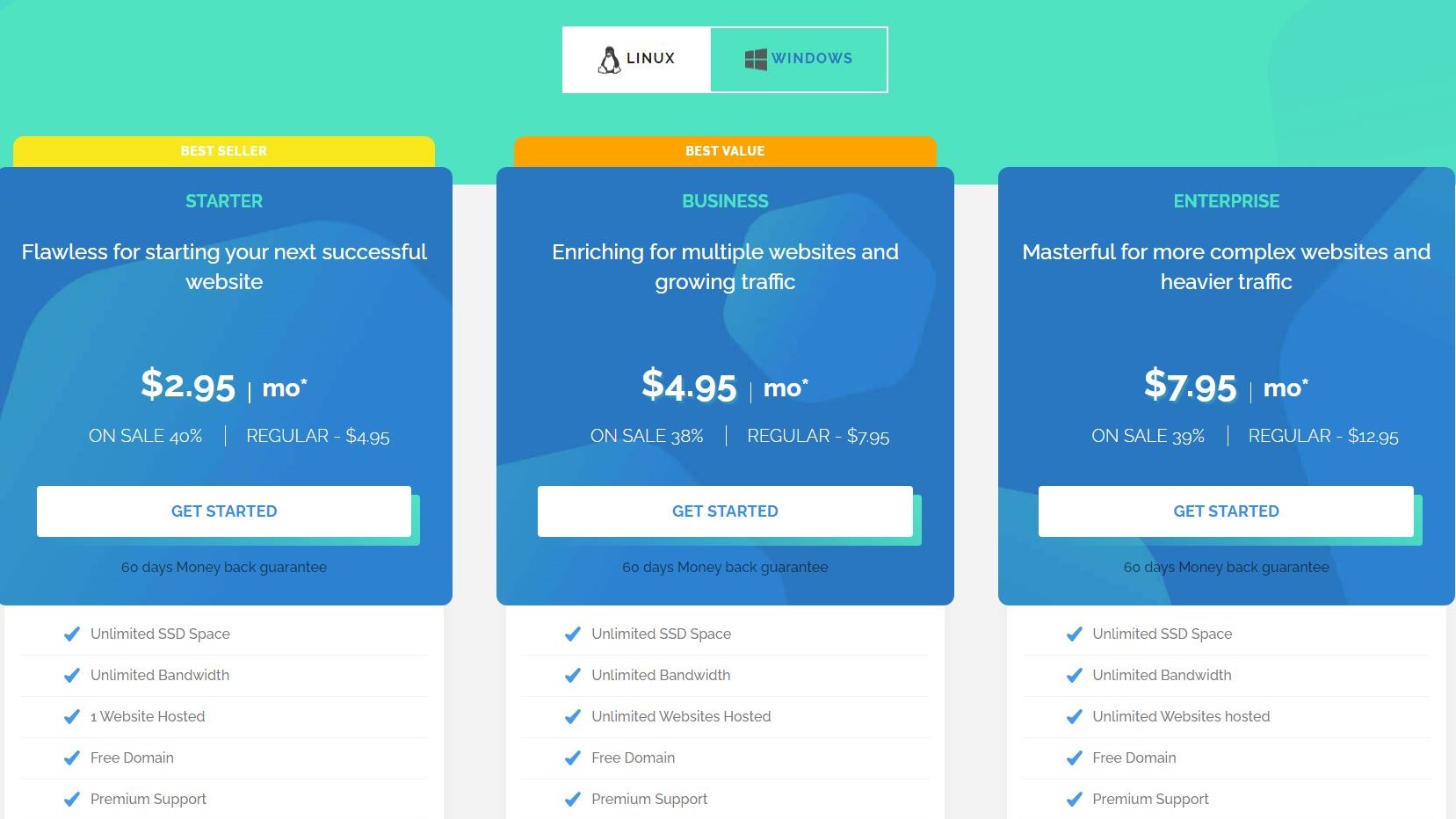
The least expensive shared hosting plan, Starter,  will start at $4.95 (currently on sale for $2.95) per month and will get you a free domain, Let's Encrypt SSL, cPanel and unmetered bandwidth as well as unlimited SSD space. 

Even though TMDHosting doesn’t offer a free trial, there is a generous 60-days money-back guarantee for most plans, which will give you plenty of time to decide if this provider is the right choice for you. 

As for the payment methods, TMDHosting accepts credit cards, PayPal or direct bank transfer, which is more than we are accustomed to.

Ease of use

Once you select a desired hosting plan, you’ll be able to choose a new domain or use an existing one. There is a large variety of both country-specific and generic domain names, which is always a welcome sight.

After that, you can start creating your TMDHosting account. The process will require you to supply quite standard personal information, generate a password and select a paying method. Additionally, you can choose a hosting server location among the six listed ones, and the nearest one will be pointed out. You will be able to see the charge for monthly, annual, biennial or triennial plans and choose the one you desire. Not surprisingly, if you choose a triennial plan, as an example, it would cost you about three times less for every month, instead of choosing one monthly plan after another. If you need any extra services TMDHosting provides, such as those related to search engines or security, you’ll have to part with additional dollars for it.

cPanel

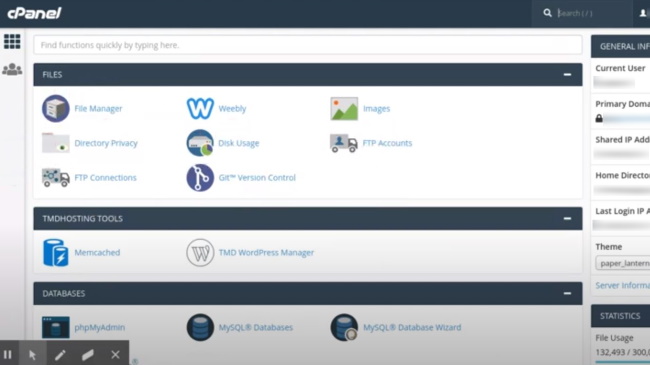
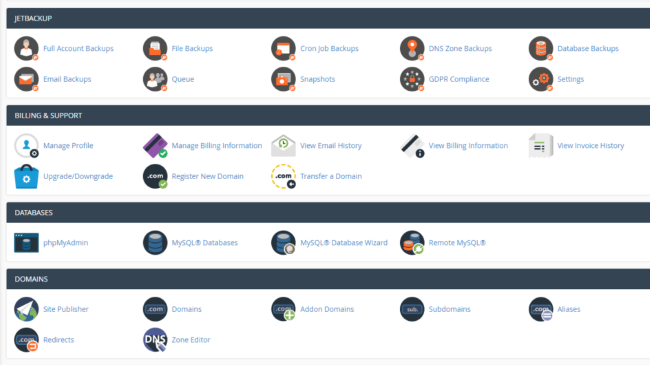
TMDHosting allows you manage your site using the industry standard cPanel (Image credit: cPanel)

Finally, you can review the details of your order and purchase your plan. Considering that every plan comes with the cPanel i.e. the industry standard one, users that are already familiar with its layout won’t have any problems finding their way around this one. Even if you are a first-timer, the administration of your newly created website will be easy enough. WordPress is only one click away and in addition to that you can get Weebly website builder, a very user-friendly solution that comes free of charge. Magento, Softaculous, Joomla, Open Cart and more than 300 other apps can be yours after a one-click installation, and toll-free daily backups are the most welcome bonus. 

Performance

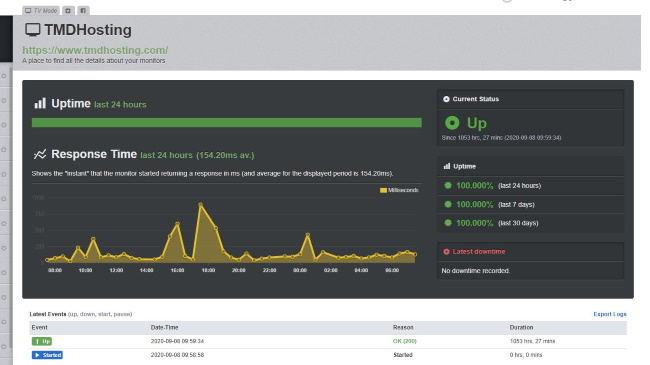
We used GTmetrix to measure the performance and uptime of our TMDHosting site (Image credit: GTmetrix)

Speed and experience

After putting TMDHosting’s main website to the GTmetrix test, we got a mixed bag of results when it comes to their speed. The time it took to fully load the page was 4.4 seconds, which is superb in comparison to the average result of 8.1. In addition, total page size is mere 1.93MB, which certainly helped the page to load faster. However, the number of requests it took was 108, which is well above the average of 89. 

TMDHosting promises 99.99% uptime guarantee and keeps that promise, at least according to our uptime test. During our month-long testing period of TMDHosting’s main website, the results showed no evidence of downtime and only a few variations in response time. Taking all of these into account, we can conclude that most users should be content at least with the performance of their website. 

Support

TMDHosting describes their customer support team as the most dedicated one, and rightly so, since they are in fact available 24/7/365, at least through tickets. They guarantee that all questions asked will be answered within 15 minutes, and based on our experience, they have delivered on that promise.

Additionally, you are able to reach out to their team via live chat or at toll-free UK and US telephone numbers, but only when sales are concerned. Their routine services include free application installation, upgrade and integration handled by the specialists, and the same can be said for installation of templates, plugins and more.

Support

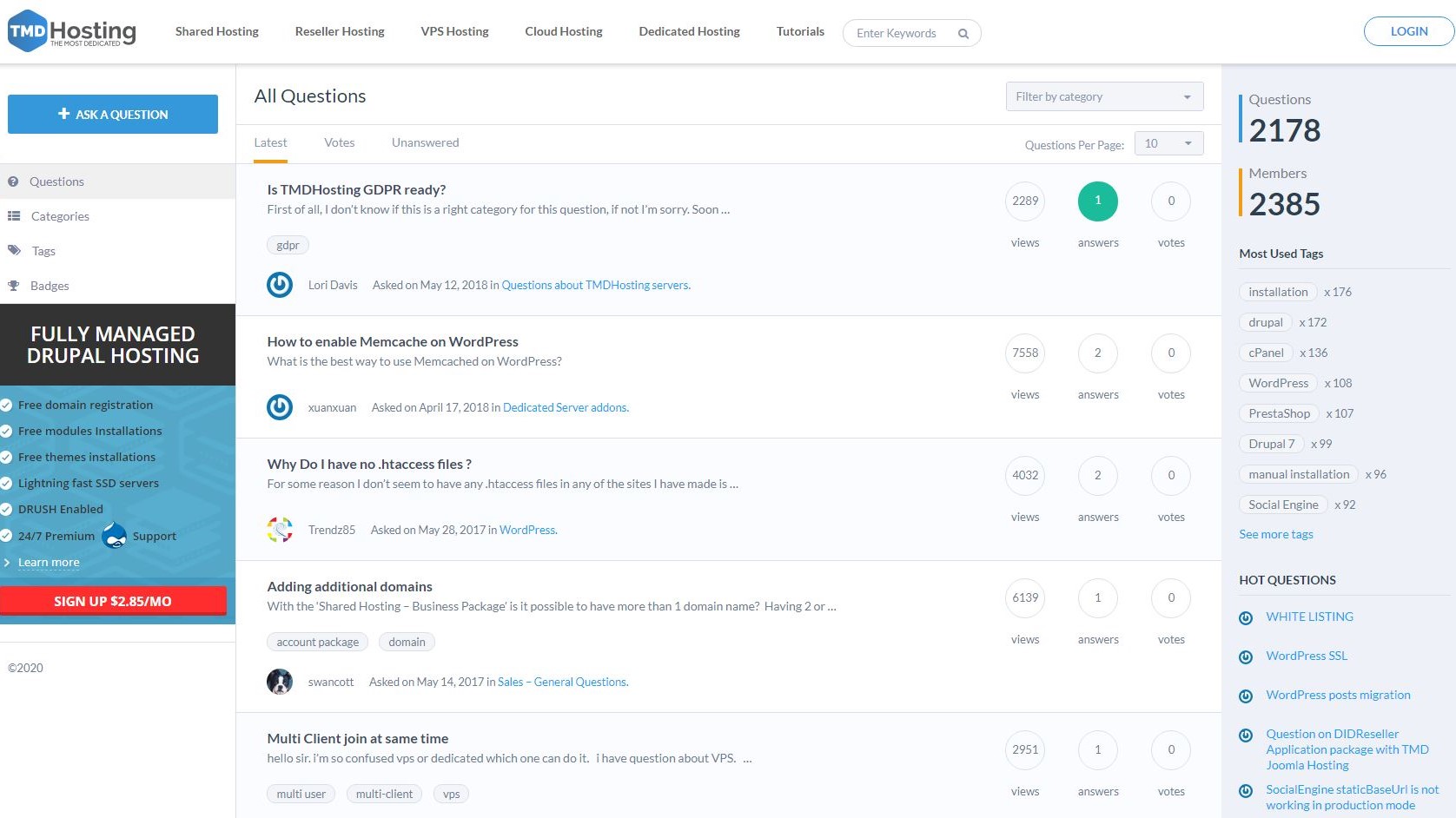
While TMDHosting does offer a knowledgebase, it looks much more like an online forum (Image credit: TMDHosting)

When it comes to self-help services, they provide a knowledgebase, which can be described as such only by its title, since it looks and functions as a forum in all aspects. However, this is not a key issue here, but rather the fact that the knowledgebase doesn’t seem to be used since 2018. There are several lists, one of them titled Hot Questions, but all the questions found there are at least two or three years old. Some of them were answered in a detailed manner resembling a tutorial with suitable pictures, yet others got rather brief and generic responses. Searching through different categories or the most used tags will get you answers (since not a single question was left without a reply), but this might take a while and all links to video tutorials seem to lead nowhere. For these reasons, you are probably better off contacting the customer support team directly. 

The competition

Both TMDHosting and HostDime are US-based web hosting providers with a great deal of experience, fairly good reputation and data centers all over the globe. However, HostDime is more geared towards larger businesses, while TMDHosting is able to provide simpler and less pricey hosting plans for beginners or those running less demanding business. 

TMDHosting has a serious competitor in a fellow US-based provider that goes by the name Hostgator. Both of them offer a wide variety of hosting options, add-ons and features for budget-friendly prices. Having said that, Hostgator offers various self-help options including a well-organized and useful knowledgebase, while with TMDHosting you’ll be forced to get in touch with the support team. 

Bluehost is another tough competitor based in the same country as TMDHosting. Both providers have a lot to offer to businesses of different sizes and affordable prices. Still, much like Hostgator, Bluehost has much more developed self-help options and one of the best knowledgebases we have encountered so far. 

TMDHosting and 123 Reg are pretty similar, although the latter one is UK-based and more oriented towards the UK market while TMDHosting has the international market in mind. Besides that, 123 Reg prices can add up and jump after a year, which is not the case with TMDHosting. While 123 Reg does offer a 14-day money-back guarantee, TMDHosting’s guarantee for most plans covers as much as 60 days, meaning that the users will have quite enough time to decide if the service fits their needs. 

Final verdict

After we have witnessed everything TMDHosting can offer and at what prices, we can say it is a diamond in the rough worth keeping in mind when searching for an ideal host. Yet, to stand out among well-known hosting giants such as Bluehost and Hostgator, TMDHosting will need to take their services to the next level.


from TechRadar - All the latest technology news https://ift.tt/3klfFHq
via IFTTT
ProtonMail secure email

Internet businesses such as Google and Facebook work on a targeted advertising model. In exchange for the use of free services, like Gmail, you agree to let them harvest your data so they can more accurately target advertising at you and others like you. To maintain your privacy online, consider a secure email provider, such as ProtonMail.

In our ProtonMail review, we test the service’s privacy features, user interface, security, and customer support to determine whether it’s one of the best secure email providers for privacy-conscious users.

ProtonMail: Plans and pricing

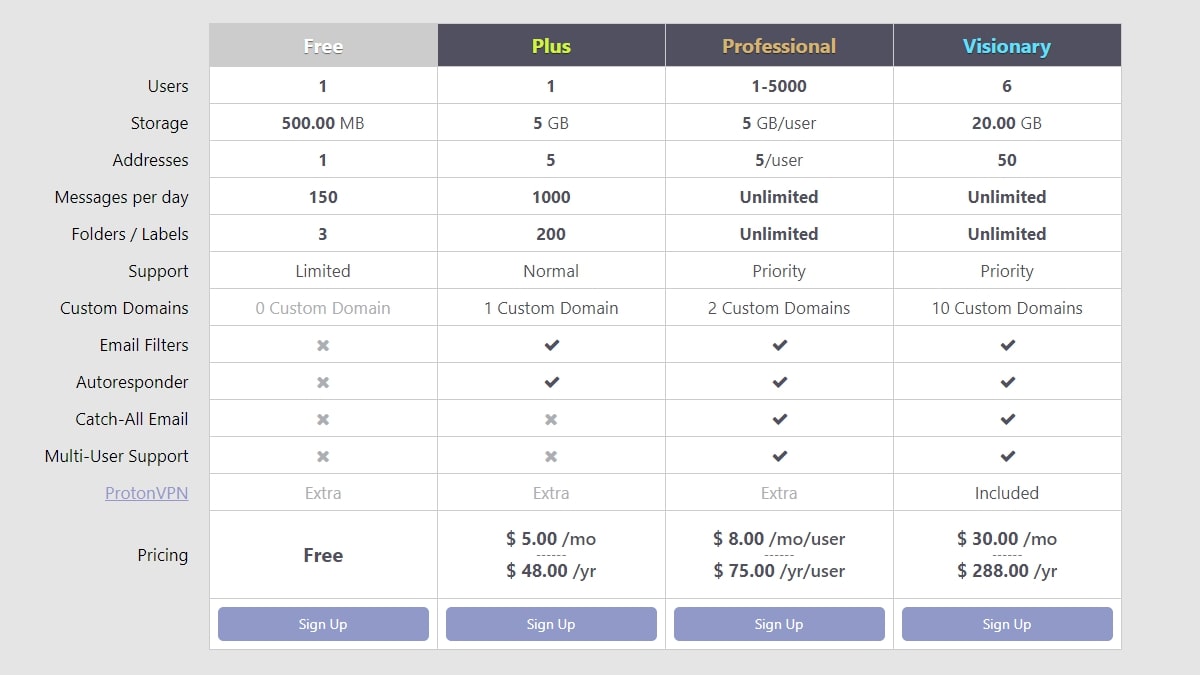
ProtonMail has four pricing plans you can choose from. The Free plan is for one user and has a few limitations: 500 MB of storage, 20 labels, 50 messages/hour, and 150 messages/day. You can receive emails at the @pm.me short email domain name, but you can’t send messages from it. Custom domains and additional addresses are also not supported on the free plan. Support is limited.

ProtonMail Plus costs $5/month or $48/year. Your storage is bumped to a useful 5 GB, and you can attach a custom domain if you wish. You can have up to five additional addresses and 200 labels and send 300 messages/hour or 1,000 messages/day. With the Plus plan, you can send and receive messages using the @pm.me short email domain, and there’s support for IMAP email clients like Outlook, Thunderbird, and Apple Mail. It’s the first plan with custom filters and an autoresponder.

ProtonMail Professional costs $8/user/month or $75/user/year. It’s the choice for small businesses, allowing unlimited users, emails, and labels. Each user gets 5 GB of space. The default user gets 10 addresses, and five addresses are added for every additional user.

Finally, ProtonMail Visionary costs $30/month for up to six users. You get 20 GB of storage space, 10 custom domains, and 50 additional addresses.

You can pay a fixed price to upgrade the number of custom domains or extra email addresses that your account has or increase the storage space that you can use. This makes the available services quite flexible. You also get 20% off when you purchase ProtonMail in conjunction with ProtonVPN, the company’s virtual private network service.

ProtonMail has plans for individuals and businesses (Image credit: ProtonMail)

ProtonMail: Features

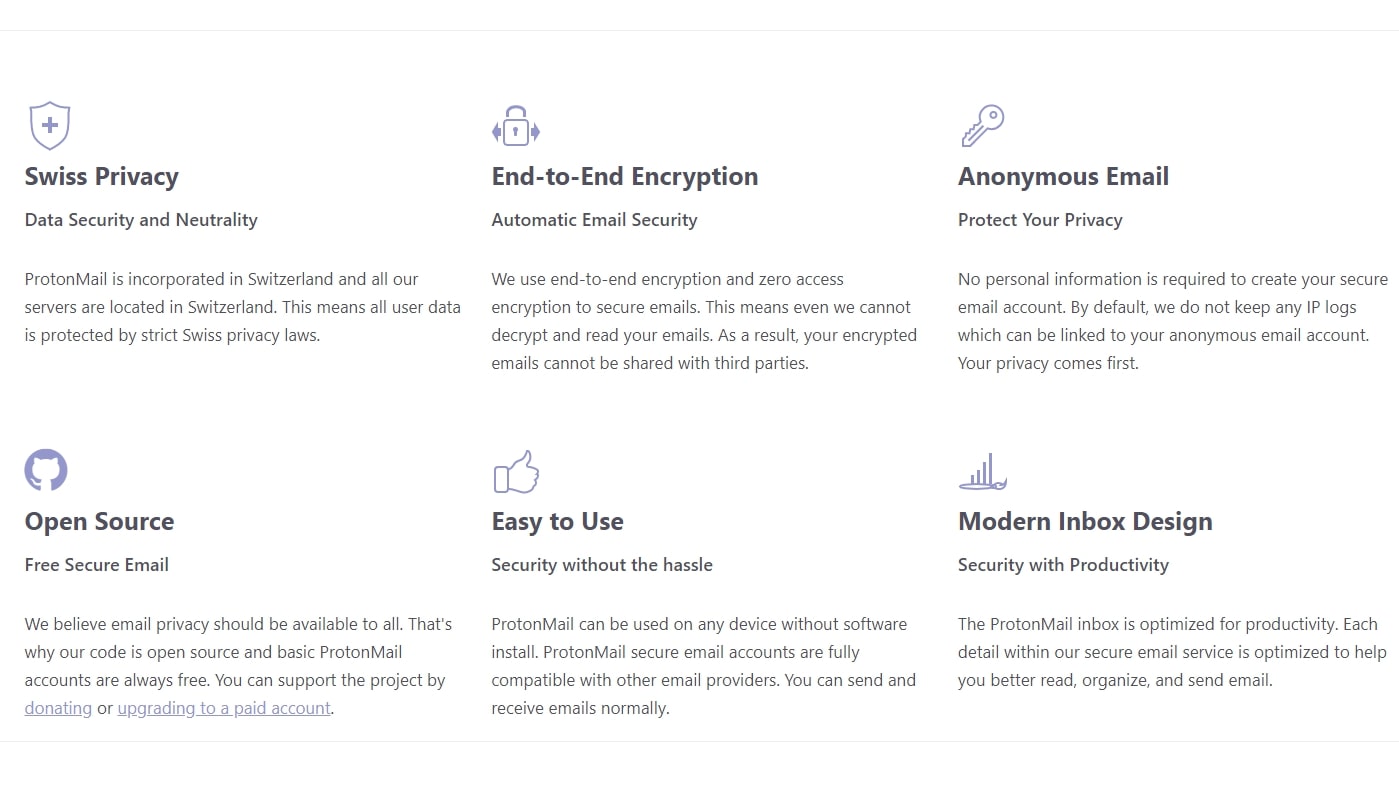
Besides the strong end-to-end, zero-access encryption of your email and contact data, ProtonMail has many useful features. For example, you can set an autoresponder, create a custom spam filter, and manage multiple email addresses in the same account. Emails that you send can be self-destructing, so they are automatically removed from the recipient’s inbox after a set time.

ProtonMail Bridge is an application that you can use to encrypt all your emails as they enter and leave your computer. After installing the bridge and setting it up, you can use your favorite email client, such as Thunderbird, knowing that your emails are fully encrypted when sent over the internet.

ProtonMail secure email review 2

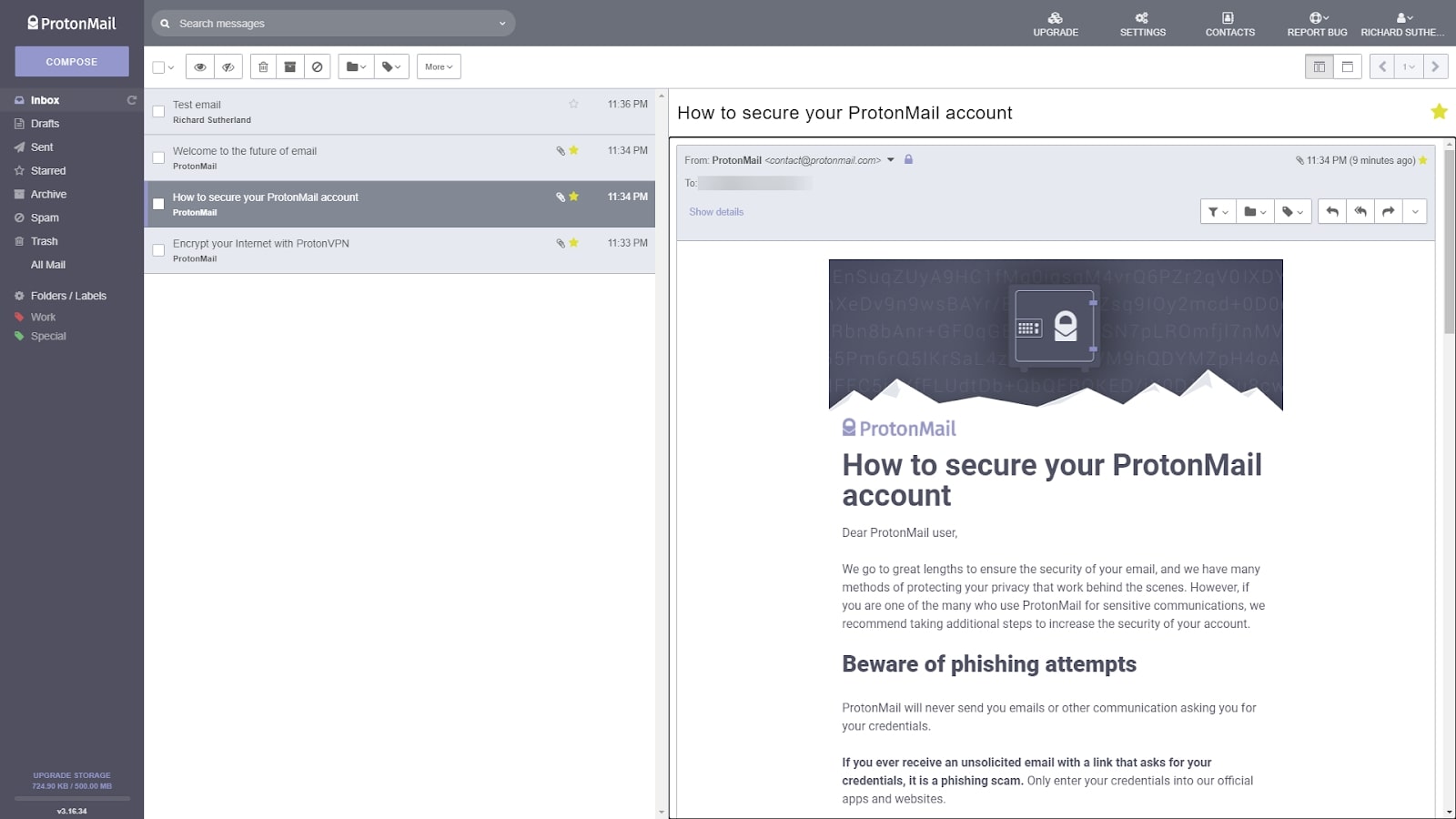
ProtonMail’s primary focus is on privacy, but it has a modern interface that’s easy to use (Image credit: ProtonMail)

ProtonMail: Interface and in use

Signing up for ProtonMail requires you to enter your current email address or phone number. Alternatively, you can donate to ProtonMail, but that also requires giving up personal information. ProtonMail says that it only uses your current email address or phone number for registration purposes, but it does keep a hash of the details that you use to sign up.

The dashboard is one of the slickest that you’ll find in a secure email service. With its modern inbox design, you can swap between column and row layouts, use conversation grouping, edit the toolbar, and use custom themes. Emails can be arranged into folders and labels, and you can use custom filters to organize your emails automatically. ProtonMail also has similar apps for Android and iOS.

ProtonMail secure email review 3

ProtonMail has a clean, modern user interface (Image credit: ProtonMail)

ProtonMail: Support

ProtonMail offers three levels of support. Free users get limited support, Plus users get normal support, and everyone else gets priority support. You can email the support team from within the ProtonMail interface or send them a support query through Zendesk. In our testing, ProtonMail responded within 24 hours.

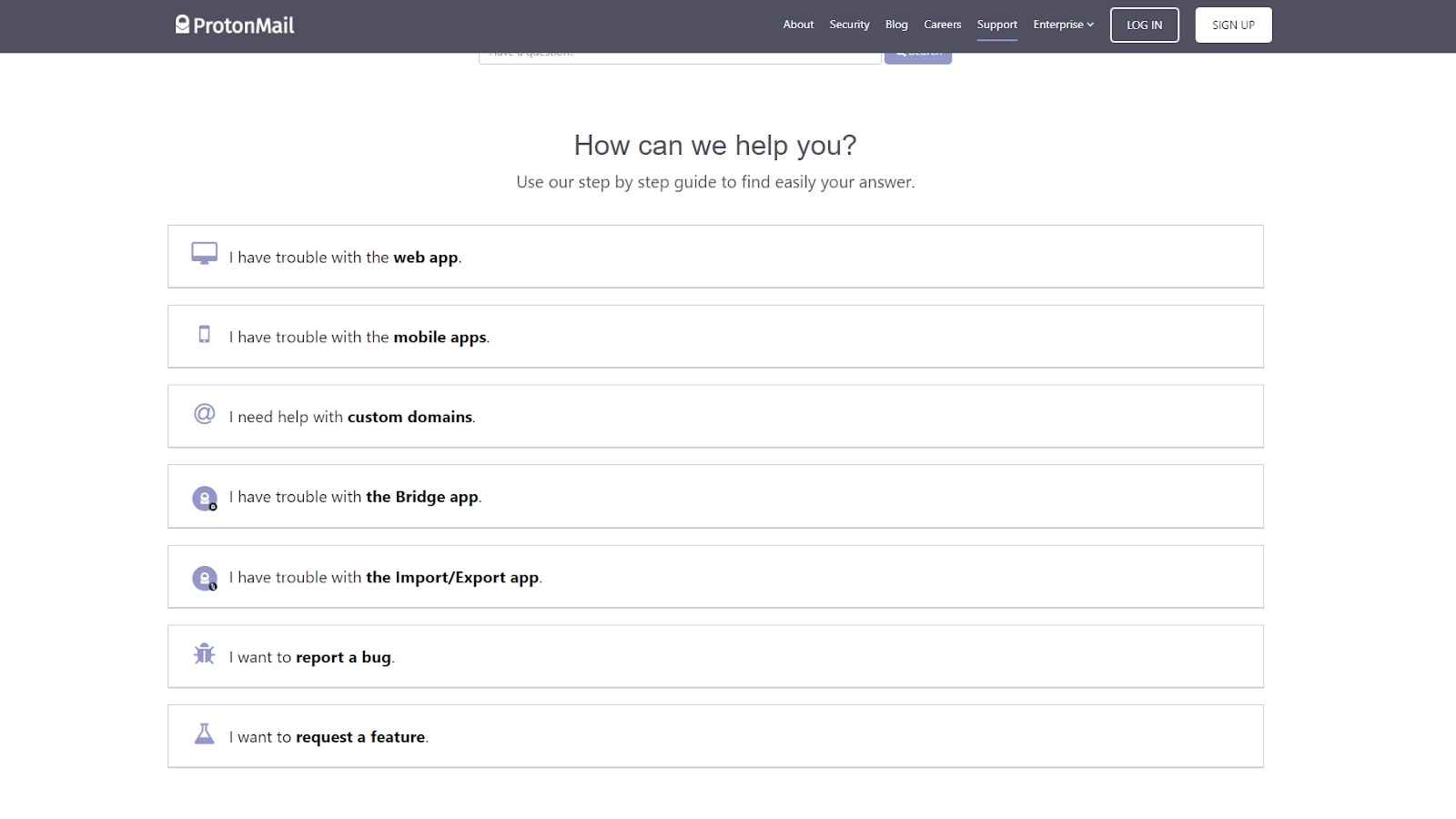
The online knowledge base for ProtonMail is well organized and full of details on every aspect of the product. Guides include short example videos, and there’s a search function so you can quickly find answers to your questions.

ProtonMail secure email review 4

ProtonMail has a comprehensive knowledge base (Image credit: ProtonMail)

ProtonMail: Security

ProtonMail uses end-to-end, zero-access encryption for your emails, so they are always encrypted when in transit or when stored on the email servers. However, the email subject lines are not stored in an encrypted format, so if compelled to by a Swiss court order, ProtonMail could turn over the subject of your emails to the authorities. In terms of physical security, ProtonMail’s IT infrastructure resides under 1,000 meters of granite rock and your data never goes to the cloud.

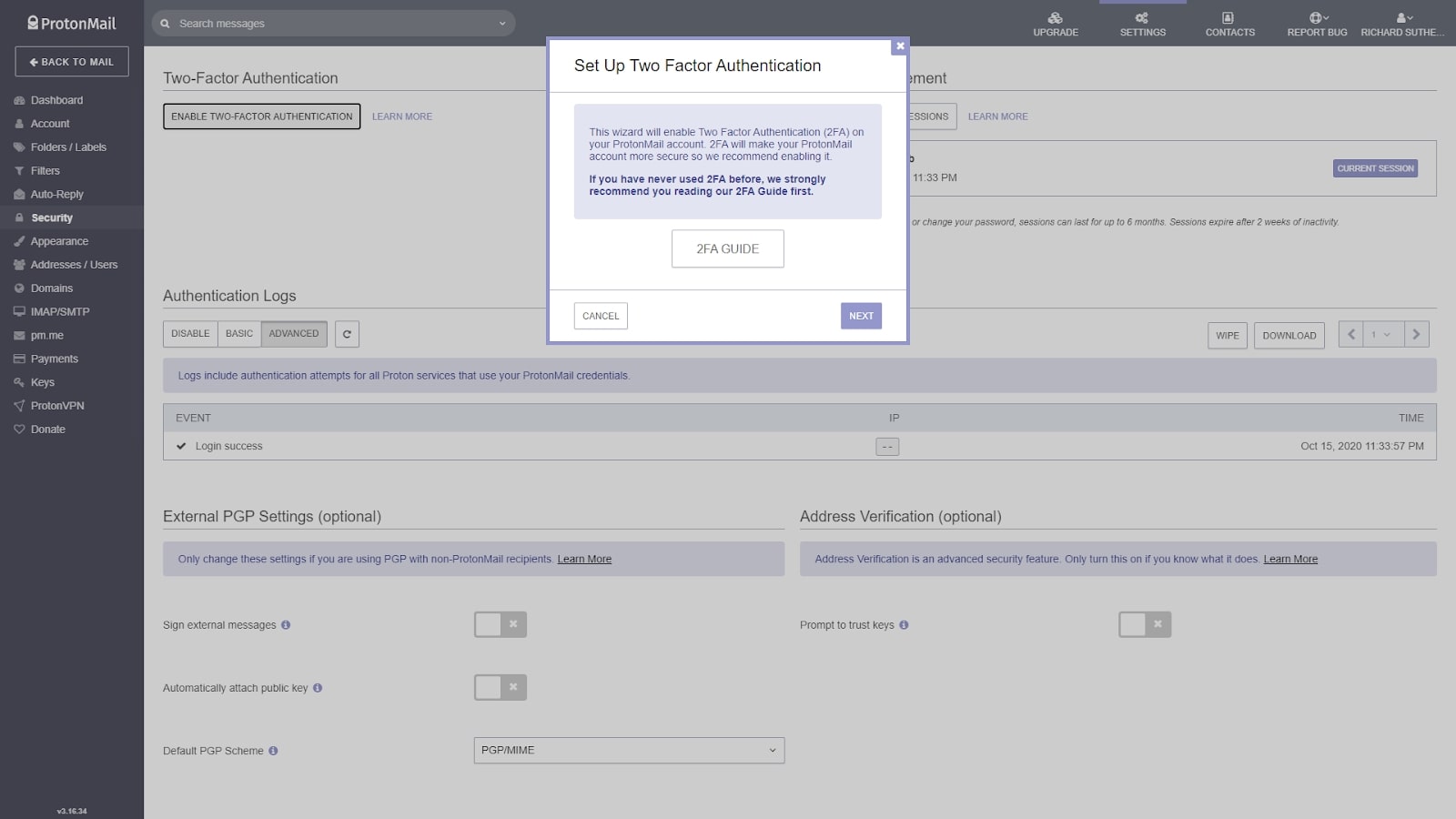
The code for the web client and encryption algorithms are all open-source, so any security issues can be patched quickly. There’s full support for PGP, and the encryption algorithms used are open-source versions of RSA and AES. You can enable two-factor authentication so no one can access your account without also having access to your mobile device. Overall, it’s an impressive level of security for emails.

ProtonMail secure email review 5

Two-factor authentication is supported (Image credit: ProtonMail)

The competition

If security is your highest priority, Tutanota is a German secure email service that uses its own encryption standards. You may prefer ProtonMail’s adherence to open-source standards, but while ProtonMail doesn’t encrypt your email subject line, Tutanota does. It also offers a fully-encrypted calendar and support for U2F two-factor authentication. 

If you like ProtonMail’s modern interface, Mailbox.org is another secure email provider that’s easy to use. It lacks mobile clients but includes a full suite of web-based email, contacts, cloud storage, and calendar office apps.

Final verdict

ProtonMail is one of the most polished secure end-to-end encrypted email services on the market. The free basic account means you can try it out at no cost, but you must upgrade to the Pro plan to unlock features like custom filters. ProtonMail strikes a good balance between high security and accessibility, and it’s a solid choice for anyone looking for a secure and private replacement to Gmail.


from TechRadar - All the latest technology news https://ift.tt/2Io0tft
via IFTTT
Tsohost

Tsohost was founded more than 15 years ago in the UK and they take pride in their aim to make web hosting simple, scalable and secure, and all at affordable prices. In 2009, they launched an innovative backup system which secures all customer data on a daily basis, making themselves pioneers in the industry. At present, they are considered to be one of the largest hosting providers in the country. 

In the beginning, their main data center was situated in the UK. They’ve decided to expand their borders in 2015 and open their first data center outside the UK, with a dedicated server in Singapore. However, those who choose to buy cPanel web hosting from Tsohost are able to choose from four different data centers: one of them in Singapore, followed by Amsterdam (the Netherlands), the third one at an unspecified location in North America and the final and the recommended center located in Strasbourg, France. It seems clear that Tsohost is targeting the international market in addition to its customer base in the UK and Northern Europe. They claim to be trusted by more than 250,000 customers, providing them with everything from the domain names and WordPress hosting to customizable server solutions.

Their web page is visually appealing and easy to navigate. It offers, among other things, a blog filled with the latest news, product announcements and tips and tricks for those who need it, and it seems to be updated on a weekly basis at the very least.

Additionally, in 2019 Tsohost launched a new-generation training program with the aim to further develop customer service and make it, as they stated, second to none.

For the more environmentally-minded among its customers, Tsohost’s eco-friendly attitude is worthy of note, since they claim their UK center is powered by renewable energy, generated from hydroelectric and wind sources. 

Pricing

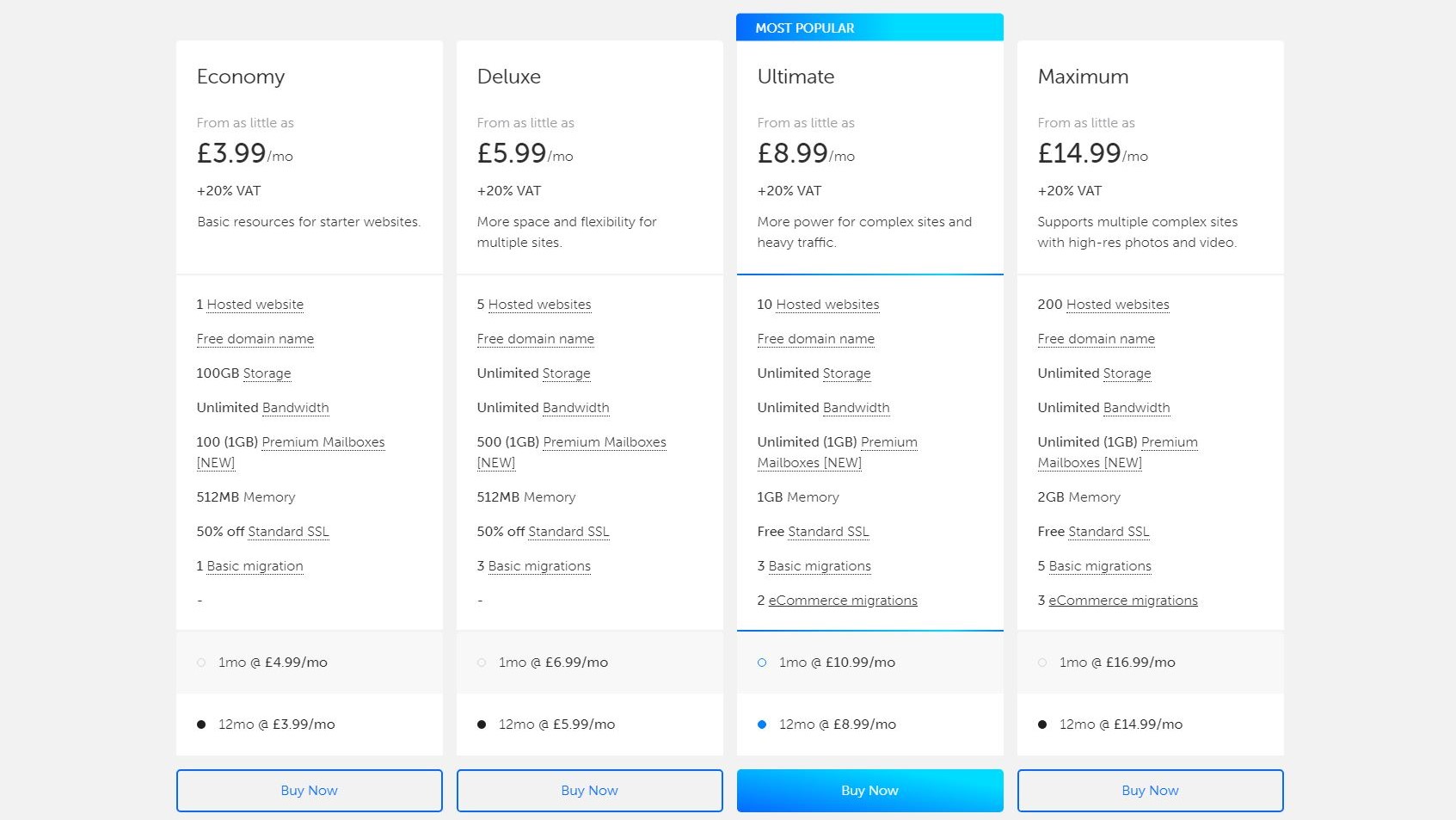
Tsohost throws in plenty of extras with each of its plans (Image credit: Tsohost)

Plans and pricing

Tsohost offers basic web, WordPress and VPS hosting, all packed with various options depending on your business needs and how much are you willing to invest.

The basic Economy web hosting plan starts at £3.99 ($5.16) a month for over a year and £4.99 ($6.45) for a single month. This plan will get you one hosted website, a free domain, 100 GB storage, unlimited bandwidth, 100 (1GB) premium mailboxes, which is a novelty, 512MB memory, 50% of standard SSL and one basic migration, which is suitable for smaller  businesses. 

Along with that, they offer a Deluxe, Ultimate and Maximum plan, of which the Ultimate is highlighted as the most popular. The Maximum plan, which costs £14.99 ($19.39) a month for a year or £16.99 ($21.97) for a single month, offers additional 200 hosted websites, unlimited storage, 2GB memory, standard SSL, 5 basic and 3 e-Commerce migrations. Tsohost also now provides Business hosting plans which are not quite budget-friendly, but will provide you with everything required for a larger business.

It’s important to note that no matter which plan you decide to go with, at minimum you’ll get a free domain, unlimited bandwidth, one free migration and 50% off standard SSL. 

As for servers, they offer VPS, dedicated servers and complex hosting, all of which follow a similar pricing pattern and options for Windows and Linux.

As it usually is with payment methods, the preferred options are PayPal and credit/debit cards and if you decide that Tsohost isn’t the right provider for you, there is a money-back guarantee available for the first 30 days of your annual plan, or for the first 48 hours if the plan covers a month.

Dashboard

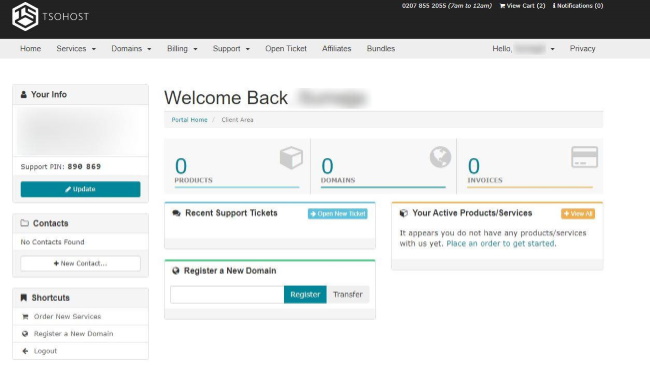
This is Tsohost's dashboard where you'll be able to manage your plans and domains (Image credit: Tsohost)

Ease of use

The installation of a website on Tsohost is quite simple. After choosing a plan, you can create an account while providing them with your personal data and a preferred payment method. After a verification via email or webmail, a newly created account will be activated in a matter of seconds.

By simply clicking on any offered plan, you will be presented with a rather modest FAQ section but some plans offer video tutorials on related subjects, which is always handy.

The site you created should appear within a day, and since cPanel is included in the original cost, at the very beginning you are given the necessary tools to manage your site with ease. Tsohost uses a customized version of the cPanel, however, it is quite similar to the more standard cPanels and if you are at least somewhat familiar with them, you won’t have trouble navigating. Even if you are a complete newbie, everything is visually appealing, well organized, intuitive and easy to adjust.

Even though Tsohost has its section on the website advertised as “Fully managed WordPress Hosting”, not everything is as it is presented. On the feature page for WordPress hosting there is no mention of optimization, automatized backup or update settings or other extras, which suggests that it isn’t offering a specialized managed hosting, but rather regular shared hosting plans. If you have humble needs, this shouldn’t present a problem, since all plans cover the basics with a free domain, decent amount of storage, quick and easy WordPress installation and daily backup. The free migration is a welcome bonus, since it will save you both time and money.

Performance

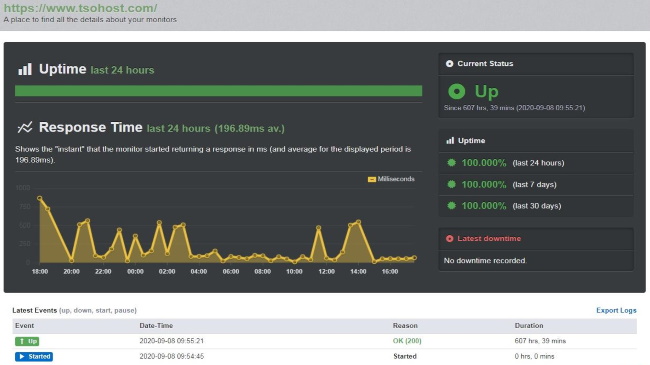
Tsohost performed quite well in the GTmetrix uptime test we ran (Image credit: GTmetrix)

Speed and experience

When it comes to speed, Tsohost passed the test with flying colors. The GTmetrix test on their main site reveals they are taking 4.6 second to fully load, which is well above the average result of 8.2 seconds and the number of requests was 57 in comparison to the average of 89.

Since Tsohost guarantees an uptime of 99.9%, we decided to put it to the test. After more the two-week testing of their main site’s uptime, we recorded no downtime at all, but with quite a few response time oscillations which could be attributed to immoderate amount of website traffic. 

Ultimately, although two or three weeks are not indicative of a whole year, they show that they are likely to keep their promises.

Support

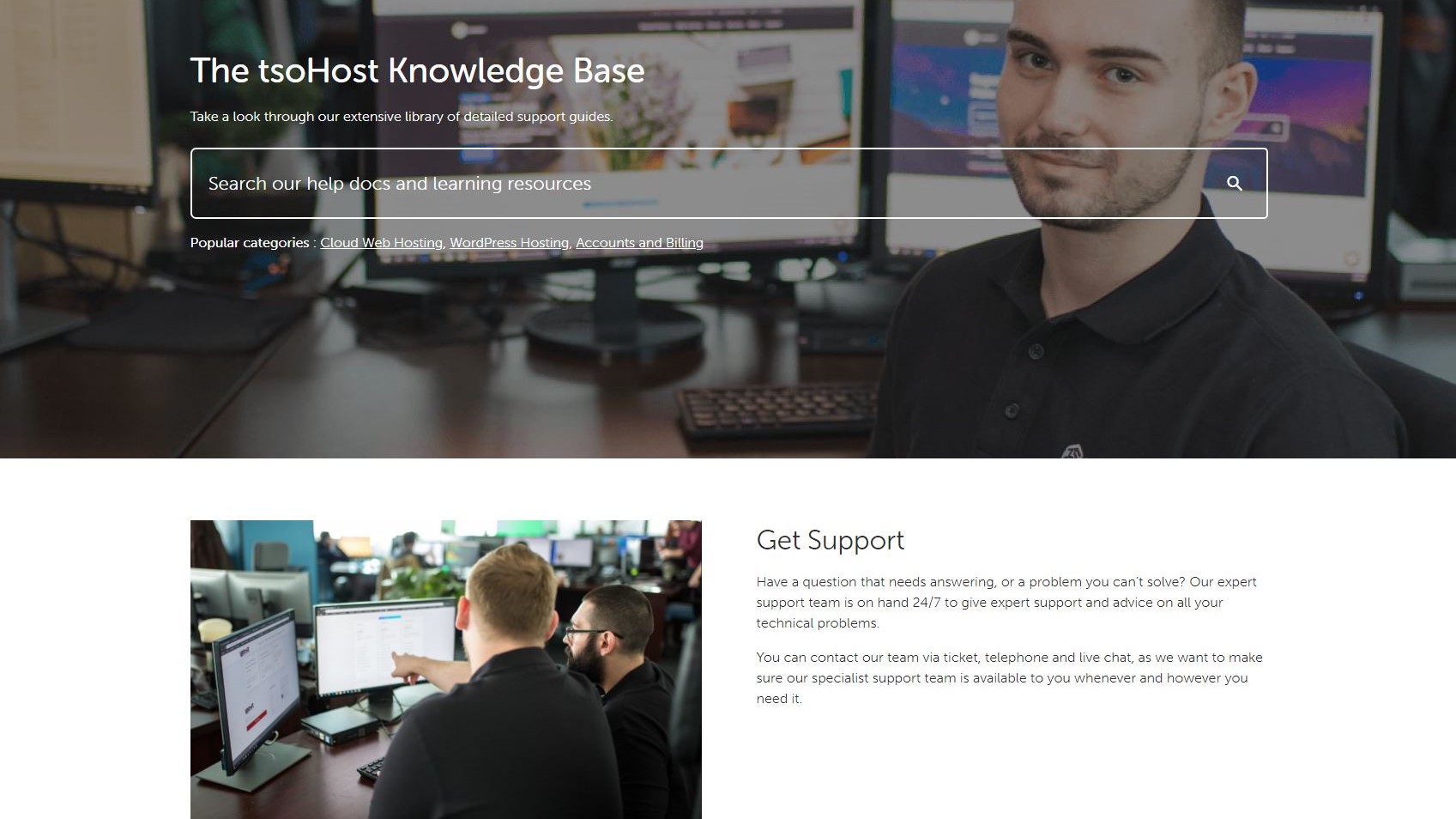
Tsohost offers support via ticket, live chat and over the telephone. The company also has a knowledgebase on its site which has not been updated recently (Image credit: Tsohost)

Support 

When it comes to support services, Tsohost offers access to a frequently updated blog, a knowledgebase which has not been updated since the April of 2018 but still manages to offer a decent amount of information. The platform offers 24/7 customer support via ticket, live chat and a telephone support, which are available 07:00 - 24:00 GMT. The live chat was originally available from 9:00, but they’ve extended the chat hours due to high demand, as they state.

We were most impressed with the live chat, since the connection was instant, the agents responded immediately and offered a clearly presented and suitable solution to our issues. Tsohost also provides the live chat option which pops up on main page in the far right end of the screen to easily steal a reader’s attention. Although live chat and telephone options are not conveniently available at all times, there is certainly a valid reason they decided to describe their customer service as superior.

What they lack in that department is an official support forum where users could present their concerns and problems in the hope of being able to brainstorm on the solutions together. 

The competition

Catalyst2 is a fellow UK-based provider with slightly more affordable plans and free SSL provided with every plan. In comparison, Tsohost offers 50% of standard SSL on Economy plans, but includes a free domain, daily backup system and more beginner-friendly approach. 

When the approach to newcomers is concerned, both Tsohost and Hostgator are very much user-friendly and all plans from Hostgator include a free website builder. However, since the latter’s data centers are located in the US, it could be less convenient for the UK-based customers.  

Certa Hosting is another UK-based provider with a wide array of features, and it offers plans that don’t impose the bandwidth restrictions. In addition, their customer support is available 24/7 via telephone, email or live chat. 

The main difference between Bluehost and Tsohost is that one is US-based while the other one hails from the UK. Bluehost offers less expensive options, but their subscription fee increases after three years, which is not the case with Tsohost. However, Bluehost offers a free SSL certificate with even the cheapest plans and their customer support is available 24/7.

Final verdict

Tsohost is without a doubt a competent host who offers a variety of hosting types to choose from and a helpful (although somewhat limited) customer support. So, no matter how big or small your business is, you will be able to find a satisfactory solution for your needs. If you are not strictly looking for a UK provider or you want a truly managed WordPress hosting, Hostgator and Bluehost could be better suited to your needs.


from TechRadar - All the latest technology news https://ift.tt/3phhRmN
via IFTTT
PayPal Business App

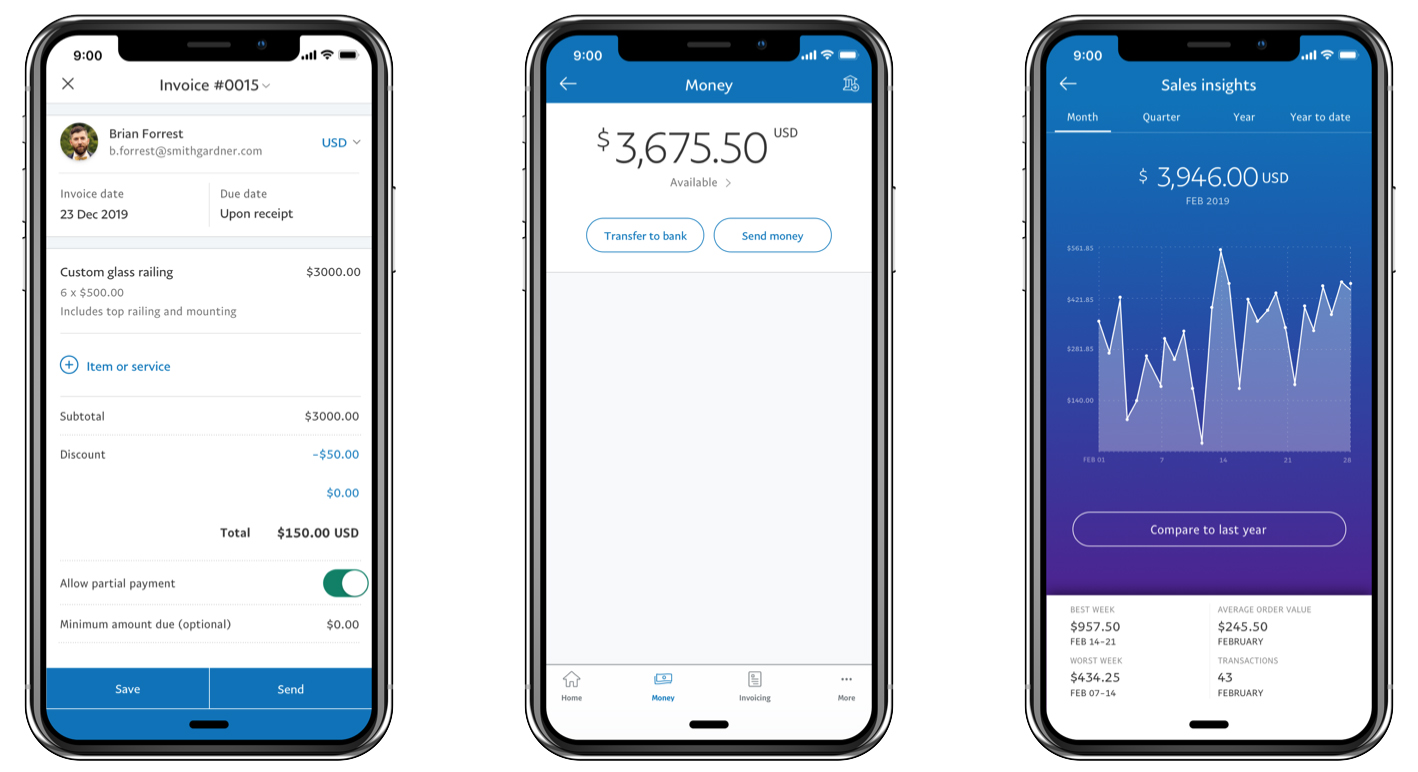
PayPal Business App is another aspect of this company that is evolving all the time and now has numerous products and services aimed at making life for business owners that little bit easier. If you’re frequently on the move, or just prefer to have your business activities at your fingertips rather than being stuck at a desk then the PayPal Business App is a real boon. It allows you to do all manner of business related tasks, such as creating and sending invoices and keeping tabs on your business account activity along with issuing refunds to customers where necessary. 

Being able to do all that and more, from your mobile phone, offers your business that additional edge when you're away from a desktop or laptop machine. And, because this is PayPal you’re getting the benefit of a truly global operation, which is available in just about every part of the world.

PayPal Business App

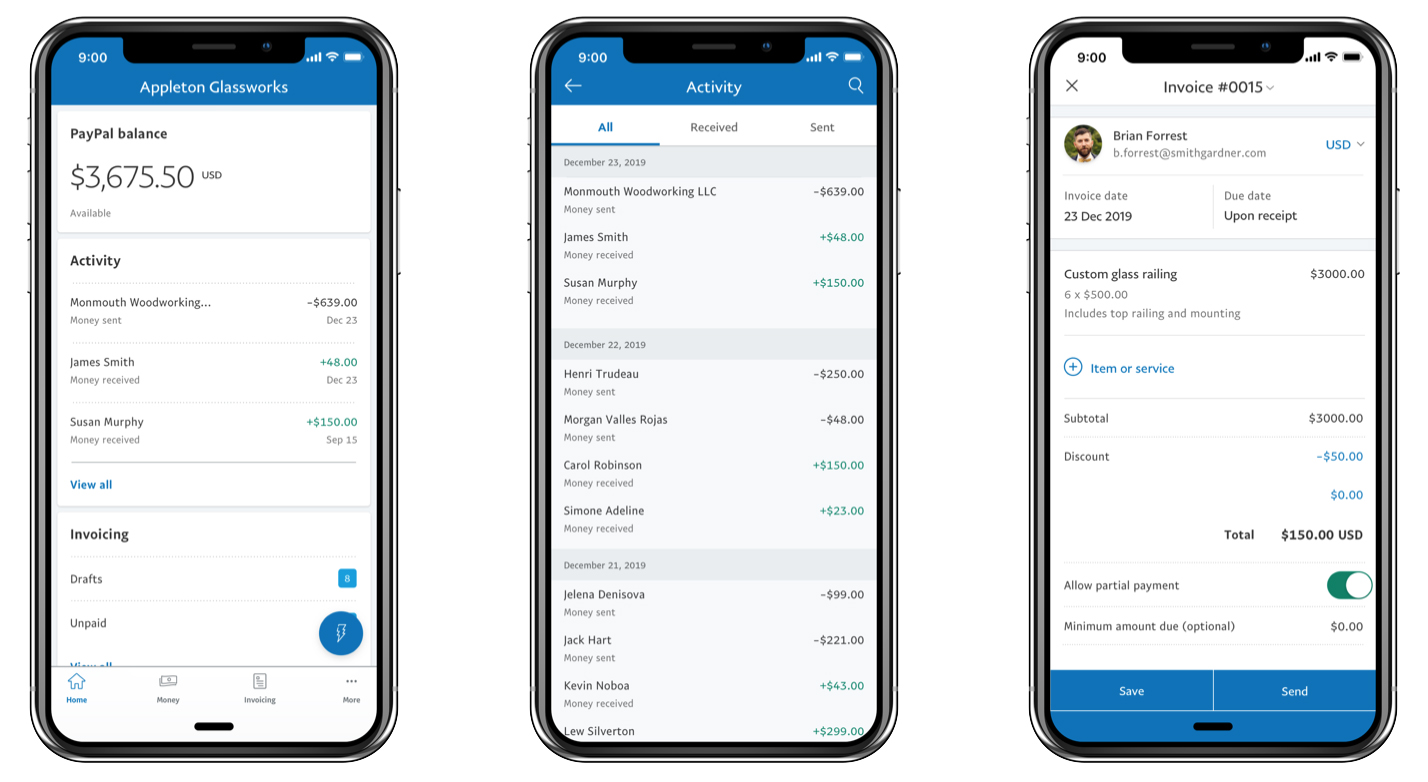
The PayPal Business App is both practical and powerful (Image credit: PayPal)

Pricing

If you’re already a PayPal Business user then you’ll doubtless be well aware of the numerous different tiers of charges that are involved when you have an account with the company. PayPal has lots of different products and services, so for an accurate breakdown that matches your needs then you’re best off heading to the pricing page on their website. The other thing to remember is that prices are different depending on the way you pay, the currency you’re using and also your business location.

PayPal Business App

Being able to stay productive on the move is a real strength of the app (Image credit: PayPal)

Features

The PayPal Business App comes with plenty of features to help make your workflow more efficient. You get a comprehensive overview of all your business activities for starters, and having a complete toolkit for issuing things like invoices on the go means that it’s easy to keep on top of finances even if you’re not at your desk. In fact, producing invoices is a doddle, even within the confines of a smaller mobile phone screen thanks to a dedicated invoice-making tool. 

Complimenting that is the way you can issue payment reminders to help ease cashflow. The app will also give you a detailed breakdown of sales and account activity, with a range of different views allowing you to get a snapshot of business turnover from monthly through to annual overviews. 

It’s possible to transfer money using the app as well as issue refunds when you need to. Rounding it all out is the ability to get detailed insights into all of your customer activity, which will reveal everything from invoicing histories through to processing ongoing payments.

PayPal Business App

Having a dedicated app is just one of many resources available to business users (Image credit: PayPal)

Performance

You can get the PayPal Business App for iOS or Android and it continues to be downloaded by many business account holders who want to have the added convenience of mobile productivity. As you’d expect from a large company, the app has been well put together, although there is a proportion of users who seem to have experienced operational difficulties with it. 

PayPal does have a lot of different products and services, which might also be the source of some customer woes as its portfolio can be a little bewildering. Bear in mind that, as the name suggests, this is a business-based app, so you’ll need to have the right setup with PayPal in order for it to work properly.

PayPal Business App

The great thing is that business users also get their own dedicated support arena (Image credit: PayPal)

Ease of use

Credit should go to PayPal for developing a business app that, while it does come packed to the hilt with features to aid productivity, is also easy to use. Considering the powerful feature set you can easily switch between tasks. Naturally, having most if not all of the tools you’d normally use on a desktop computer at your fingertips and on the move is hugely helpful. 

Just being able to ping a new invoice to a customer on the go is beneficial, but to also monitor payments as well as keep an eye on sales activity means there’s plenty here to help your business. It’s all easily mastered too. The interface is a nice balance of PayPal’s blue and easy-to-read white with black text overlaid, which makes the app all the more practical if you’re using it in less than ideal conditions.

PayPal Business App

PayPal's Business App offers convenience and access to productivity tools from anywhere (Image credit: PayPal)

Support

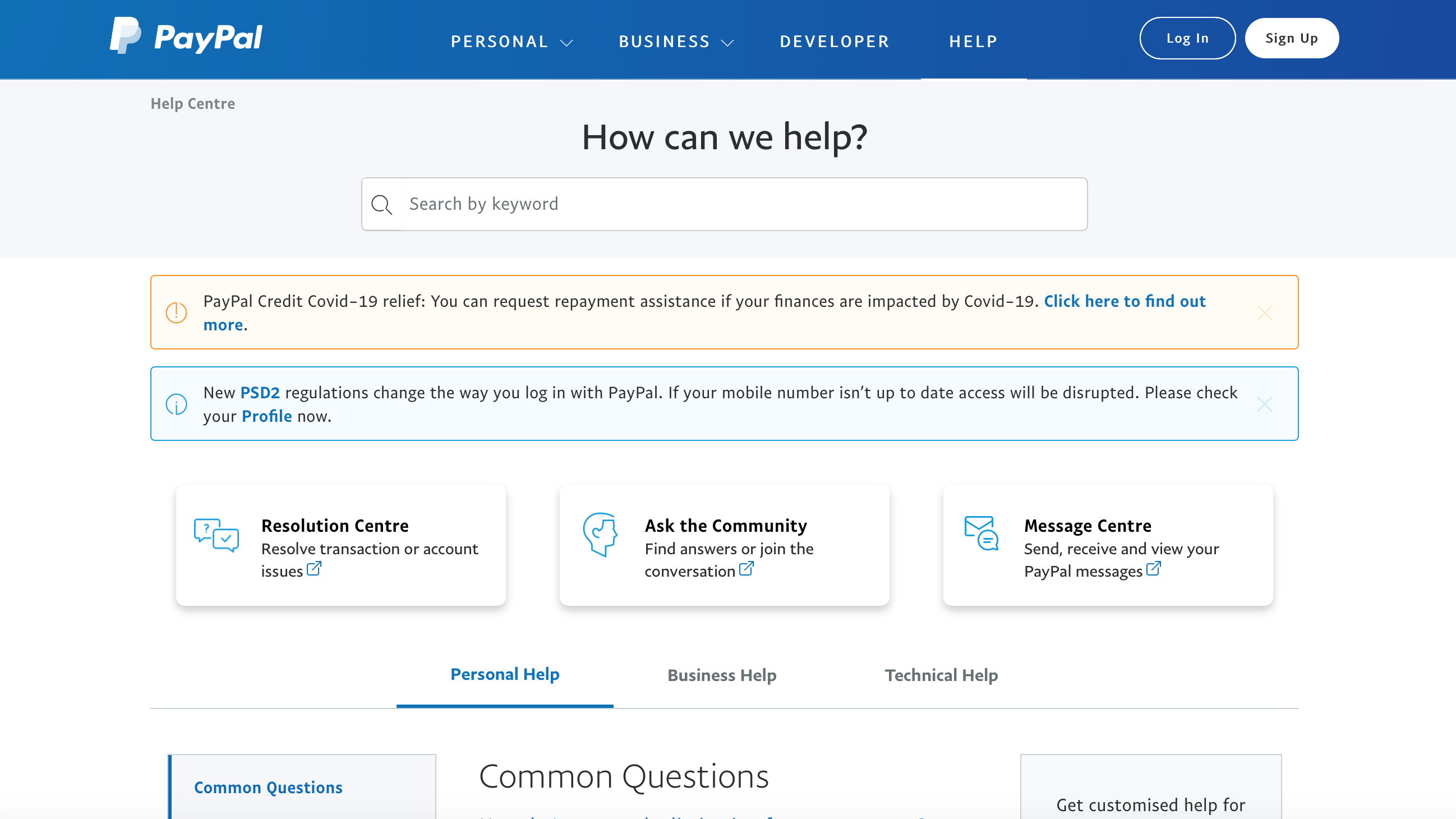
With so many products and services falling under the PayPal banner it’s quite easy to feel a little overwhelmed by your support options. PayPal does, of course, have the usual support hubs where you can find answers to lots of common queries, but the company has a raft of other options open to you if your enquiry is less straightforward. 

Similarly, because PayPal processes a lot of payments it’s only natural for the business to have a resolution center, in case of any issues with a transaction or a problem with your account. Lookout too for healthy community areas, which are often great places to find answers, as well as the Message Centre that will be the first place to check into if you’re expecting correspondence from PayPal.

Final verdict

PayPal Business App is extremely useful, especially if you’re frequently tackling business tasks while you're on the go. Even though many of us are doing less mobile business due to coronavirus, PayPal’s Business App is still a boon for its convenience factor. 

You’ll obviously get more from it if you’re signed up for other PayPal services, and you’ll need a PayPal Here account if you want to process credit and debit card payments on your mobile too. However, being able to process payments, transfer funds along with issuing invoices on-the-fly makes the PayPal Business App a worthy addition to your arsenal of business-focused phone software.


from TechRadar - All the latest technology news https://ift.tt/2Iunk8Q
via IFTTT
UKHost4U

As the company name states, UKHost4u is a UK-based web hosting provider. It takes great pride in years of experience they’ve spent in the business, which is justified given that they had their first hosting client back in 2000 and a year later they set up their first official website. 

The reason UKHost4u is lesser-known player among the competing UK-based companies is likely due to the fact they are an independently owned company while about 95% companies on the market are owned by three hosting companies, which they like to point out. 

Without doubt, UKHost4u came a long way from a small web design and hosting company to what they are today, a competent company offering a myriad of web hosting-related options.

We can conclude that their intended audience are their fellow countrymen, since most of their data centers are located in the UK and their tier 2 center is located in Maidenhead, England.

On the UKHost4u’s main site, you can access their blog which is designed in a simple but pleasing enough manner. There, you are able to look for specific content using the search bar or by browsing the enlisted categories on the side, and if you scroll down a bit you’ll see what is currently offered at a discount. The blog itself seems to be alive and well, updated once or twice per month.

Pricing

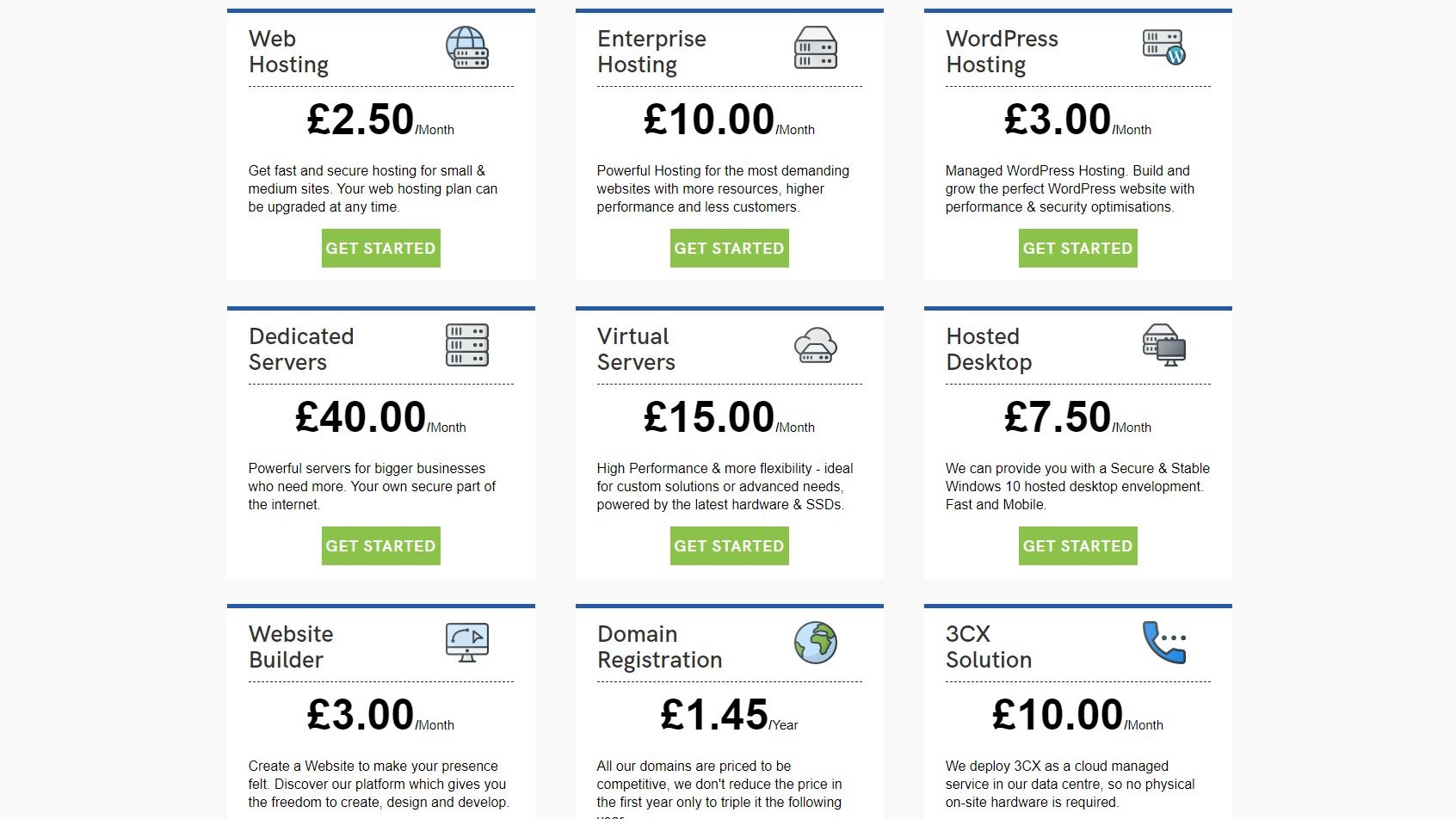
UKHost4u offers a wide variety of plans to fit your web hosting needs (Image credit: UKHost4U)

Plans and pricing

No matter how big or small your business is, UKHost4u will have something to offer. The least expensive plan that provides basic web hosting for a small website starts from £2.50 ($3.23) a month, and if you choose to take the plan for six months, the price will be halved. 

In addition to what is generally expected, the basic plan includes unmetered bandwidth, unlimited email accounts, a free Comodo SSL certificate, free Enterprise Spam Protection and Enterprise LiteSpeed Web Server, all of which is rather useful for a start. This plan, along with others, can be easily updated at any time.

When the servers are concerned, they offer a hosted desktop, VPS hosting as well as dedicated servers. As for the types of hosting, there is shared web hosting, managed WordPress hosting, enterprise managed hosting and reseller hosting, with at least three plans for each of them. 

As for the paying methods, available options include debit/credit card, PayPal and direct debit (GoCardless) payment. For those unsatisfied with the provider’s service, there is a risk-free 30-day money-back guarantee with no questions asked, as they state.

Ease of use

After deciding which plan you’ll want to go with, you’ll be given information about your plan in detail (yes, free SSL certificate is included even in the cheapest plans) and have to choose a billing cycle (monthly, annually or triennially), so there is a certain flexibility in terms of payment. 

How much money you’ll save by going for a year or three will be shown as a percentage, just below the full price. Scroll down, and you’ll be offered to pay an extra £2 ($2.59) for an automatic account backup or duplicated IP address.  

You’ll be also offered to register a new domain, transfer an existing one from another registrar or use and update your name servers. The domain register isn’t free and domain names vary between £5.85 ($7.57) and £11.40 ($14.74), which is a fair price.

To finish creating an account, you’ll have to provide a number of rather standard personal information and generate a password with at least five digits. At the bottom of the page, you can choose to receive occasional emails informing you of the latest news, information and special offers. If you want it, you can even leave notes to the UKHost4u team. 

Even if you choose the least expensive plan, you’ll get at least 50GB of SSD storage, meaning you’ll have good enough performance and your website won’t be too slow. If you want a website builder, it is also on offer, but as a separate paid subscription.

cPanel

Manage your website using the industry standard cPanel (Image credit: UKHost4U)

UKHost4u provides a standardized cPanel packed with features and extras that will provide an intuitive and stress-free user experience even for less tech-savvy users. Applications and platforms are only a click away and all hosting plans support Node.js, so you can make the whole process even easier. 

Performance

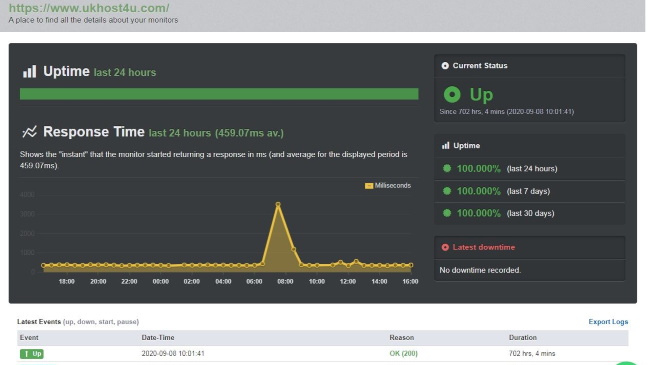
We used GTmetrix to measure the performance of our UKHost4u site (Image credit: GTmetrix)

Speed and experience

When it comes to speed, UKHost4u gave us commendable performance, taking 3.0 seconds to fully load its page as monitored by GTmetrix test, in comparison with average loading speed of 8.2 seconds. The amount of requests it took was 63 which is still above the average of 89, so we can confirm that they’ve successfully completed the first testing phase.

When it comes to uptime, UKHost4u stresses out that the availability of their customers' websites is their key priority as they promise 99.9% uptime across all of their hosting solutions. The results of our two-week long tests shows no downtime at all and only a few oscillations in response speed, so it appears they are more than likely to keep their promise.

Support

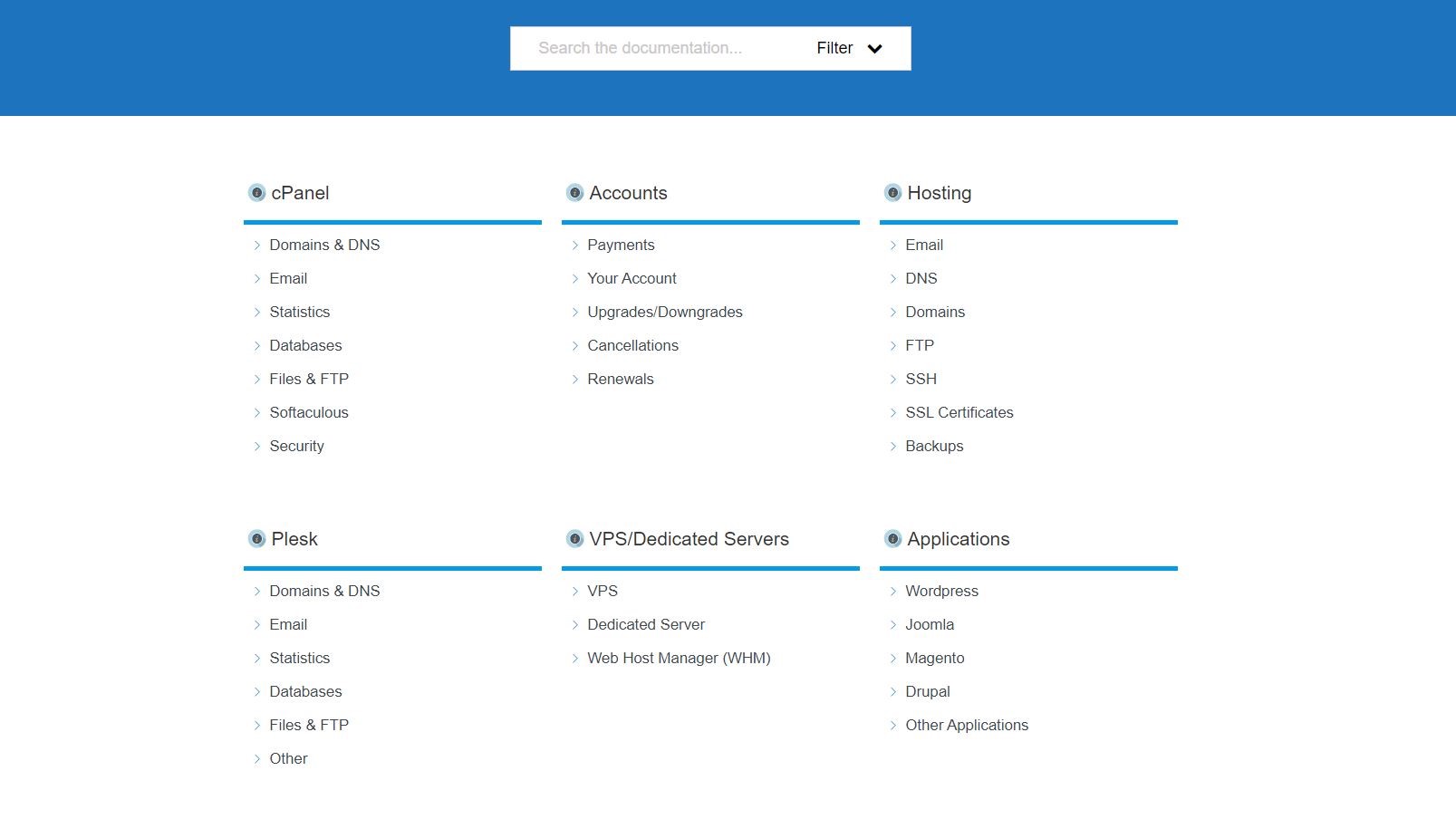
Unfortunately UKHost4u's knowledgebase could use some updates as some subjects turned up no articles at all (Image credit: UKHost4U)

Support

UKHost4u pride themselves in taking customer support seriously, as they offer 24/7 support via ticket, a phone number available during the working hours (Monday to Friday, 9AM to 5PM) and a dedicated knowledgebase.

The search for specific information in the UKHost4u’s knowledgebase has left us somewhat disenchanted. Although it doesn’t look amateurish, there are only nine categories that are further divided into subcategories and clicking on some of them will get you nowhere, since there are zero articles on the specific subject with just a short promise of “Articles coming soon”. 

Others lead to a written solution to specific problems, with adequate illustrations in the form of “How-to-do-something” and those do offer some beginner-friendly instructions and, despite being very brief, they should be helpful to most users. All of the articles appear to be created in 2020 and updated subsequently in the course of the year, hence we can conclude that UKHost4u is actively updating and optimizing their knowledgebase. They don’t have a support forum at present. 

The competition

UK2 and UKHost4u are rather similar, with both of them being UK-based providers with a wide variety of options and hosting plans for different types of businesses. However, while UK2 includes one domain name, backups and automatic malware removal, be prepared to pay extra to get more than bare bones from the UKHost4u.

Catalyst2 is another competent host from the UK, which, unlike UKHost4u, includes free or quite cheap domains and a three-day-trial. In addition to that, Catalyst2 offers more transparent and straightforward pricing, while the discounts that UKHost4u offers apply if you choose an annual or triennial plan.

Hostgator is a much larger company than UKHost4u and it is US-based, while UKHost4u is more focused on the UK market. While both provide a 30-day money-back guarantee, Hostgator adds a free domain name into the basket, and for the first year of use.

Bluehost is an alternative competitor from the US that offers remarkably low prices for the first three years before a price hike as well as a free domain for a year. The UKHost4u doesn’t offer this, so if you don’t mind having data centers in the US, Bluehost might be the right choice.

Final verdict

UKHost4u is a quality beginner-friendly all-inclusive hosting solution that can meet everyone’s needs, but to take full advantage of all its features, be ready to pay a higher price. If you are interested in all the above, but with more affordable prices and you don’t mind data centers located in the US, Hostgator or Bluehost might be better options for your needs.


from TechRadar - All the latest technology news https://ift.tt/32uz6Hy
via IFTTT
BenQ EX2510


The world of gaming monitors is far from commoditized, to the point where most models offer something different to everything else on the market. In the case of BenQ’s Mobiuz EX2510, its feature set places it somewhere around the top-end of the budget market and the bottom end of the mid-range market. So how does it stack up against 2020's best gaming monitors and, who, if anyone, should buy it?

The BenQ EX2510 is available in the US, UK, Australia and other regions, at street prices of around $249 / £240 / AU$359 at the time of testing. That places it significantly higher than our favored and similarly specced ViewSonic XG2401 recommendation, but the latter doesn’t have HDR and is not available in all territories, such as Australia.

BenQ EX2510 gaming monitor

(Image credit: Future)

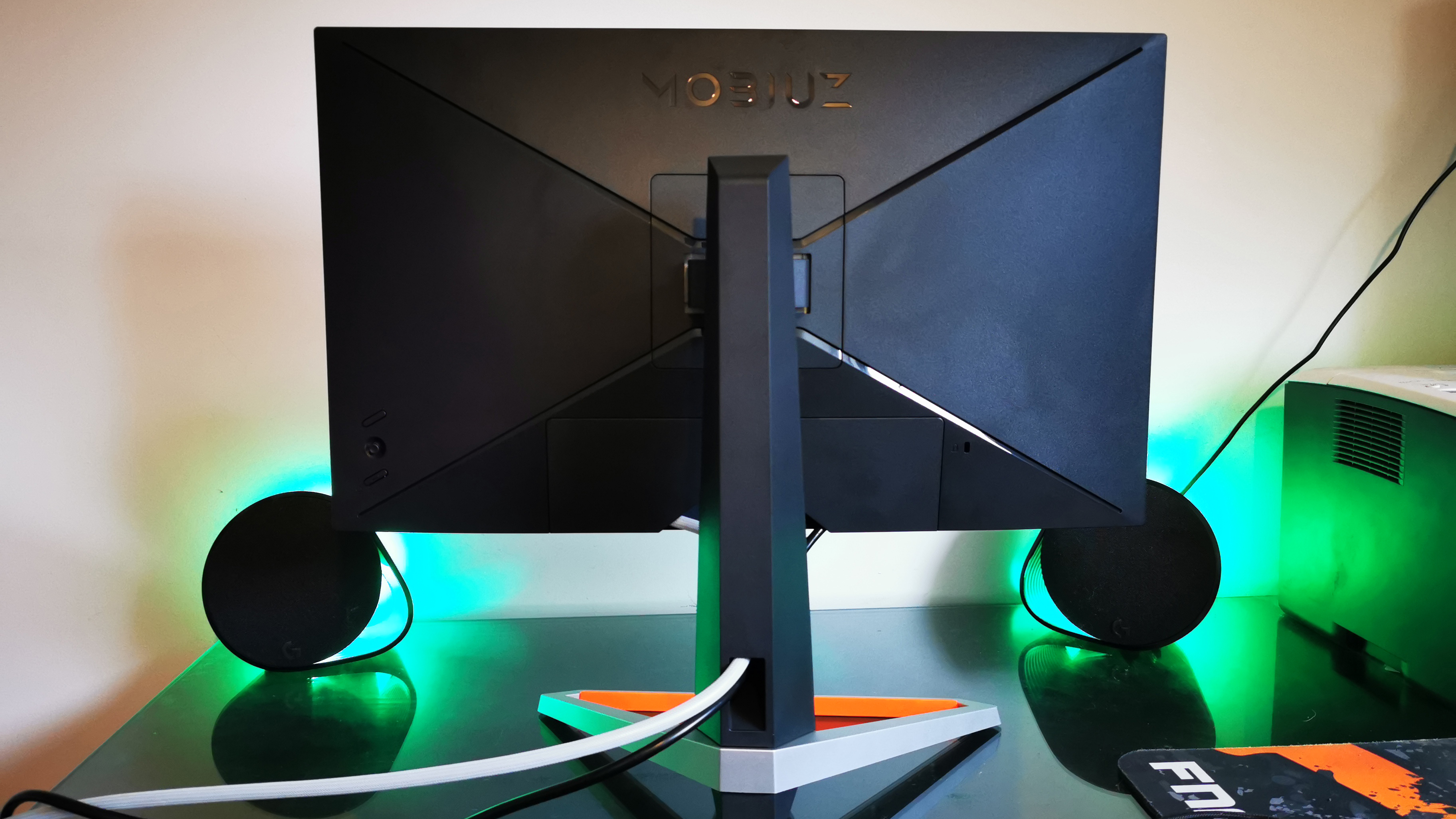
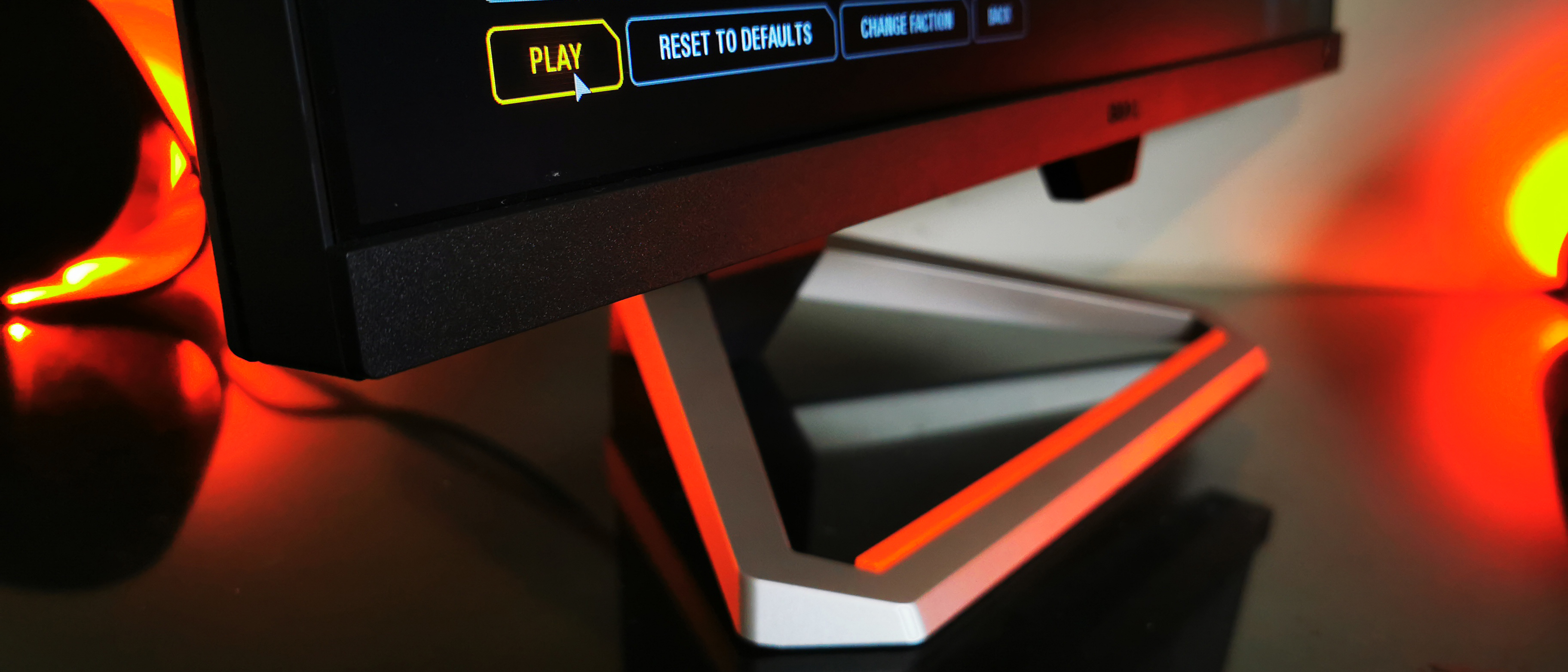
In terms of top-line specs, the EX2510 is a 24.5-inch, Full HD, IPS, 144Hz gaming monitor with ‘HDR’ technology. The Mobiuz is also much smarter-looking than most budget monitors (especially that aforementioned ViewSonic), thanks to a solid, classy stand, sharp lines, a colorful design flourish and a very thin bezel. The stand itself can be manipulated to generous degrees, offering -5°/+20° tilt, 20°/20° swivel and a height adjustment of 130mm. However, it rotates only to only a negligible degree – one that helps slightly with cable insertion but little else.

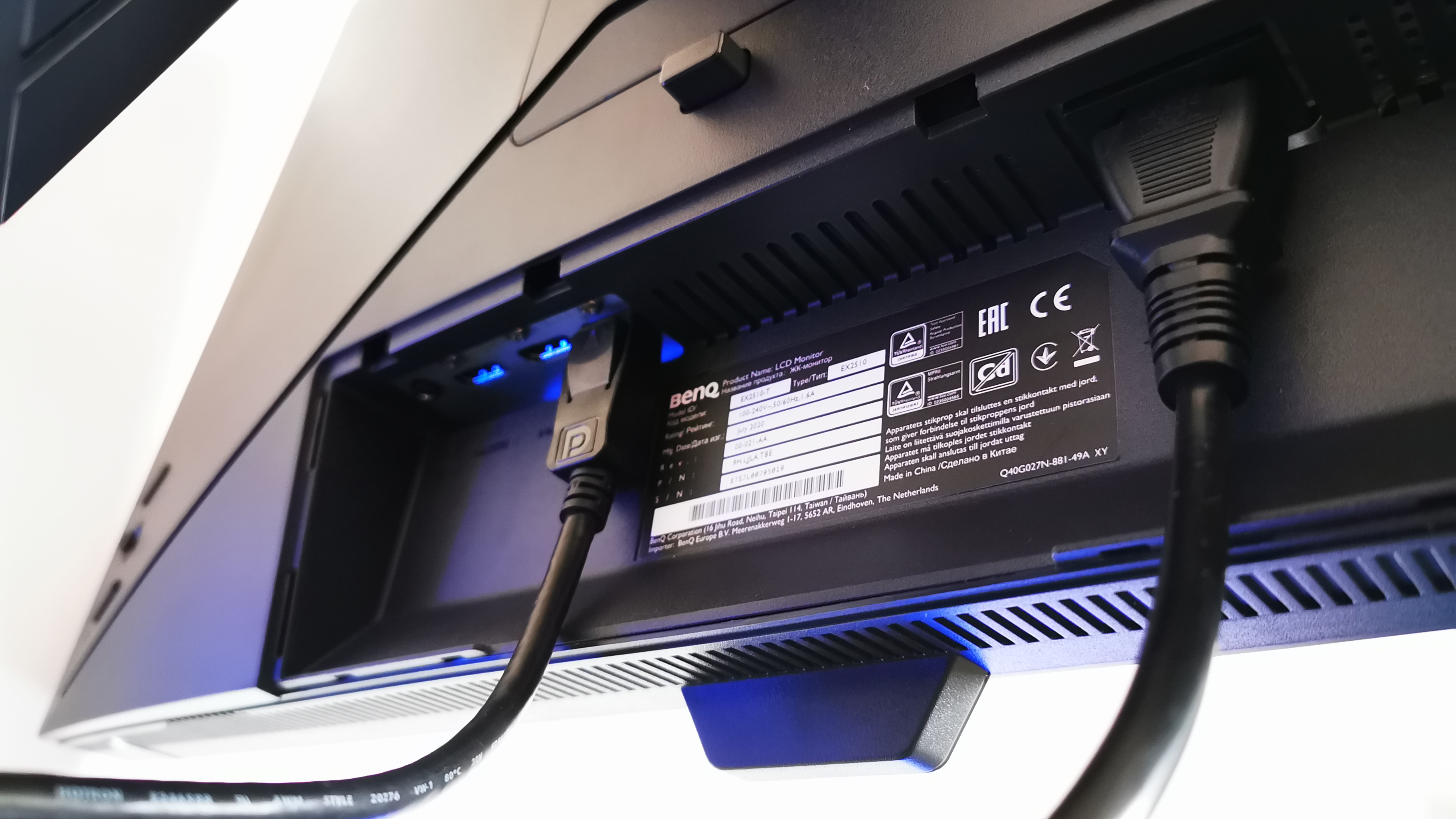
Those connections consist of two DisplayPort 1.2 sockets, an HDMI 2.0 port and a 3.5mm audio jack. They’re hidden behind a removable panel at the back and cables can be tidily channeled through a gap in the stand. Unsurprisingly for a monitor with this price tag, there are no RGB lights adorning it.

BenQ EX2510 gaming monitor

(Image credit: Future)

It houses two 2.5-watt speakers, which get surprisingly loud. They offer well-rounded audio too, which is great for casual YouTube videos and casual gaming. BenQ goes into some detail on how everything has been tailored for audiophiles by utilizing its in-house treVolo technology. However, playing music at any serious volume exposes their near-total lack of bass. Changing the equalizer from Pop/Live mode to Cinema mode merely muddies the lower frequencies, while Game mode removes them altogether – highlighting top-end, scratchy sounds of frequencies favored by approaching footsteps and gun-cocking sounds, helping battlefield awareness. Still, they’re significantly superior to most other built-in monitor speakers that we’ve ever used.

In theory, a headline feature that elevates the Mobiuz above many similarly-priced rivals is the incorporation of HDR. Not surprisingly, it can’t nearly match the stunning imagery of more expensive and premium 1,000-nit rivals, but BenQ’s emulated ‘HDRi’ system offers a little more than the usual, low-end, ‘high-contrast’ excuse for HDR that’s occasionally seen around this level of the market. In practice, a small button in the bottom right-hand corner of the screen cycles between HDR, Game, Cinema and Off modes. They all make the screen noticeably brighter and improve color vibrancy – just with slight variances in color temperature.

BenQ EX2510 gaming monitor

The built-in ambient light sensor sits at the bottom of the screen. (Image credit: Future)

The Mobius EX2510 also has an ambient light sensor for dynamic image ‘improvement’ that it describes thus, “A discrete sensor detects ambient light levels and assesses then refines on-screen HDR images for ideal display… Dark corners show what they’re hiding while bright areas are not overexposed… color balance and saturation are adapted for a mind-blowing visual experience.” The discrete sensor is actually that large, front-and-center glossy box affixed to the base of the screen. When activated it will adjust brightness and color saturation depending on your environment. It effectively works as described, but some may find the small on-screen icon, which appears in the corner when the screen is being adjusted, a touch distracting. If you find it changing the screen’s brightness too often, you can adjust sensitivity in the OSD.

When gaming, the HDRi technology can combine with the IPS panel’s 1,000:1 contrast ratio and impressive 400-nit brightness to produce a pleasing picture. However, while we liked seeing sneaky blighters hiding in dark areas, it was rather easy for detail to get lost in bright skies and such like. It was still possible to produce impressive, near-black dark areas in cinematic situations, but IPS panels only get so dark and, consequently, true-black performance is off the table.

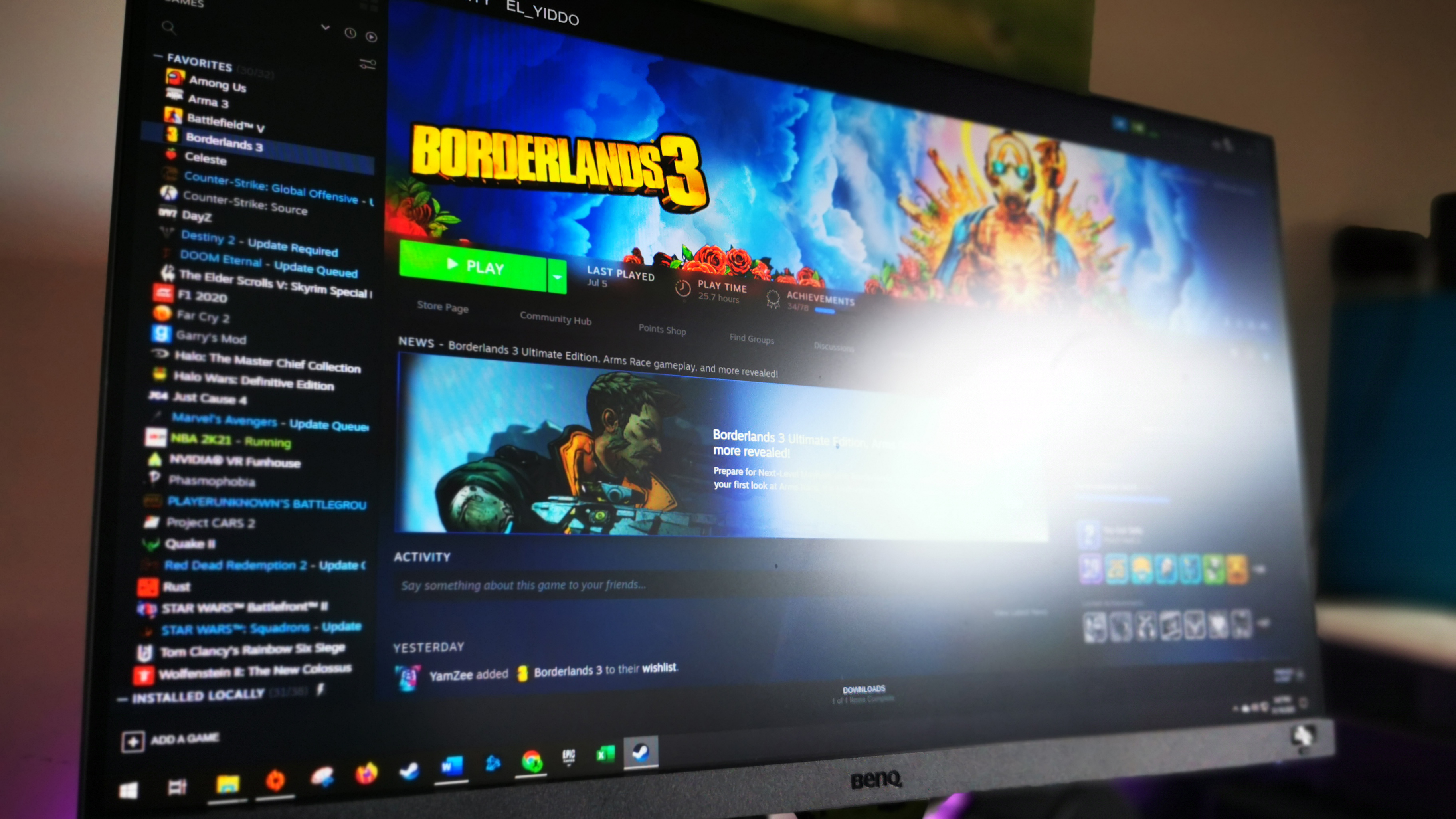
The screen is matte-finished rather than glossy. But while those unflattering ‘Black Mirror’ reflections are cut out, we felt it reflected more-than-usual ambient glare in a bright room.

BenQ EX2510 gaming monitor

The EX2510's matte finish can still reflect a fair amount of glare from bright light sources. (Image credit: Future)

The 144Hz refresh rate keeps everything buttery smooth and there was minimal ghosting. Pixels have a low 1ms MPRT response time (Motion Picture Response Time standard) and are capable of 2ms grey-to grey flexing – very fast for an IPS panel. It’s all supposedly enhanced by an overdrive technology called Advanced Motion Accelerator but, in this reviewer’s experience, it did nothing noticeable beyond changing the setting number from one to three. Your mileage may vary. The monitor also supports FreeSync but, if you’re using an Nvidia graphics card, we discovered that if the refresh rate was set differently in Windows to the game, when framerates fluctuated significantly, it would literally turn the screen off for a few seconds on each occasion. It took us a while to figure that nightmarish bug out. Ensuring everything is set to 144Hz fixes the problem.

The OSD isn’t the most intuitive at first glance, however, we were quickly cycling through all the settings using the responsive, mini joystick at the back on the right (a button above this quickly cycles between inputs while the one beneath it turns the monitor off). It offers the standard range of image adjustment functions with some more-advanced options. The latter include a Black Equalizer adjustment in the FPS settings which adjusts the gamma to further reveal dark objects lurking in the shadows. You can also adjust light filters including blue light to comfort your eyes plus, you can adjust what appears in the quick menu settings when you first click the OSD button before entering the main menu.

BenQ EX2510 gaming monitor

(Image credit: Future)

Some gaming monitors can be hopeless at displaying a Windows Desktop: butchering the contrast and detail in office documents to the point where extensive messing around with settings is required just to see text in a document. Mercifully, the Mobius’ picture quality is also very well suited to office work. It makes a decent fist at high-quality video thanks to good color performance and contrast. However, there is some light leakage noticeable in the corners when letterbox bars are present and the ability to display true black is noticeably absent.

At $249 / £240 / AU$359 the BenQ Mobiuz EX2510 represents decent value and is a worthy choice at its level in the market. While many of the advertised features are somewhat gimmicky, it’s good at displaying gaming content and more besides. While its ability to display detail in bright areas isn’t great, only those who play very bright games should steer clear.

Buy it if…

You want important gaming features without the fuss
If you’re playing fast-paced games the standard 60Hz monitors just aren’t going to cut it: you’ll be at a competitive disadvantage and frantic mouse movements can make you giddy. Once you try 144Hz for FPS games (especially) there’s no going back.

You want a stand that’s solid, adjustable and pretty
There are few more-dispiriting things than staring at an ugly hunk of plastic for hours on end: one that’s balanced on a bunch of boxes and books in a desperate attempt to stave off neck strain, to boot. The Mobiuz has classy lines, doesn’t look cheap and can be adjusted a great deal.

You’re fed up of enemies jumping out of shadows
The Mobius has many settings that allow you to stop shadowy objects jumping out of the dark. It might spoil a lifelike picture but that’s competitive gaming for you: many of your competitors will be doing similar and gaining an edge over you if you don’t reciprocate.

Don’t buy it if…

You want the best HDR image quality
When you play games on a super-premium gaming monitor with top-quality HDR technology, it appears as though lights are shining out of the screen: the picture can be jaw dropping. While the emulated HDRi technology of the mobius is better than normal, it’s ultimately a high contrast setting.

You want a screen that rotates
There are many ergonomic options afforded by the Mobius’ stand, but rotating isn’t one of them. If you ever like to work in portrait mode, make another choice: this monitor only rotates a few millimeters to facilitate the wrestling that goes on with signal cable insertion.

You play games with many bright scenes
The emulated HDR is good at displaying a wide dynamic range with enriched colors, but in bright areas, you’ll struggle to see details without serious manipulation of the image settings.


from TechRadar - All the latest technology news https://ift.tt/32pCvaL
via IFTTT
Nvidia GeForce RTX 3080

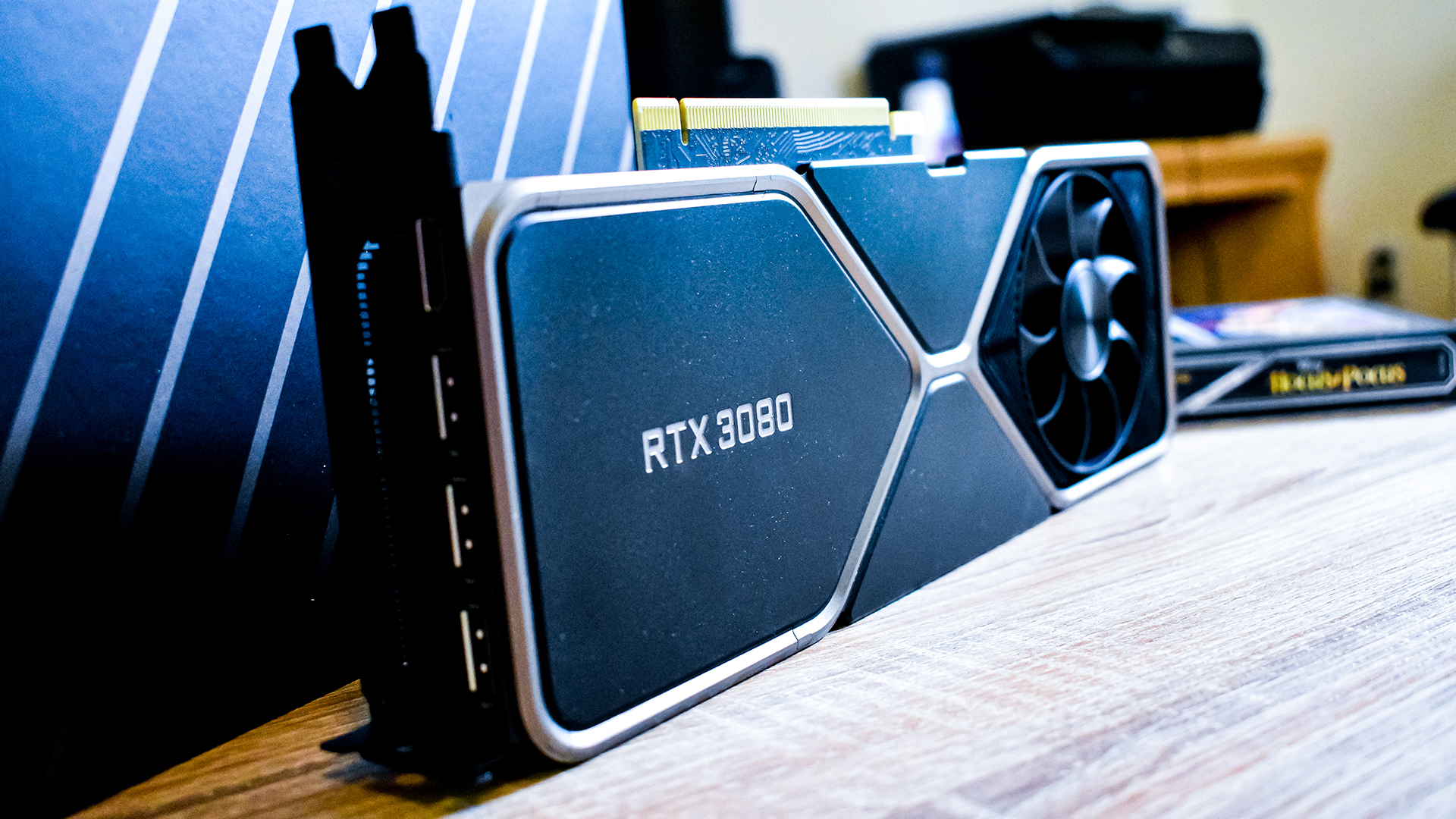
The Nvidia GeForce RTX 3080 arrived in 2020 with much fanfare, following up on the controversial Nvidia Turing lineup with much-improved performance while dropping the price $100 from its predecessor.

This is a welcome change. When the RTX 2080 and RTX 2080 Ti launched, Nvidia courted a bunch of controversy by introducing these cards at higher price points. The RTX 2080 raised the price from Nvidia GTX 1080’s $549 (£469, AU$925) to $799 (£749, AU$1,199) while the RTX 2080 Ti went up from the GTX 1080 Ti’s $699 (£649, about AU$950) price tag to $1,199 (£1,099, AU$1,899).

It wasn’t a huge jump, therefore, for people to expect the same price increase on the next generation of RTX GPUs. Luckily for everyone, Nvidia seems to have taken cues from AMD, dropping the prices of its new Turing cards, albeit only slightly.

That’s while improving power efficiency and performance. The Nvidia GeForce RTX 3080 provides a massive 50-80% boost in performance over the RTX 2080 at the same price point, not to mention a 20-30% boost to the RTX 2080 Ti, which is nearly twice as expensive. 

We would have liked to see the prices go down to where the Pascal 10-series equivalents would have sat. Plus, the launch of the AMD Radeon RX 6800 XT, which supposedly is going to directly compete with the Nvidia GeForce RTX 3080 at the same exact price, is only going to complicate things for the new Nvidia flagship.

For now, though, we can now confirm that the Nvidia GeForce RTX 3080 really is the biggest generational leap in PC graphics we've seen in years – perhaps ever. 

(Image credit: Future)

Price and availability

The Nvidia GeForce RTX 3080 is available on September 17, starting at $699 (£649, about AU$950) for the Founders Edition. However, as with any major graphics card launch, there will be dozens of aftermarket graphics cards from companies like MSI, Asus, Zotac and more.

Just be aware that some of these aftermarket card designs may see steep price increases over this Founders Edition, based on things like exotic cooling solutions and factory-tuned overclocks. But every RTX 3080 should more or less be in the ballpark of performance as the one Nvidia itself launches. 

(Image credit: Future)

Features and chipset

The Nvidia GeForce RTX 3080 is based on the new Nvidia Ampere graphics architecture, which brings huge improvements to both raw performance and power efficiency. The fact that Nvidia has increased the power budget so much over the RTX 2080 while boosting power efficiency means that the overall performance profile is far above what any Nvidia Turing graphics card was capable of. 

There have been obvious improvements to the RT and Tensor cores – we're on the second and third generation, respectively – but perhaps the biggest improvement has been to the rasterization engine. 
Through some clever optimization, Nvidia was able to double the amount of CUDA cores present on each Streaming Multiprocessor (SM) by making both data paths on each SM able to handle Floating Point 32 (FP32) workloads – a vast improvement over Turing, where one data path was dedicated entirely to integer workloads. This effectively doubles raw FP32 throughput core for core, though this won't directly translate into double the frame-rate in your favorite PC games – at least, not for many of them.

(Image credit: Future)

What this means is that, while the Nvidia GeForce RTX 3080 only has 46% more SMs than the RTX 2080 at 68, it more than doubles the CUDA core count, from 2,944 to 8,704. This translates to nearly three times the theoretical FP32 throughput from around 10 TFLOPs to 29.7 TFLOPs – an absolutely massive generational leap. 

When you pair the uplift in CUDA cores, with massive boosts to Cache, Texture Units and Memory Bandwidth – thanks to the move to faster GDDR6X memory on a 320-bit bus – gaming performance gets one of the biggest generational jumps in years, even if it does fall a bit short of that '2x performance' target that we're sure some folks were hoping for. But more on that later. 

Nvidia RT cores are also back – that's why Nvidia has the RTX name, after all – and they also see massive improvements. Nvidia Ampere graphics cards, including the RTX 3080, include second-generation RT cores, which will function similarly to the first generation RT cores, but will be twice as efficient.

When ray tracing, the SM will cast a light ray in a scene that's being rendered, and the RT core will take over from there, where it will do all the calculations necessary to find out where that light ray bounces, and will report that information back to the SM. This means that the SM is left alone to render the rest of the scene. But, we're still not at a point where turning on ray tracing doesn't have any impact on performance. Maybe some day. 

Tensor cores are also twice as powerful this time around, which has led Nvidia to only include 4 in each SM rather than the 8 you would find in a Turing SM. Coupled with the fact that there are now more SMs in general, DLSS performance also gets a massive boost. 

(Image credit: Future)

This generation of graphics cards isn't all about gaming, however, and Nvidia has brought a couple of new features to the table that will make life better for pretty much everyone with an RTX card.  

For instance, we were already big fans of RTX Voice, and Nvidia has finally brought it out of beta and worked it into a fully-featured broadcasting app. While RTX Voice filtered background noise out of your microphone, you can set up Broadcaster to filter backgrounds out of your webcam – or even just apply a blur. 

The video section is still in beta, and we did see some glitches, but it's way better than any other solution out there for blocking out your background without a green screen. 

One of the features we're most excited to see implemented, however, is Nvidia RTX I/O, which is an API that will work in tandem with Microsoft's DirectStorage API, to route data straight from your SSD to your graphics card. In next-generation games, this should not only massively reduce loading times, but also mirror the groundbreaking I/O performance that has been teased with next-generation consoles like the PS5 and Xbox Series X. Far more than high frame rates or pretty graphics, this technology is critically important to future gaming tech. 

Unfortunately, this is a technology that needs to be implemented by game developers in their games, and we weren't actually able to see what kind of real-world difference it will make. Though it is something we will be actively testing once the technology is widely implemented – and because the consoles are going to be using similar tech, we expect it will have a faster turnaround than ray tracing did. 

For the actual Founders Edition graphics card, Nvidia went with an all-new cooler design, which is way more practical than anything it's ever done with a reference design before. The company used a shorter, multi-layered PCB in order to have the back end of the card just be all heatsink. By doing this, Nvidia was able to mount a fan on the back of the graphics card that will suck cool air through the heatsink, and expel it up and out of the case. 


(Image credit: Future)

We were a bit worried when we first saw this fan design that it would affect CPU and RAM temperatures, as it's blowing hot air directly over these components, but even in our personal rig, where we have a Noctua NH-12UA air cooler on an AMD Ryzen 9 3900X, we didn't observe any difference in performance. We guess it helps that most PC games don't really stress both the GPU and CPU to the same extreme – not yet at least. 

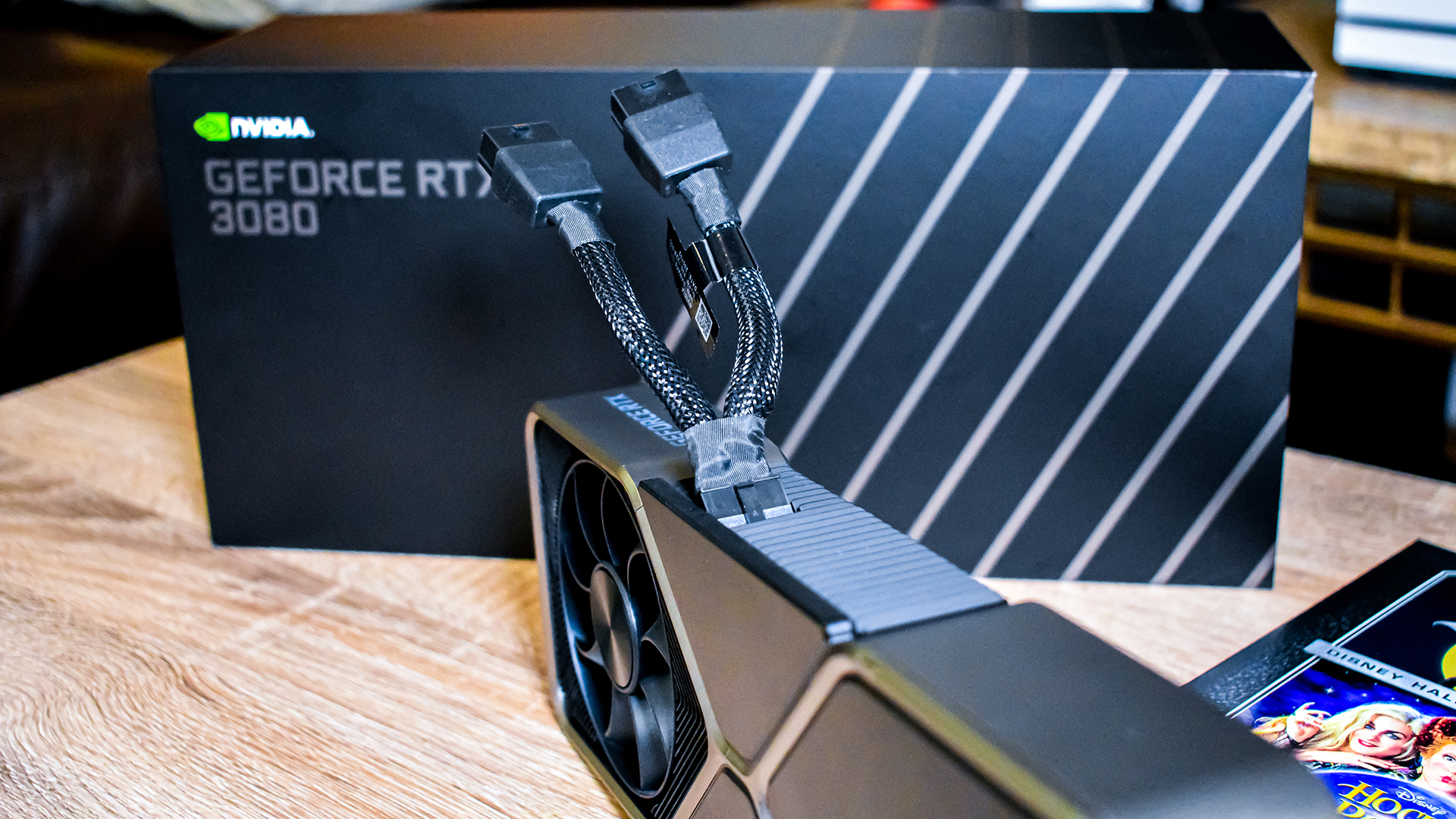
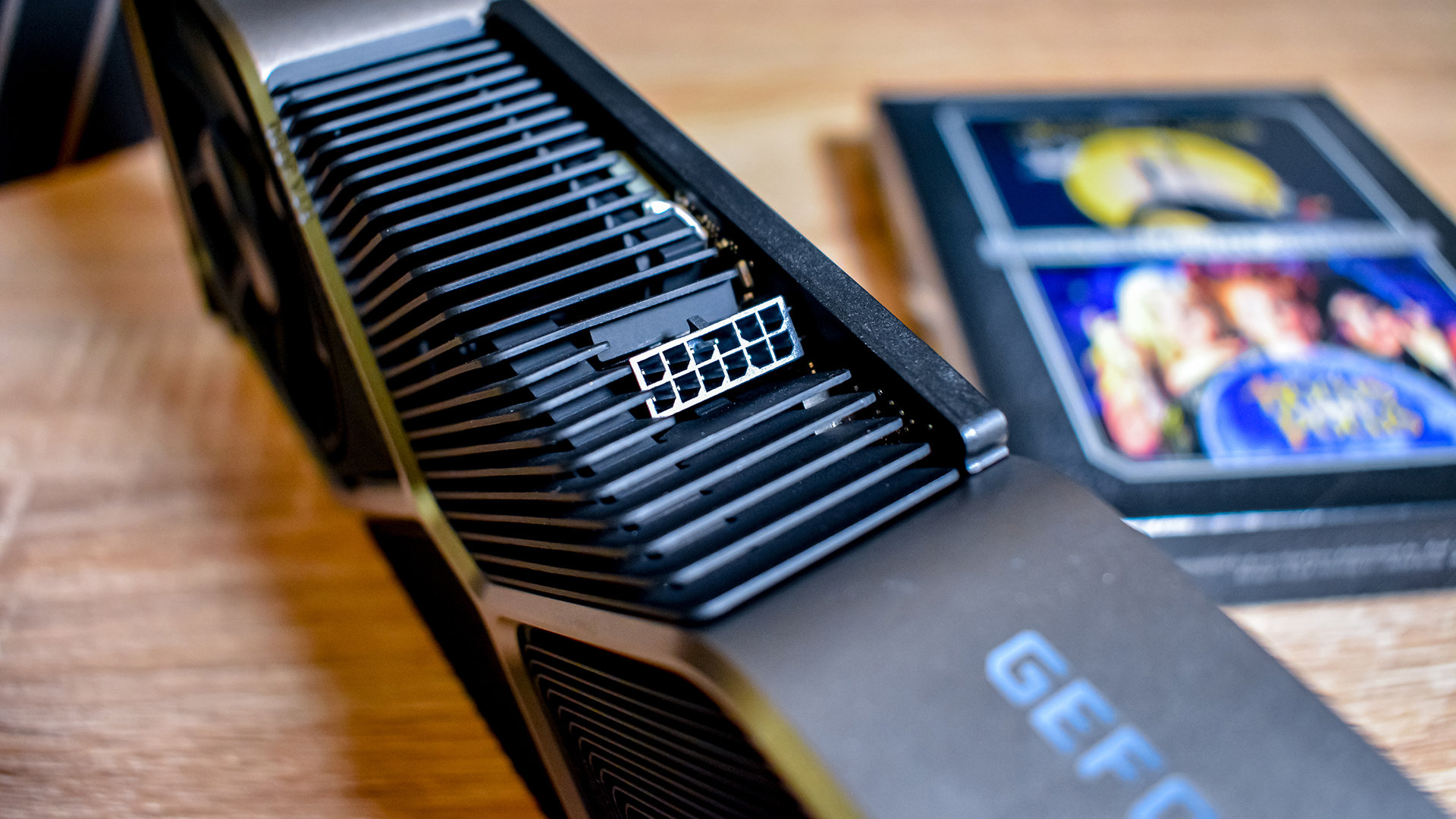
As far as power delivery goes, that new 12-pin power connector is definitely there, and we have some mixed feelings about it. It's clear that the new PCB design of the Founders Edition card needs this smaller connector to make this new cooler work, we just wish that the 2 x 8-pin PCIe to 1 x 12-pin dongle Nvidia includes was a bit longer. As it stands, it's kind of hard to tie it out of the way to not be immediately visible, but at least aftermarket cards won't be using it right away. It's worth noting, though, that Nvidia is making the 12-pin power connector design available to any manufacturer – even AMD – that wants to use it. 

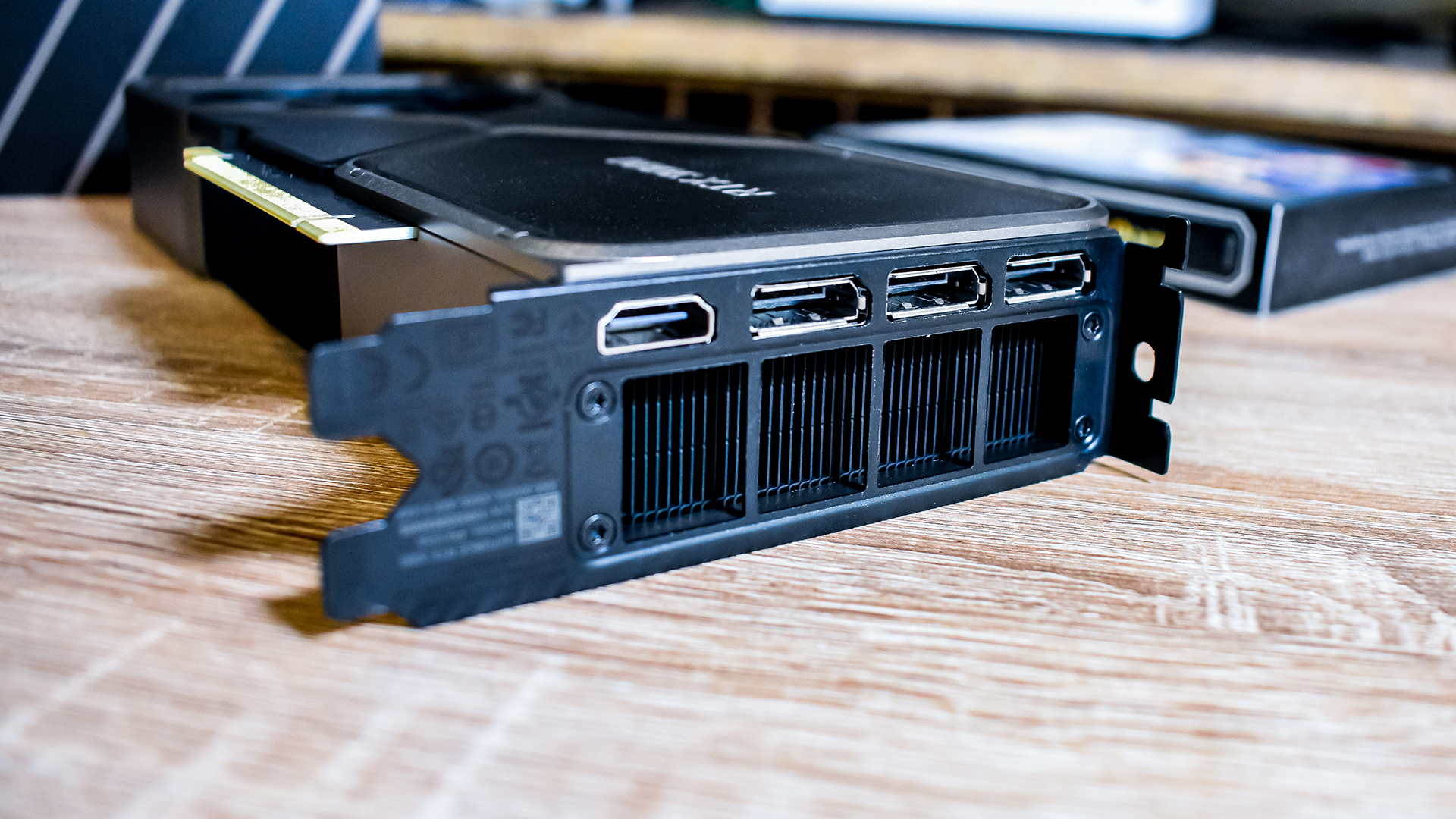
The Founders Edition also has three DisplayPort and one HDMI 2.1 output for displays, which is good. However, we don't like that Nvidia got rid of the USB-C output here, as creators will definitely still want to use this incredibly powerful card, and many pro-grade monitors out there are, in fact, USB-C monitors

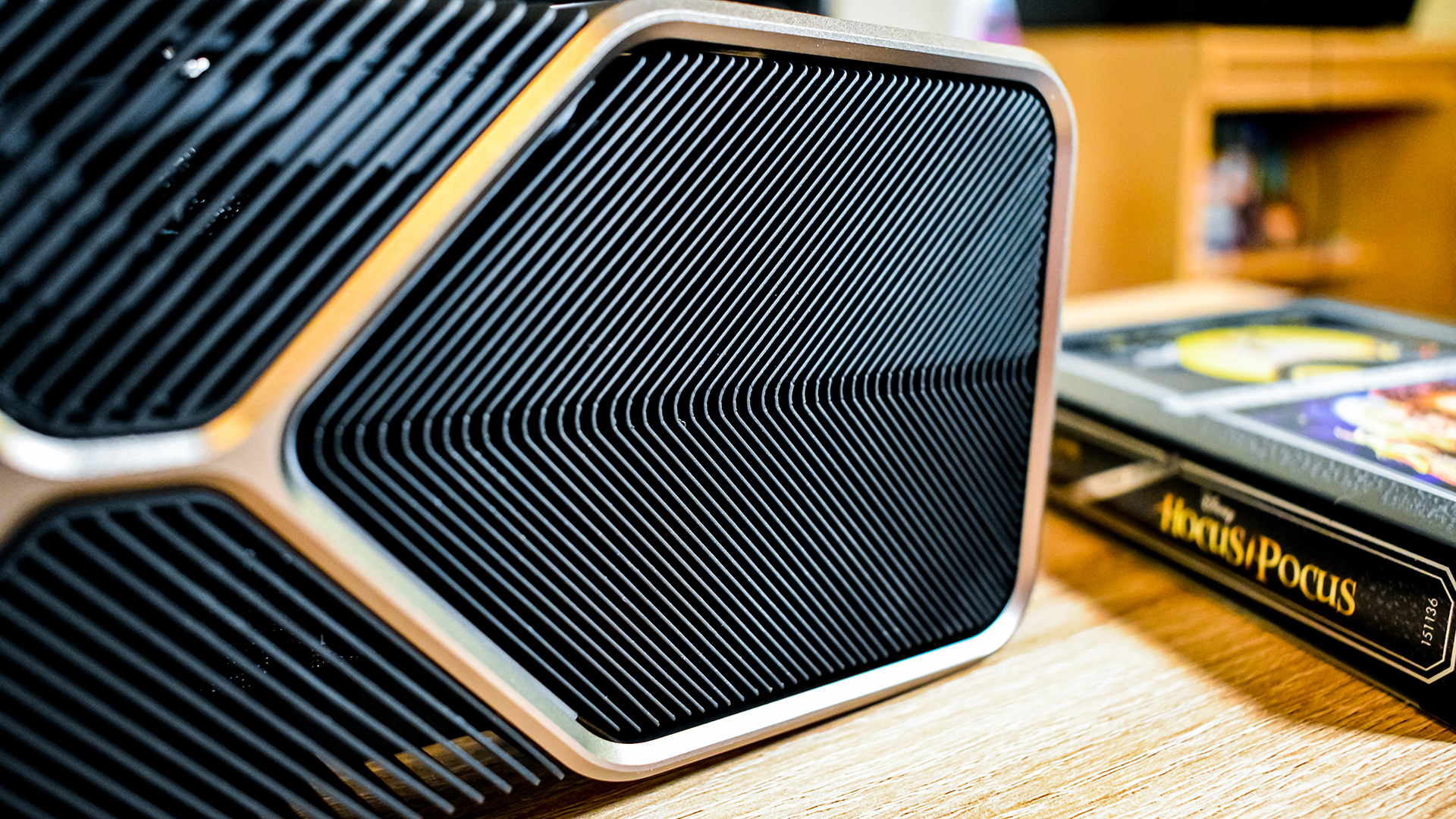
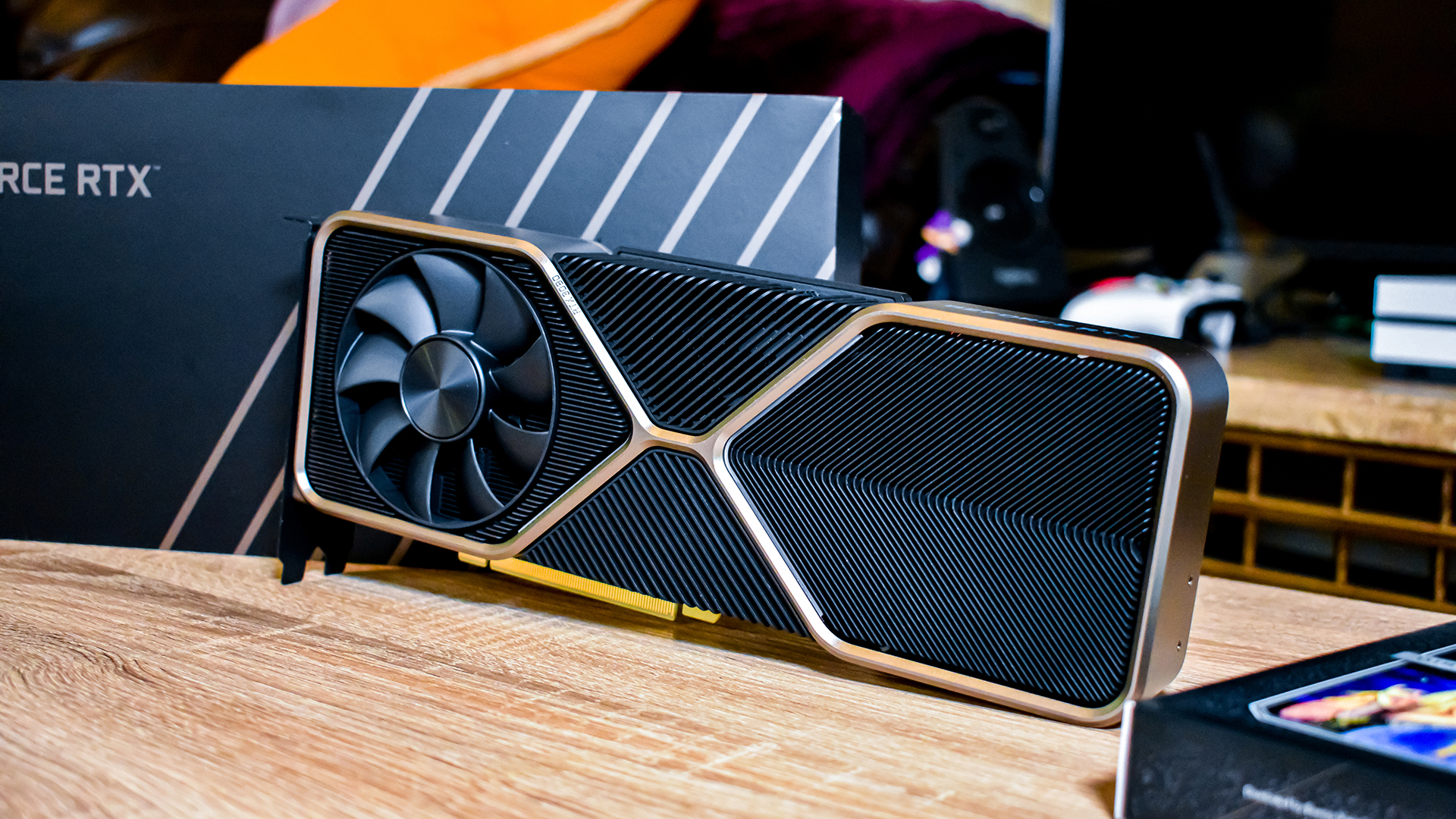
Despite our little issues with the Founders Edition – and despite thinking it was ugly when it was first shown off – it's an attractive piece of hardware in person. All black with silver accents, the RTX 3080 looks like a professional-grade piece of hardware. 

The only lighting is the 'GeForce RTX' logo on the side of the graphics card in white, which will surely please any anti-RGB users out there. Plus, gamers that really want to go all-out with rainbow lighting will have that option with third-party cards.

Image 1 of 34

(Image credit: Infogram; Future)

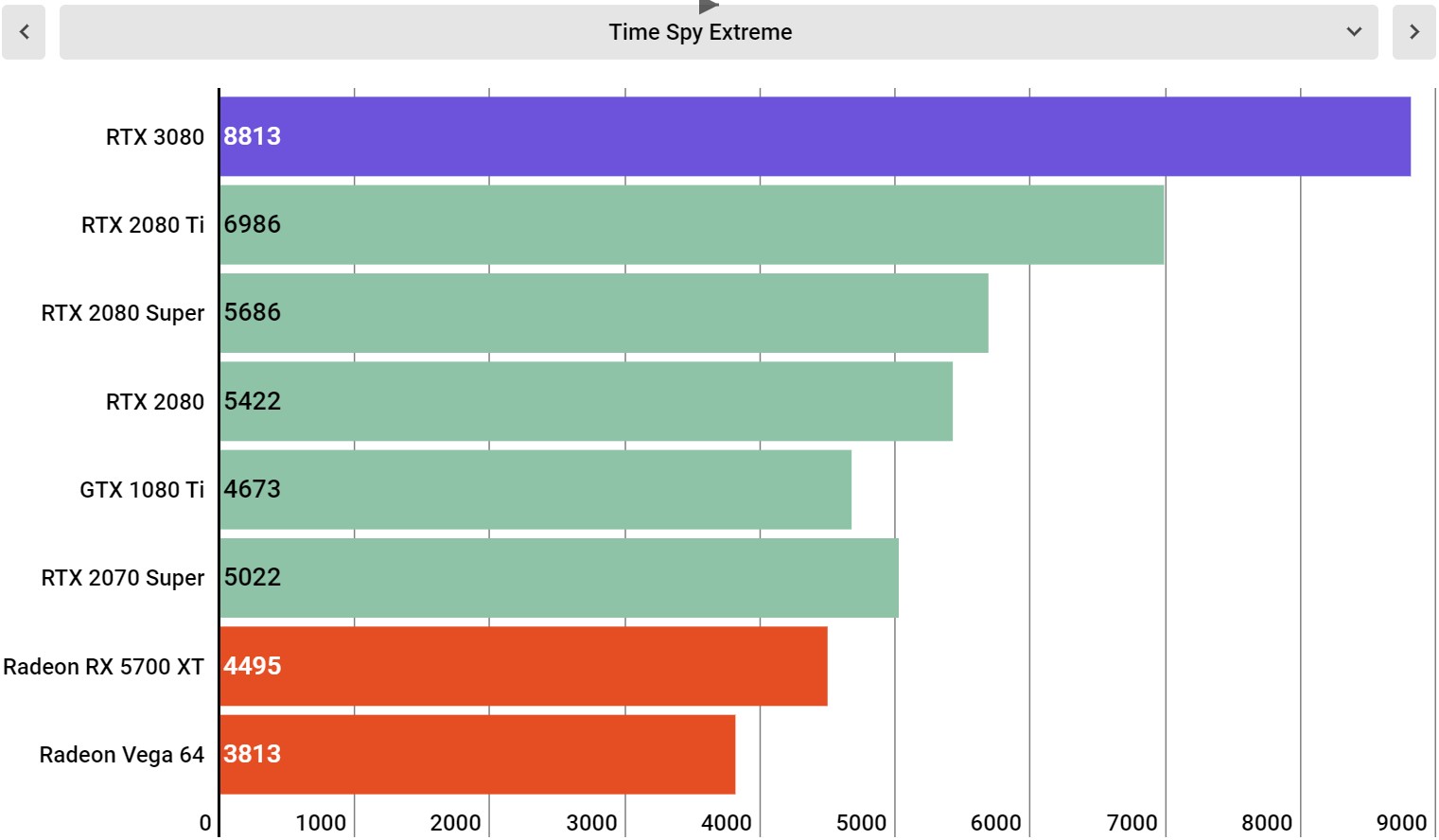
3DMark Time Spy Extreme (Higher is better)

Image 2 of 34

(Image credit: Infogram; Future)

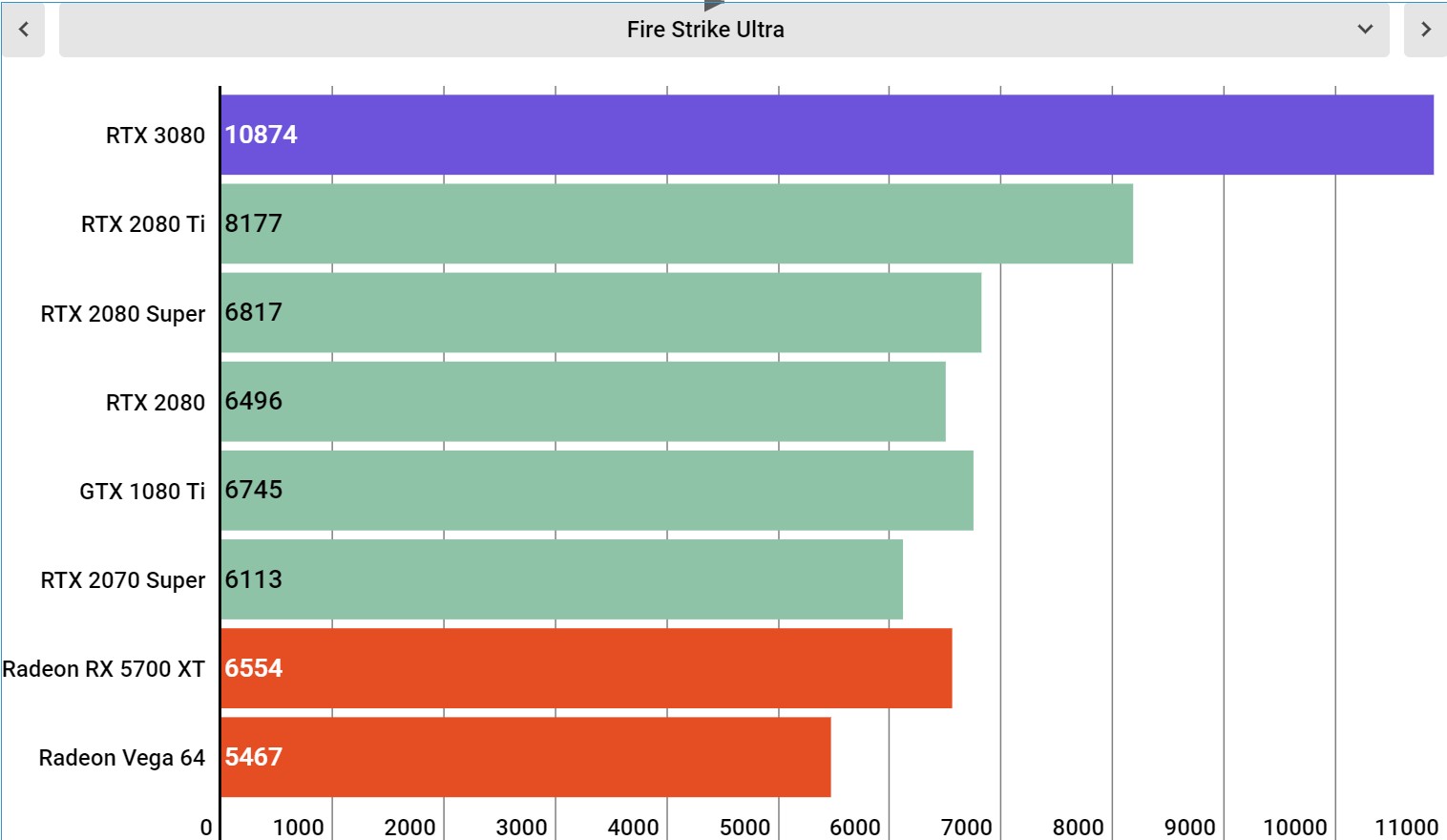
3DMark Fire Strike Ultra (Higher is better)

Image 3 of 34

(Image credit: Infogram; Future)

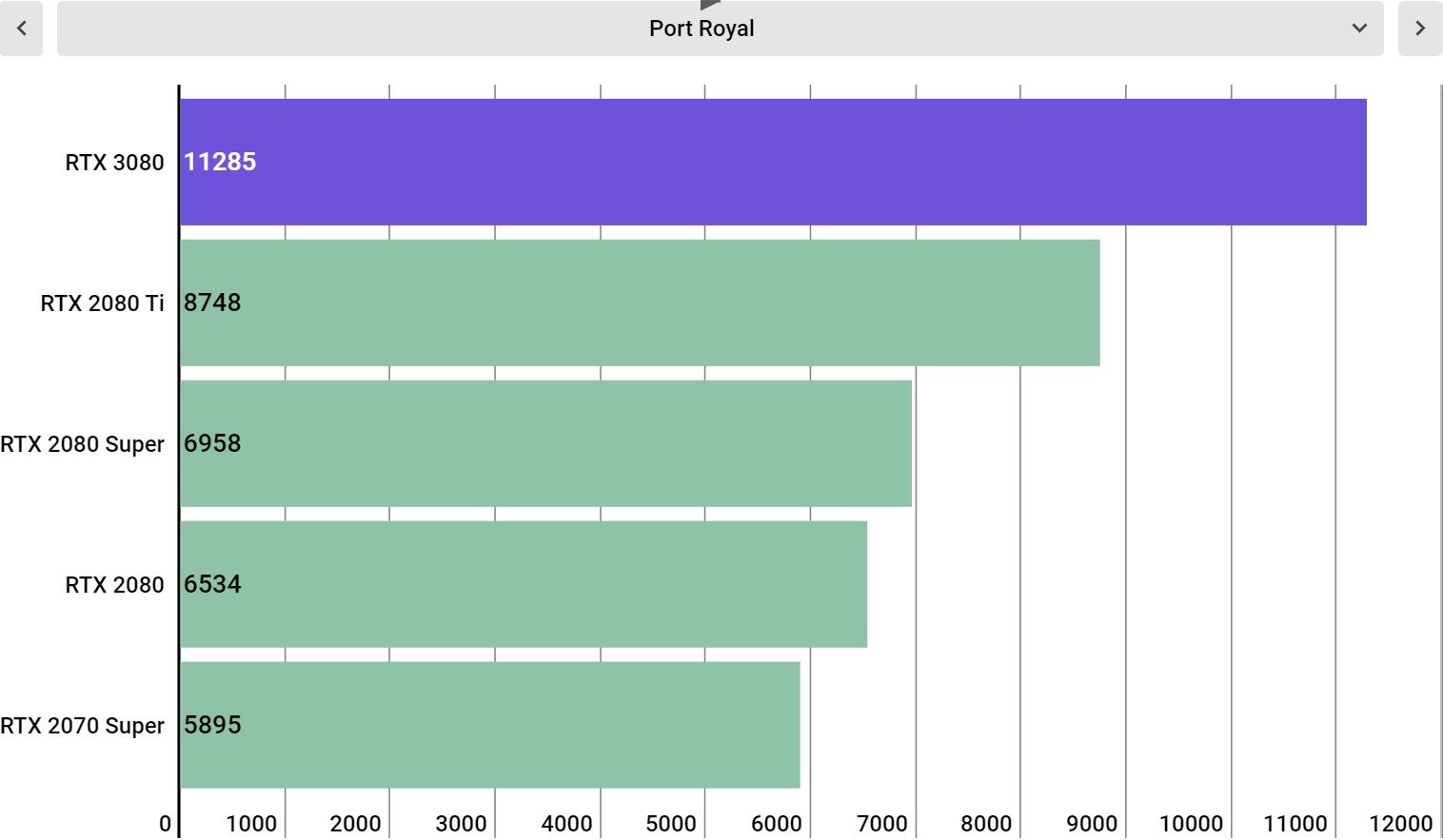
3DMark Port Royal (Higher is better)

Image 4 of 34

(Image credit: Infogram; Future)

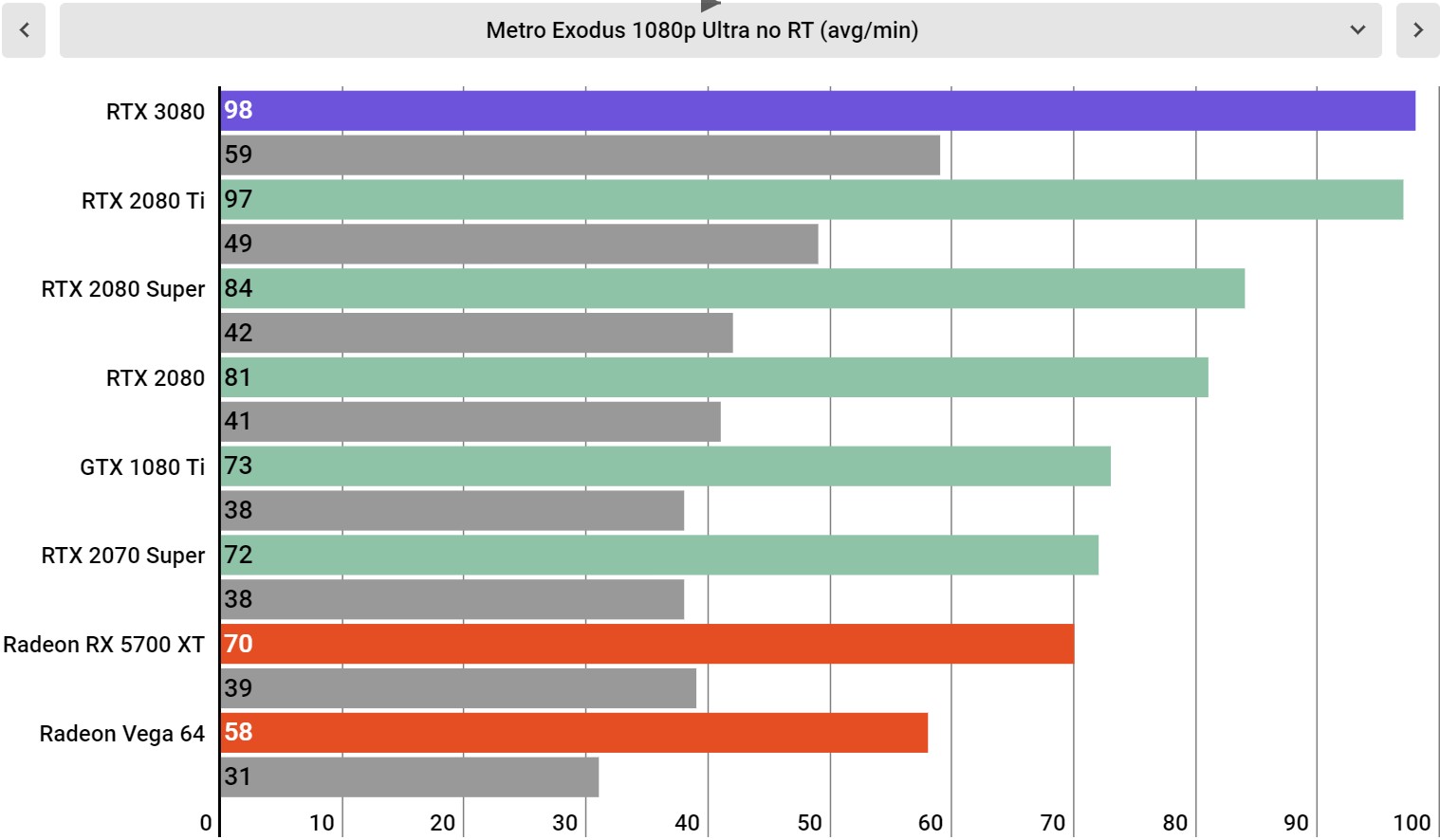
Metro Exodus Ultra Settings @ 1080p

Image 5 of 34

(Image credit: Infogram; Future)

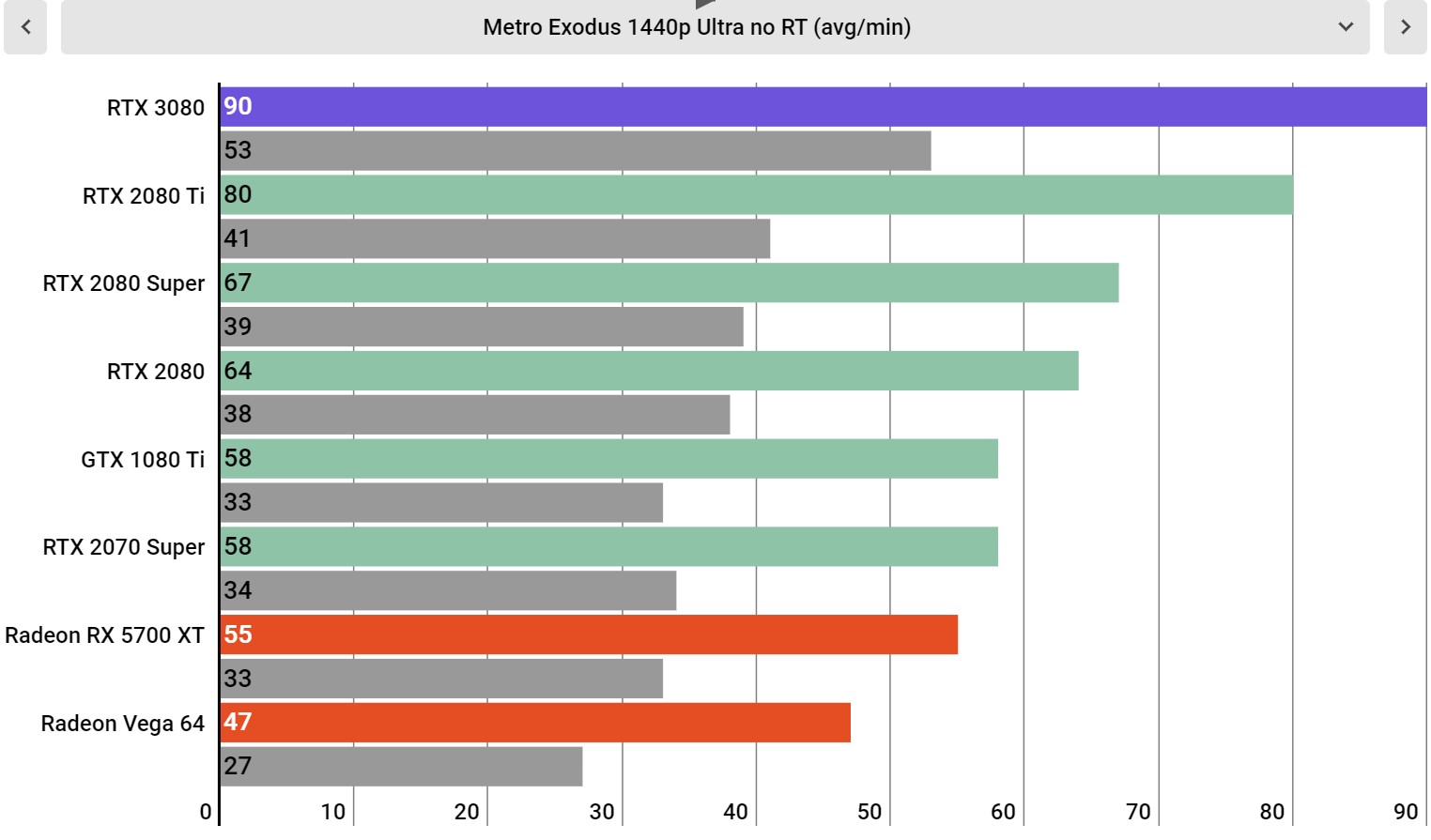
Metro Exodus Ultra Settings at 1440p

Image 6 of 34

(Image credit: Infogram; Future)

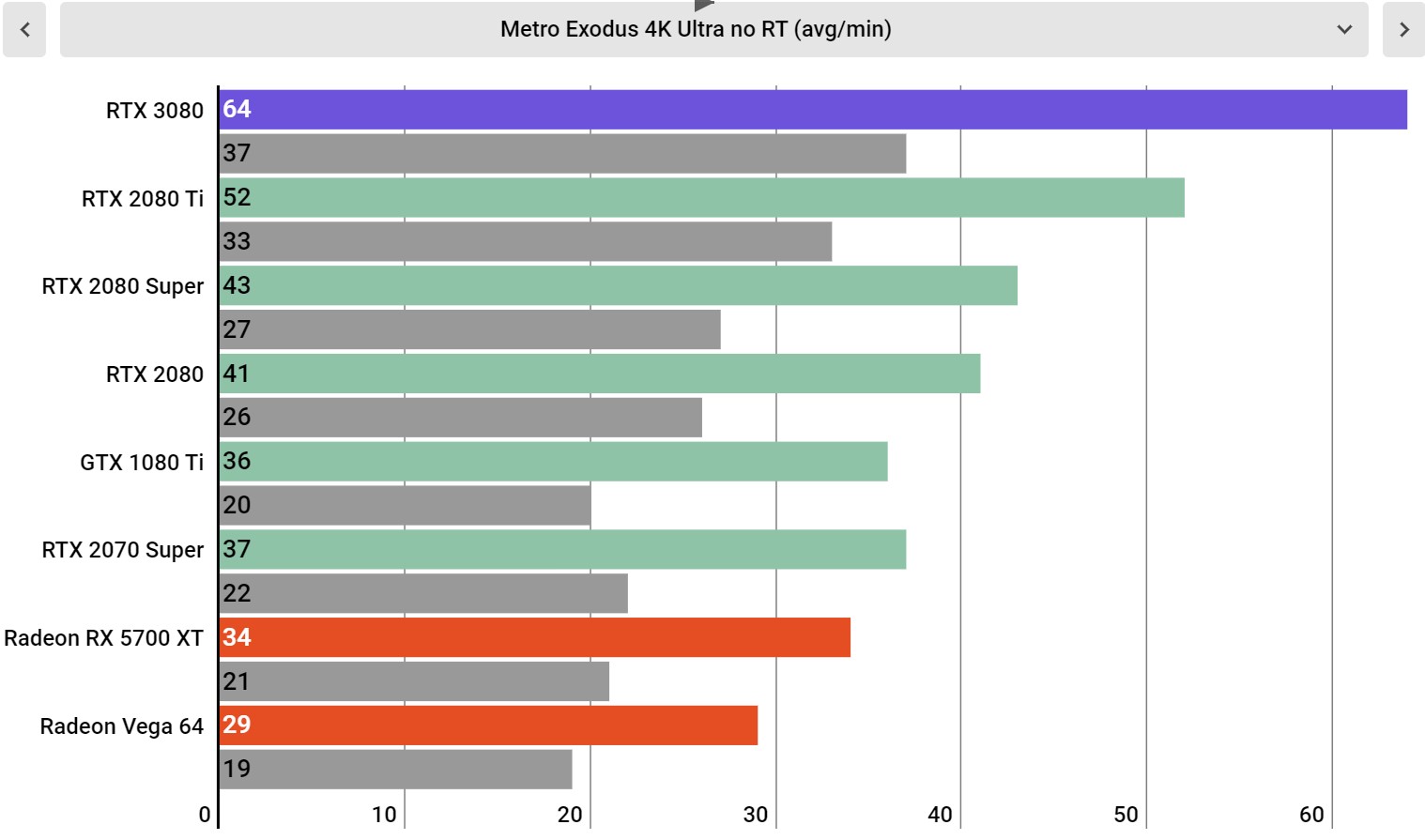
Metro Exodus Ultra Settings at 4K

Image 7 of 34

(Image credit: Infogram; Future)

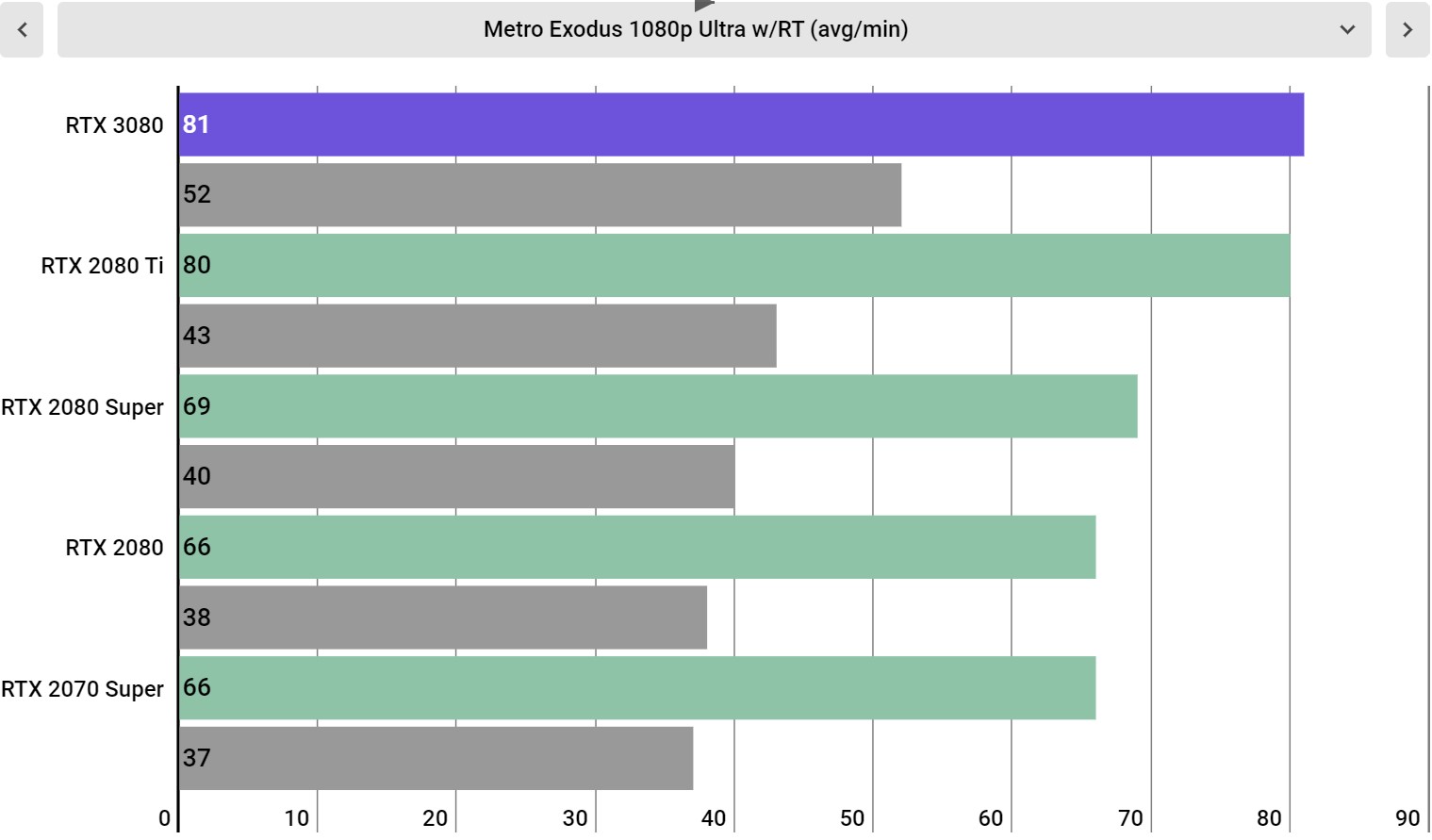
Metro Exodus Ultra Settings w/ ray tracing at 1080p

Image 8 of 34

(Image credit: Infogram; Future)

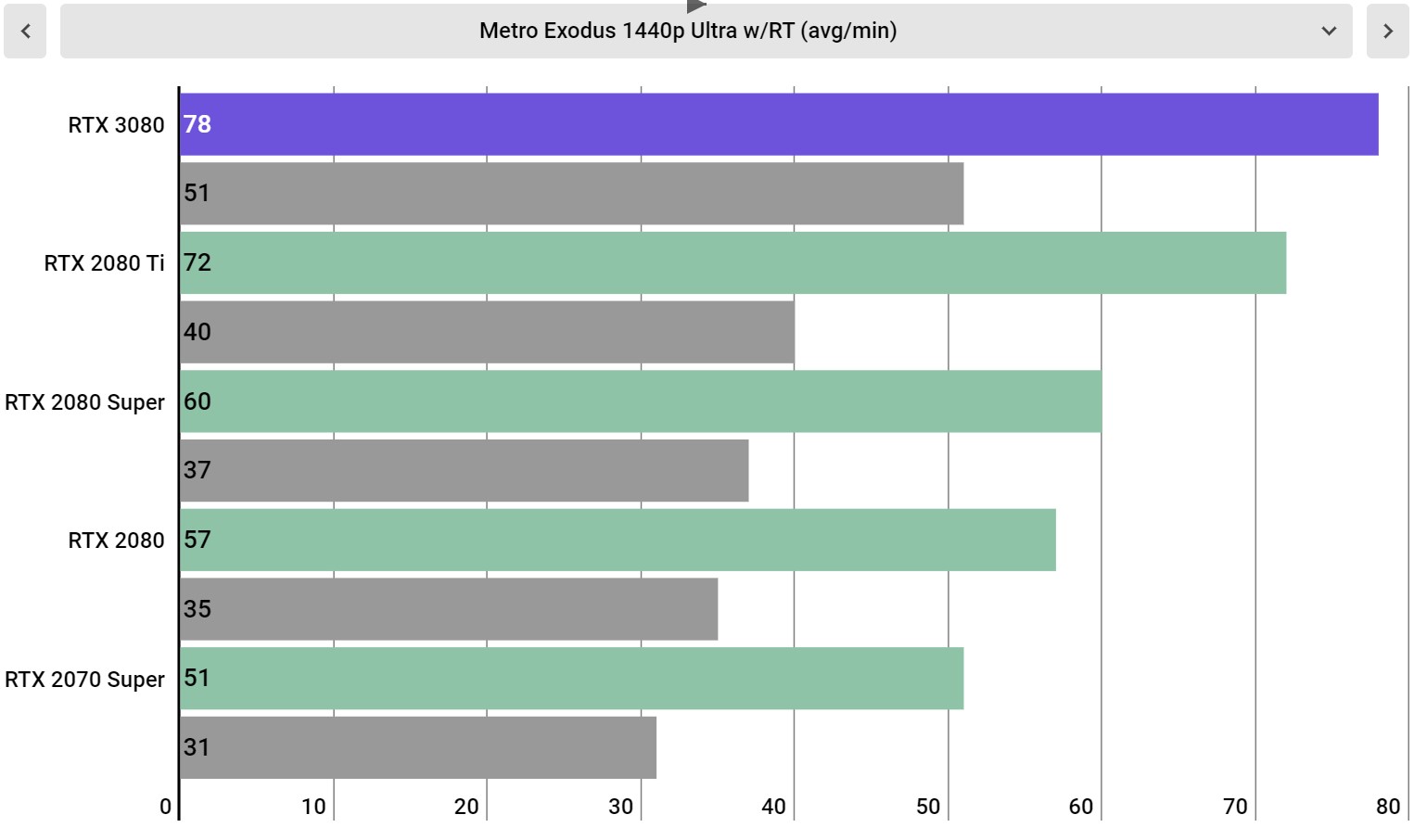
Metro Exodus Ultra Settings w/ ray tracing at 1440p

Image 9 of 34

(Image credit: Infogram; Future)

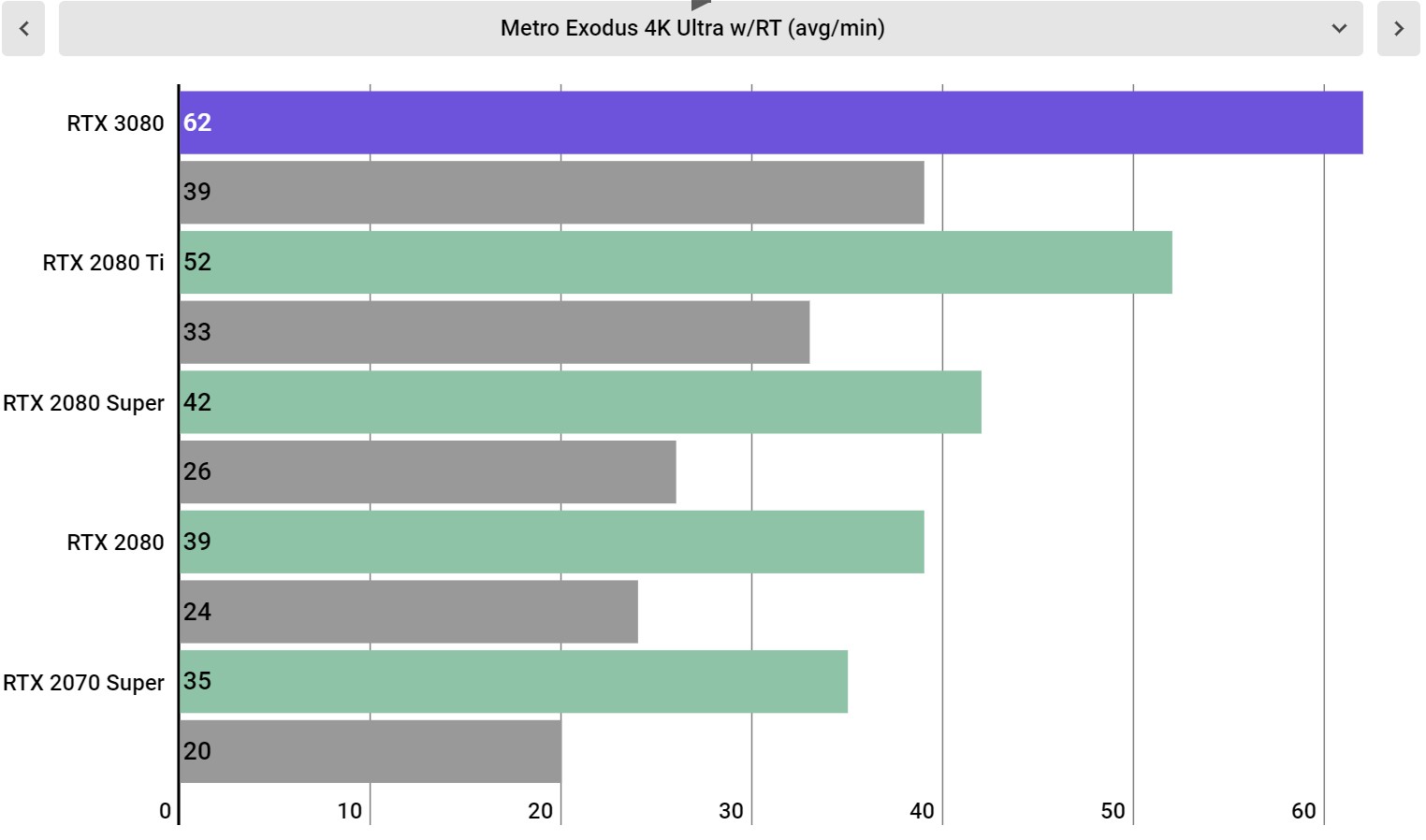
Metro Exodus Ultra Settings w/ ray tracing at 4K

Image 10 of 34

(Image credit: Infogram; Future)

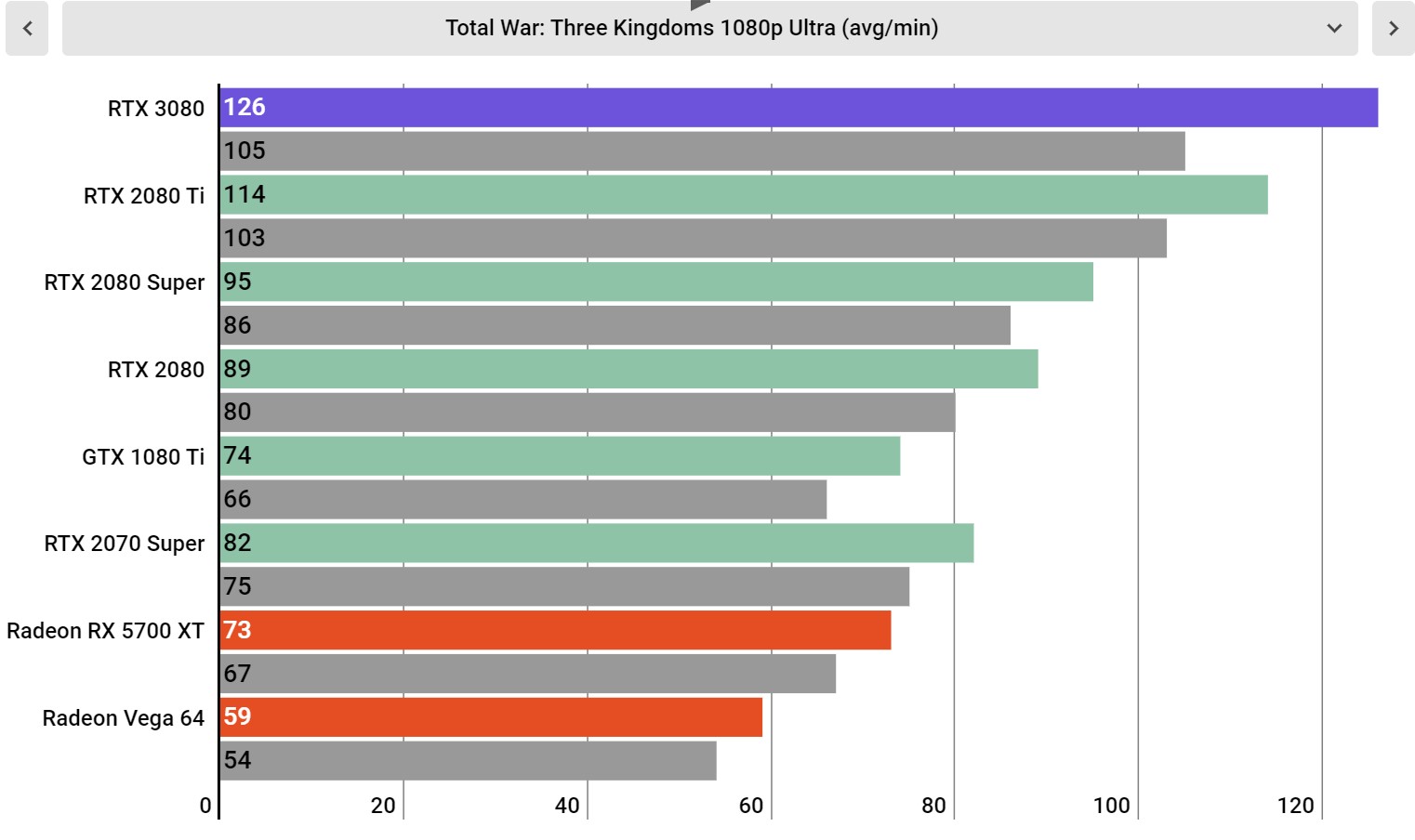
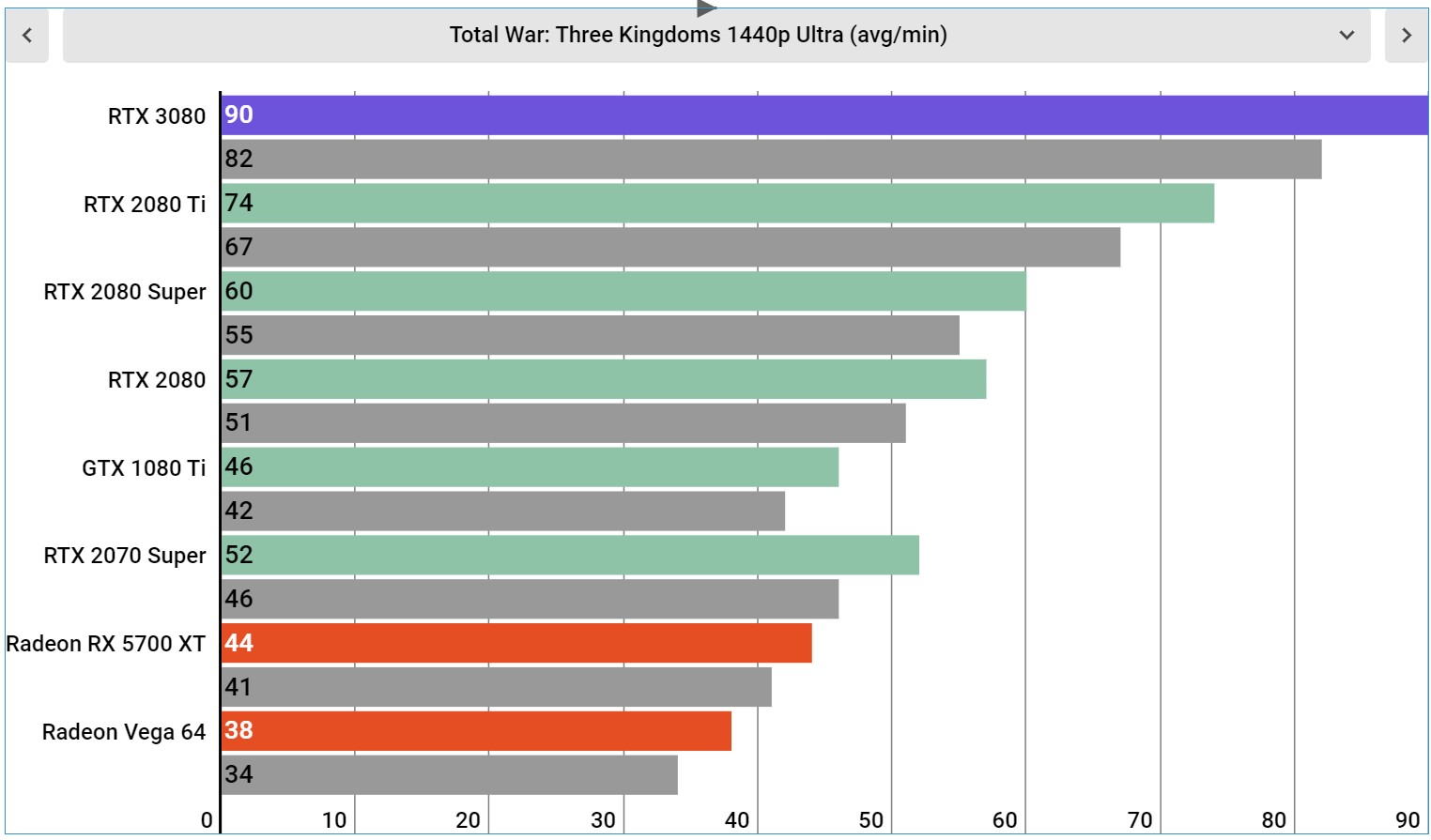
Total War: Three Kingdoms at Ultra Settings at 1080p

Image 11 of 34

(Image credit: Infogram; Future)

Total War: Three Kingdoms at Ultra Settings at 1440p

Image 12 of 34

(Image credit: Infogram; Future)

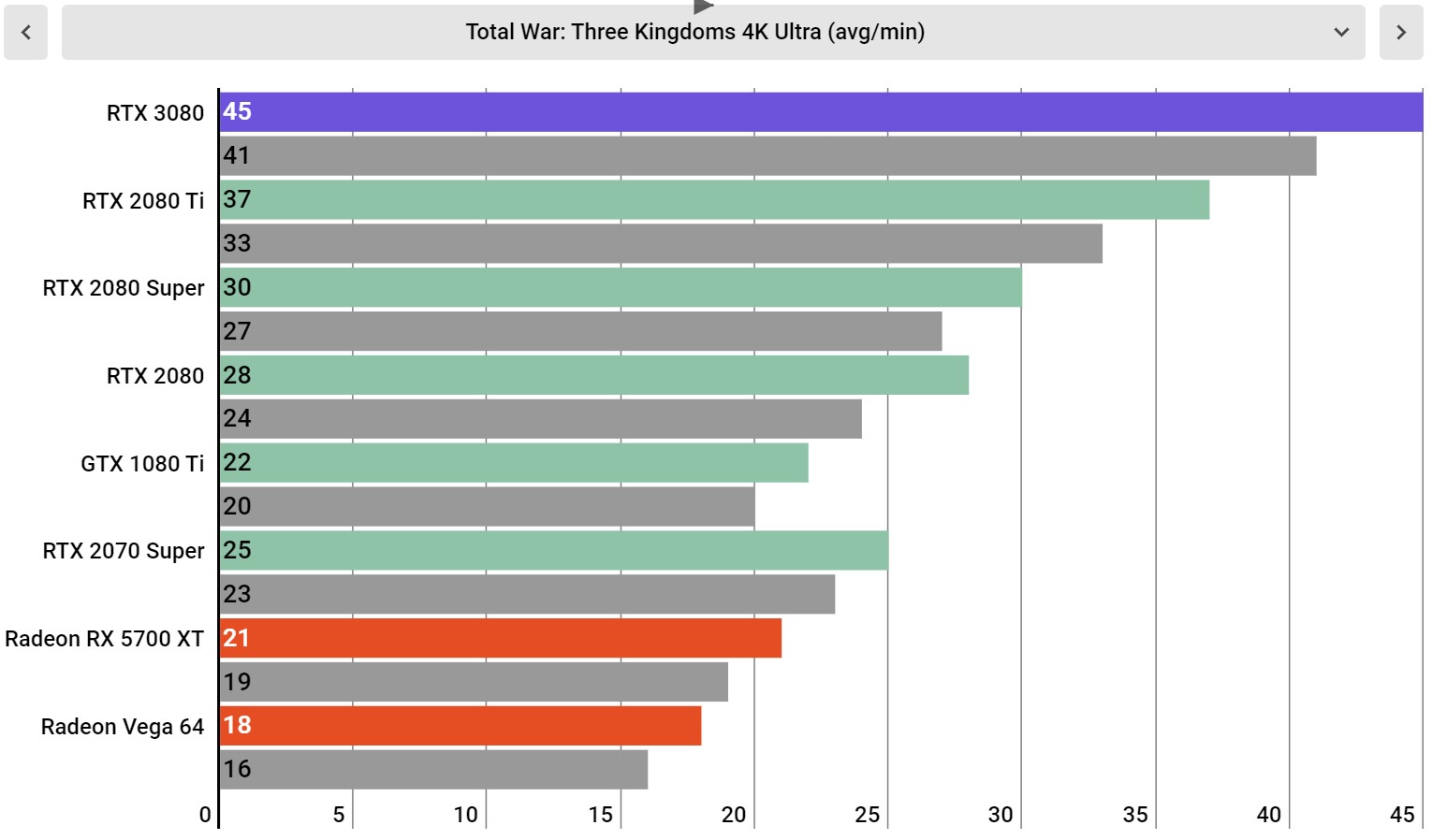
Total War: Three Kingdoms at Ultra Settings at 4K

Image 13 of 34

(Image credit: Infogram; Future)

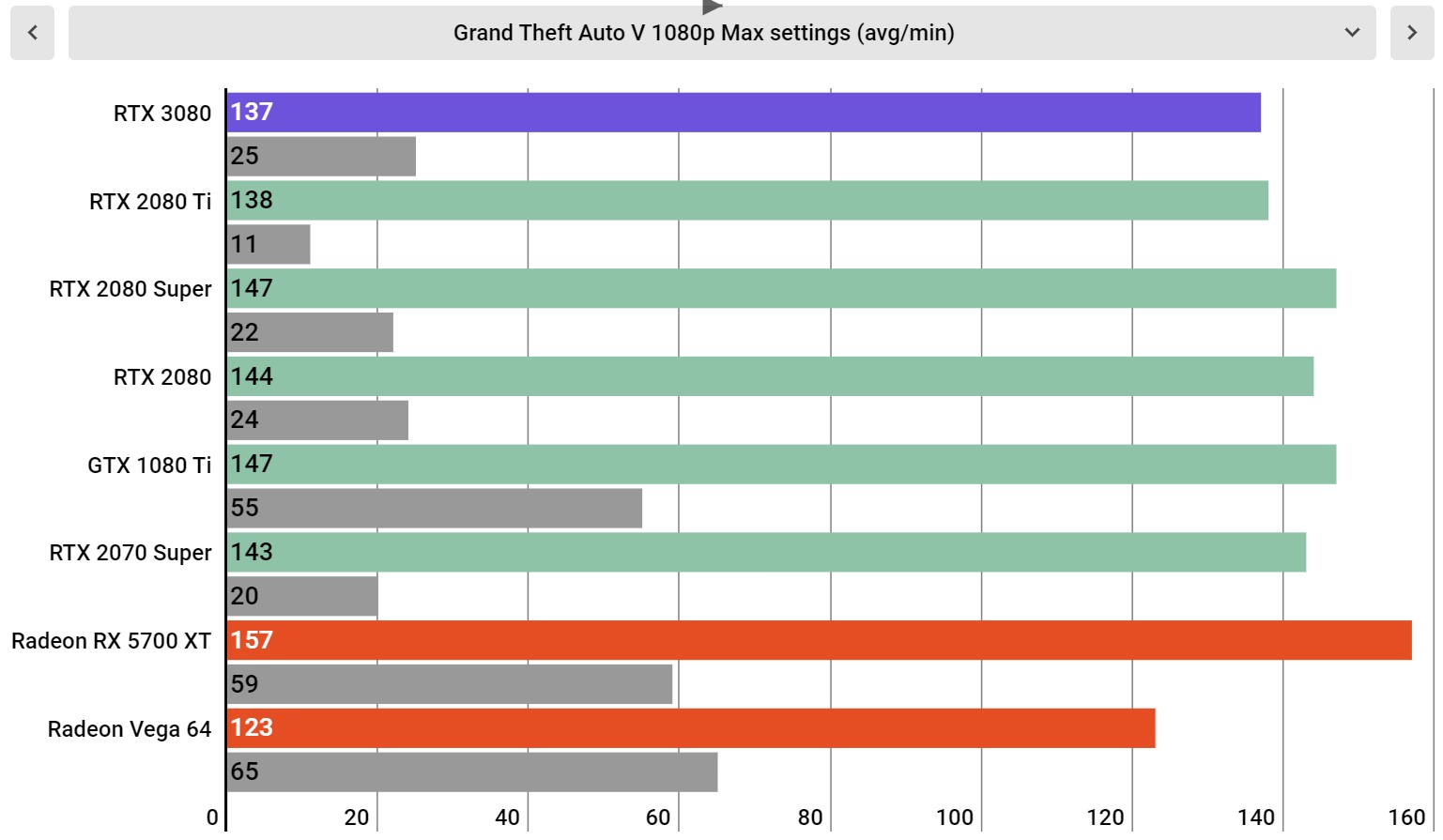
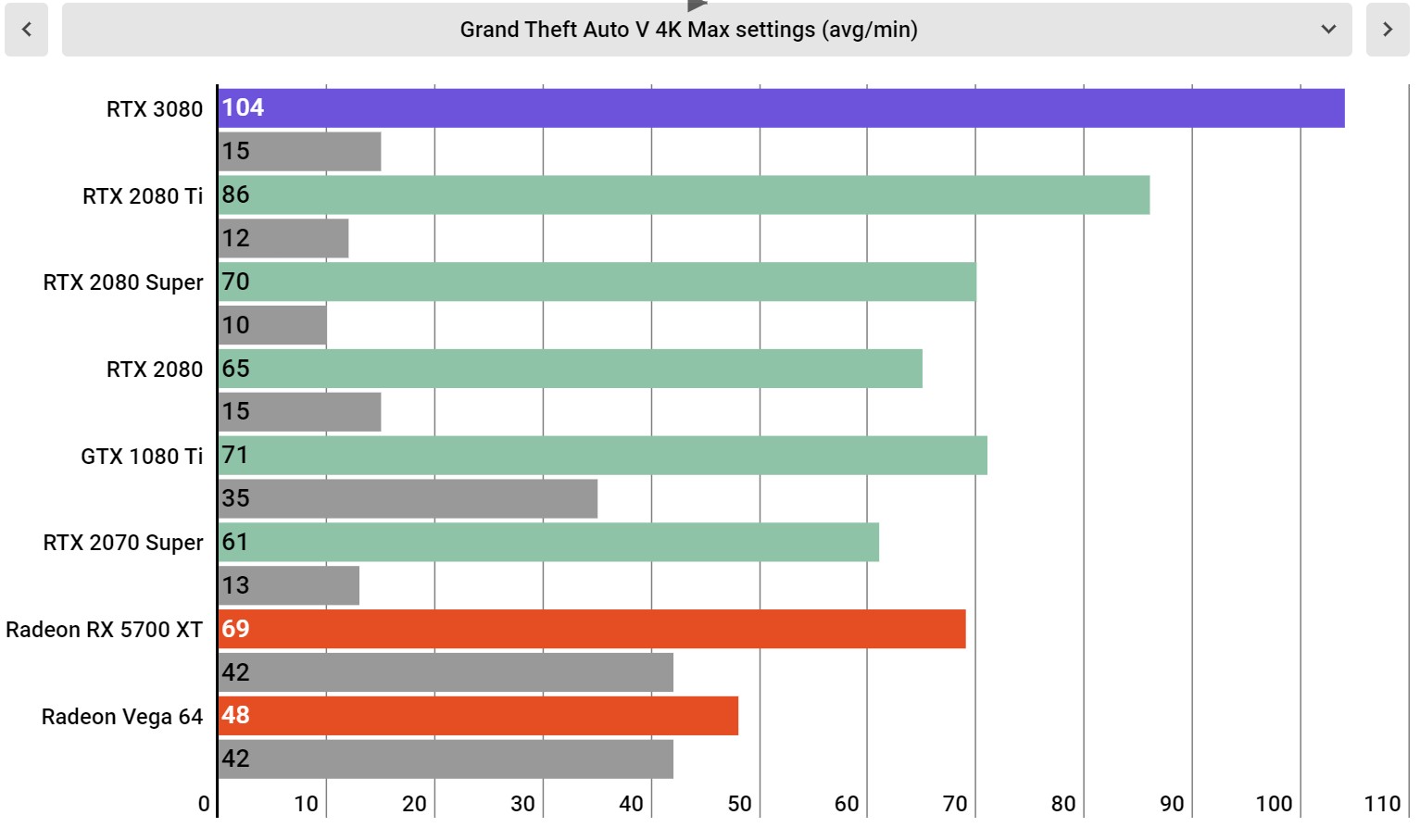
Grand Theft Auto V Max Settings at 1080p

Image 14 of 34

(Image credit: Infogram; Future)

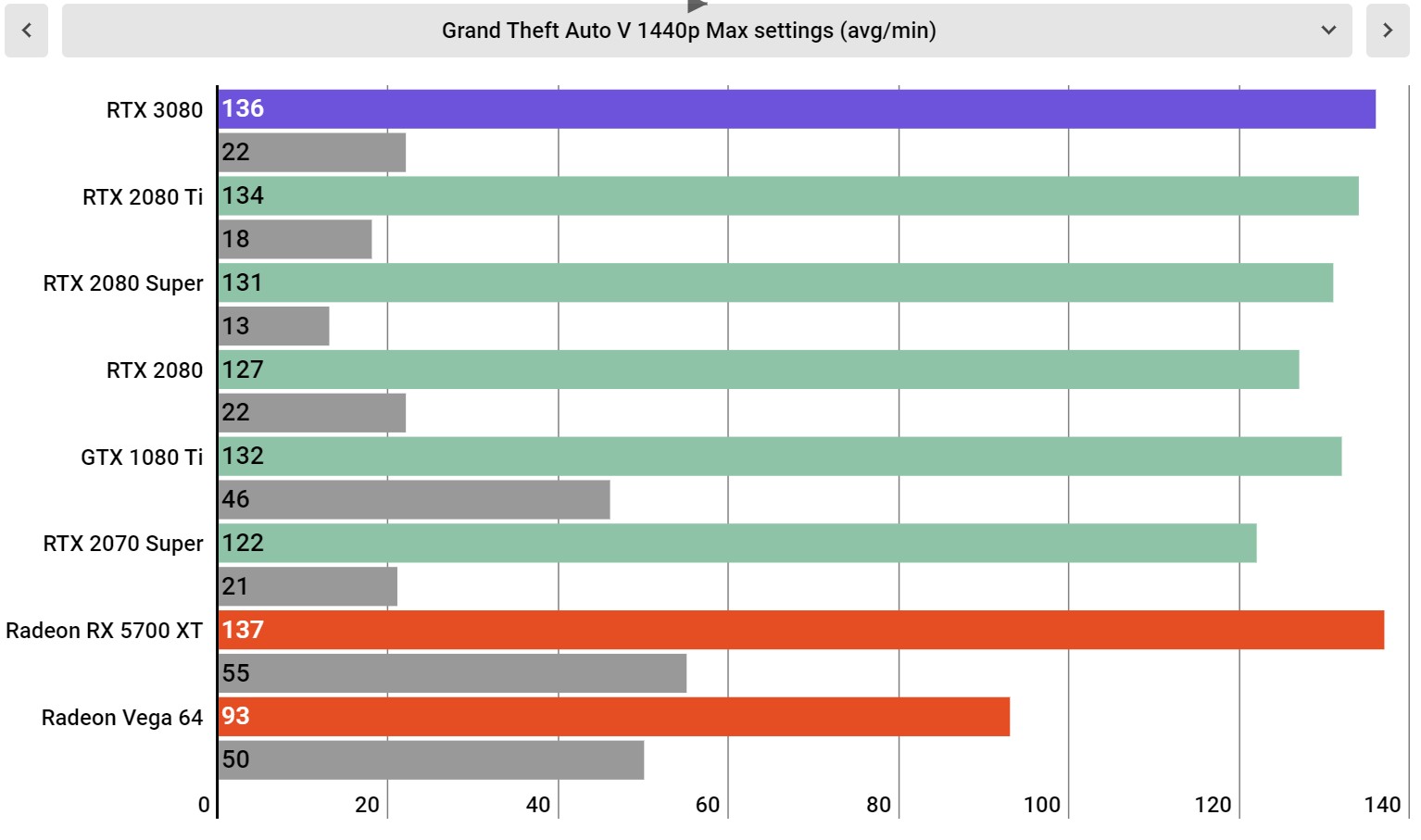
Grand Theft Auto V Max Settings at 1440p

Image 15 of 34

(Image credit: Infogram; Future)

Grand Theft Auto V Max Settings at 4K

Image 16 of 34

(Image credit: Infogram; Future)

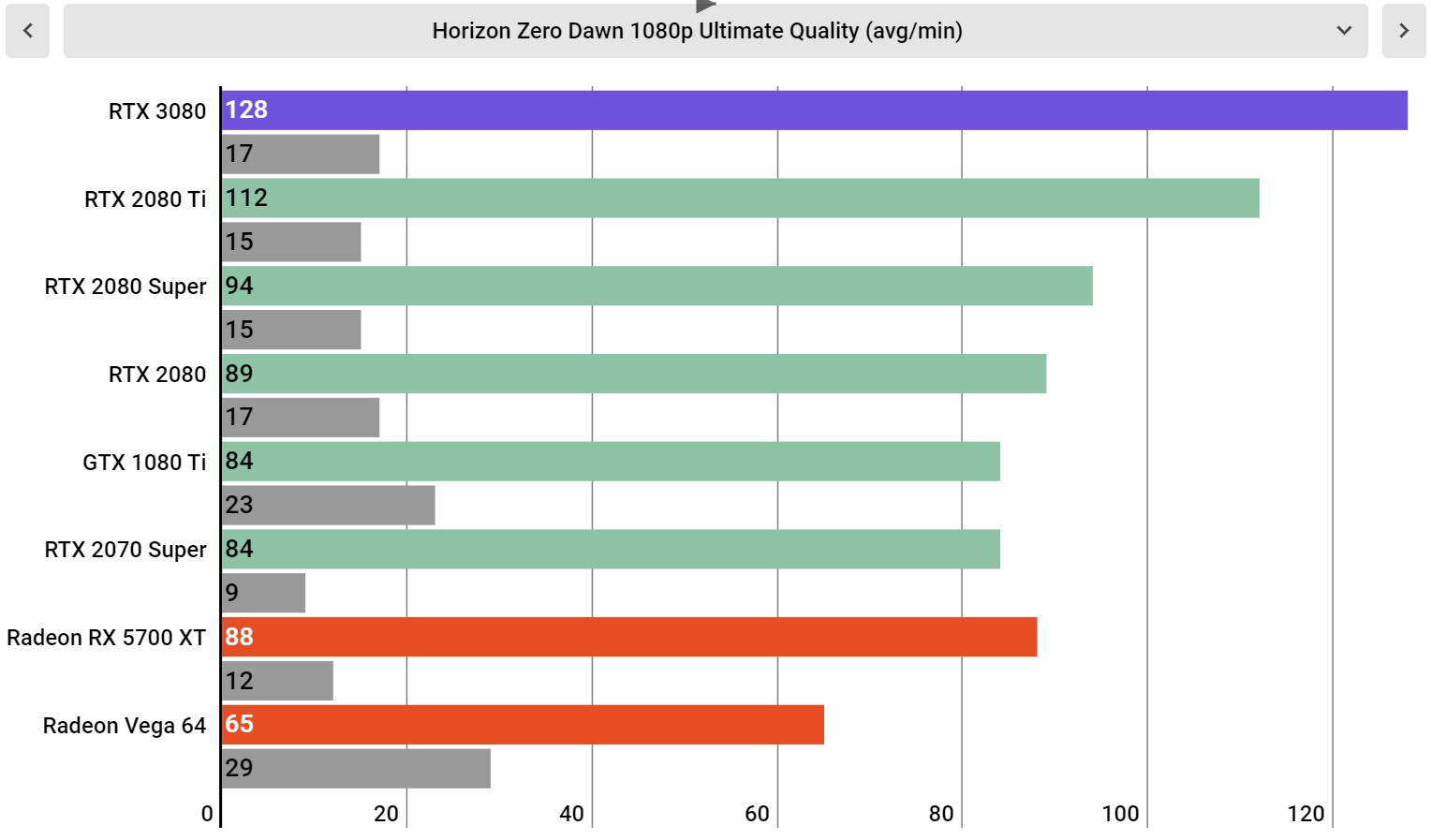
Horizon Zero Dawn Ultimate Quality at 1080p

Image 17 of 34

(Image credit: Infogram; Future)

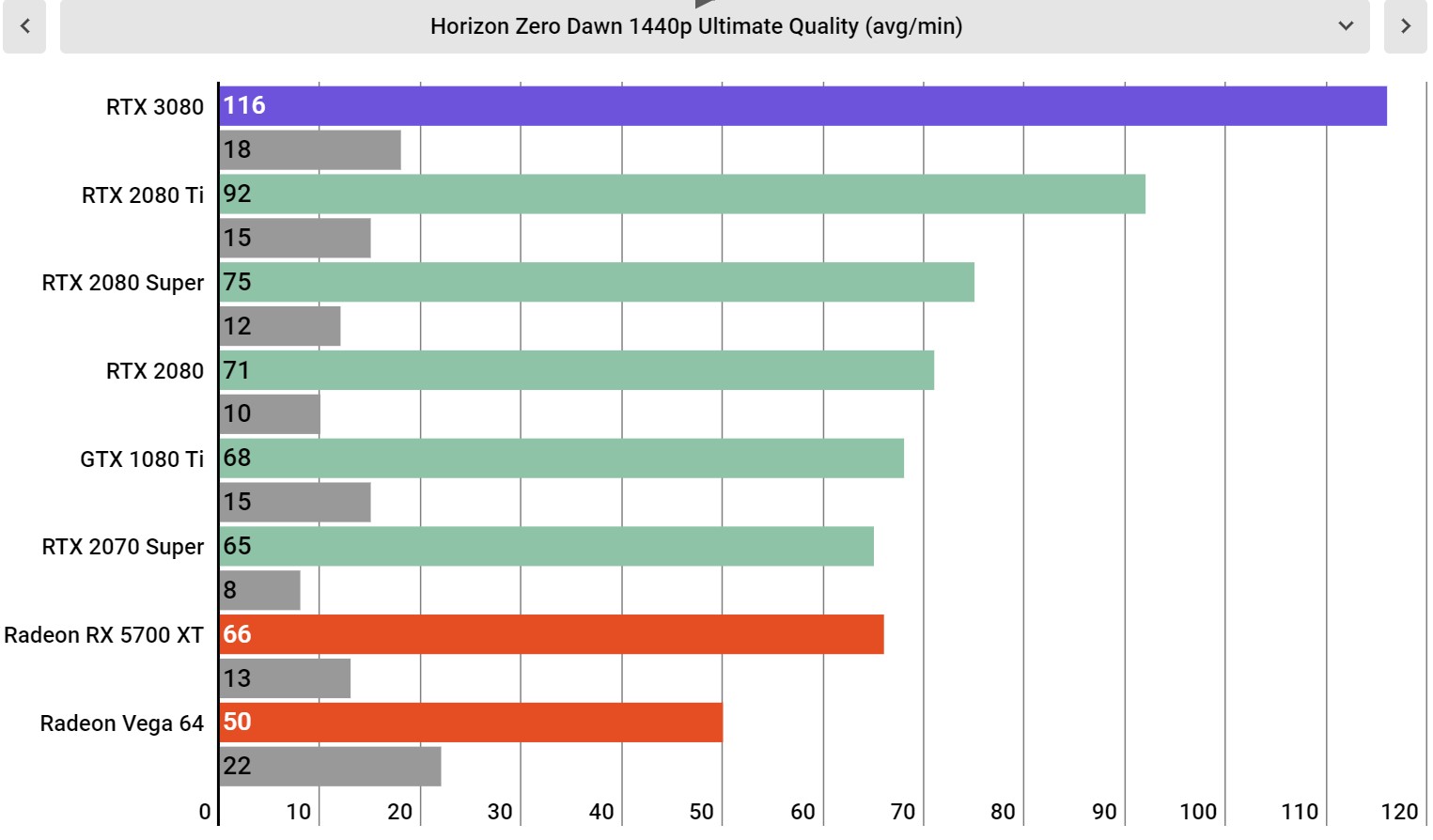
Horizon Zero Dawn Ultimate Quality at 1440p

Image 18 of 34

(Image credit: Infogram; Future)

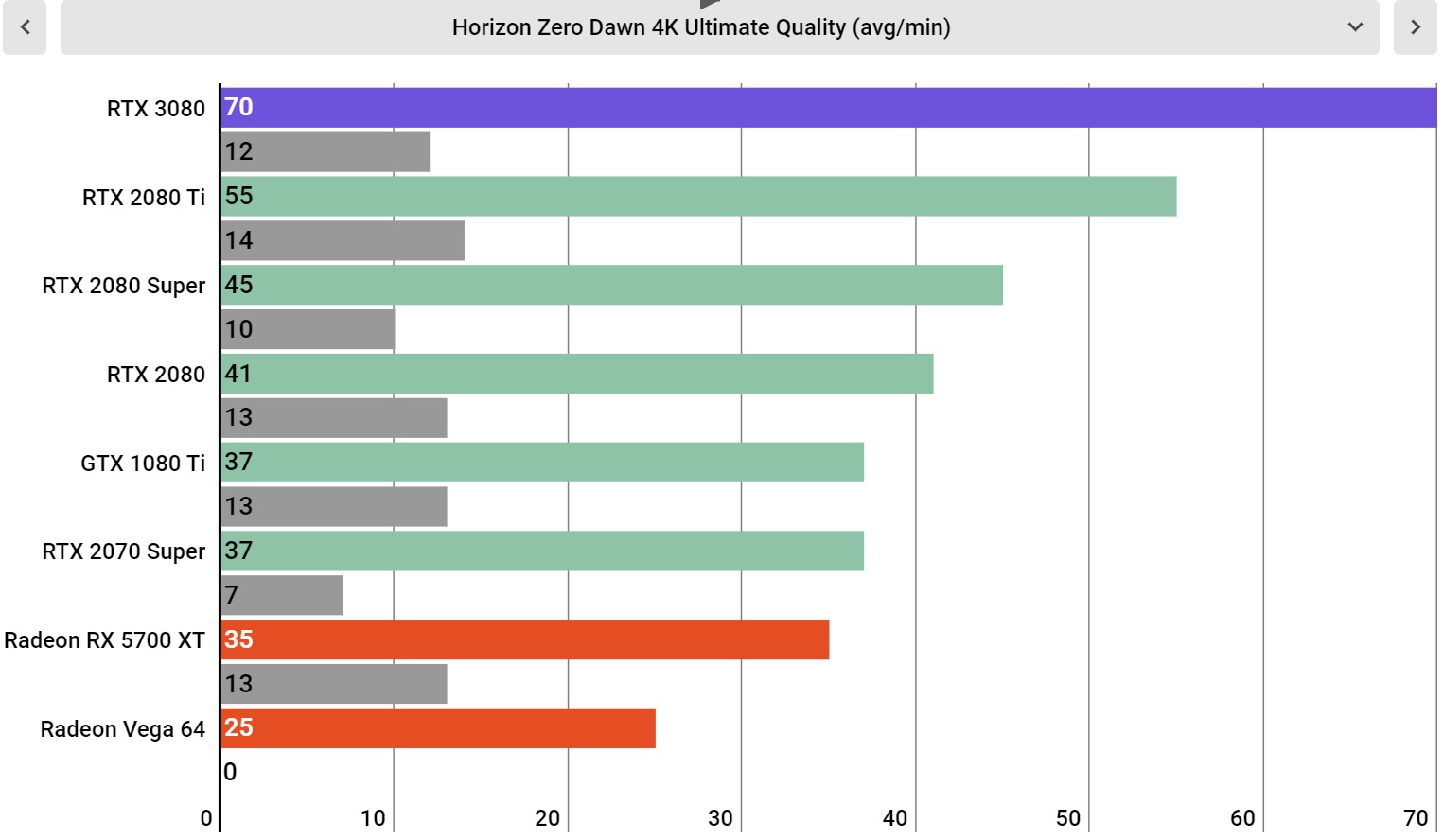
Horizon Zero Dawn Ultimate Quality at 4K

Image 19 of 34

(Image credit: Infogram; Future)

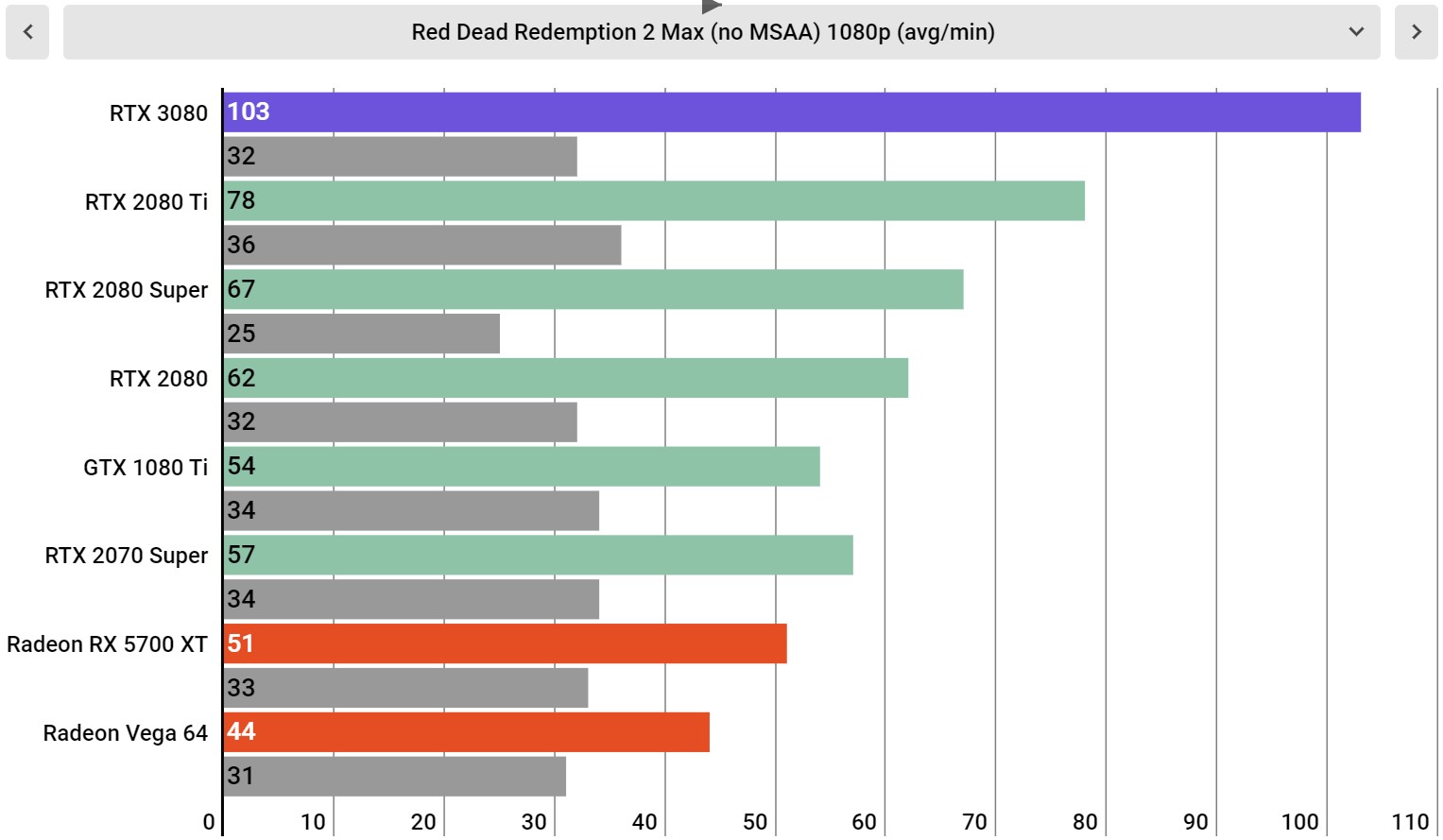
Red Dead Redemption 2 Max Settings (no MSAA) at 1080p

Image 20 of 34

(Image credit: Infogram; Future)

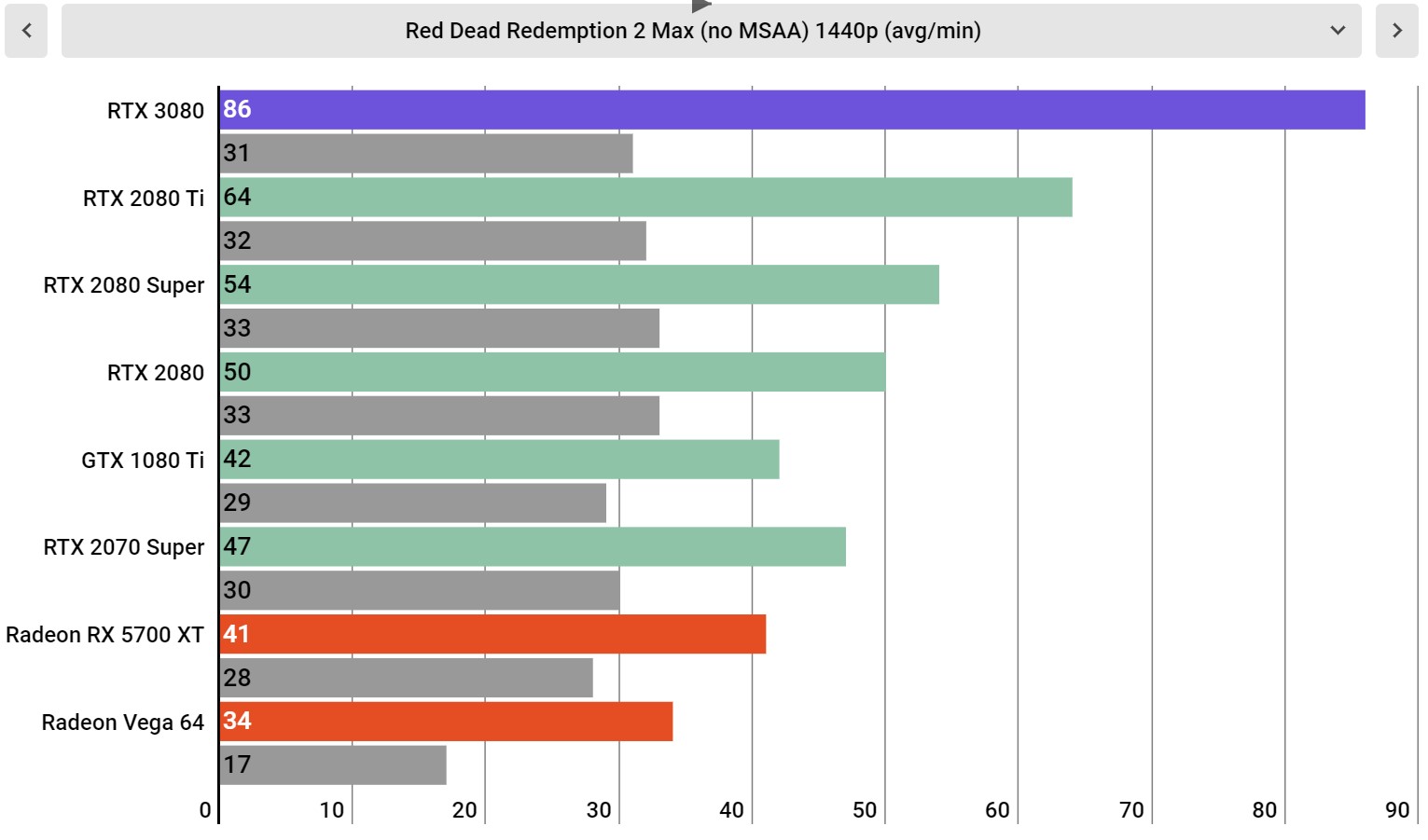
Red Dead Redemption 2 Max Settings (no MSAA) at 1440p

Image 21 of 34

(Image credit: Infogram; Future)

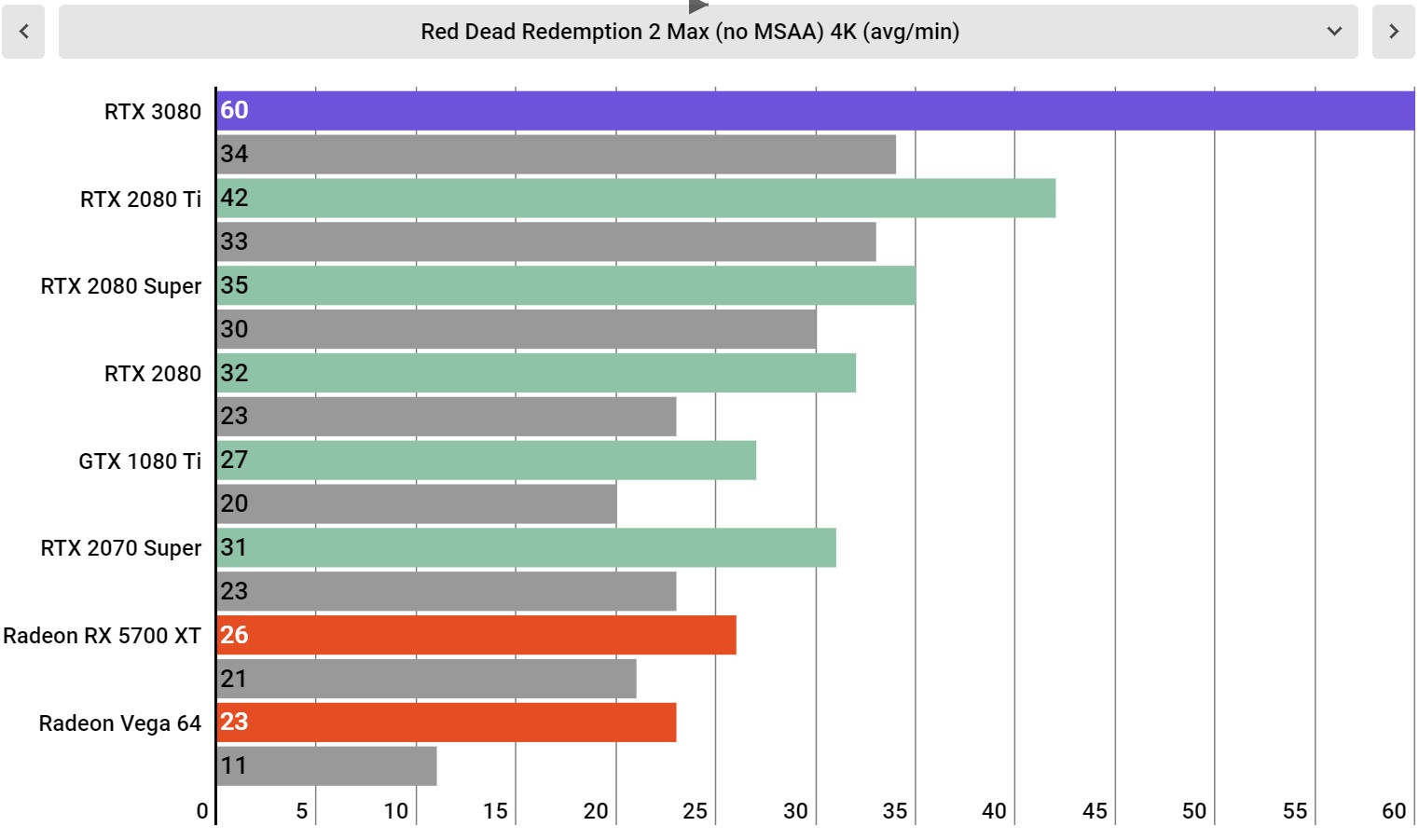
Red Dead Redemption 2 Max Settings (no MSAA) at 4K

Image 22 of 34

(Image credit: Infogram; Future)

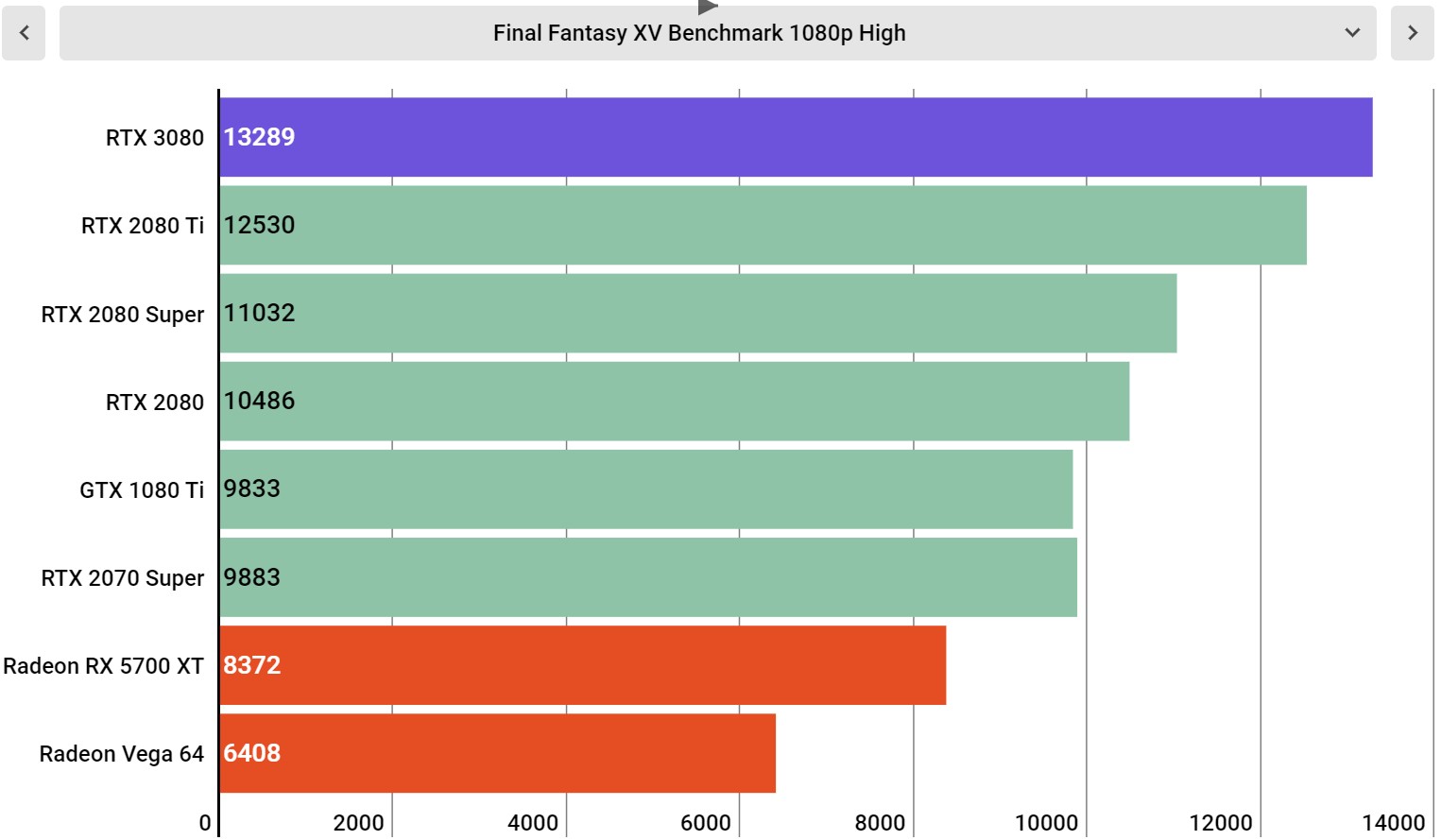
Final Fantasy XV canned benchmark, High settings at 1080p

Image 23 of 34

(Image credit: Infogram; Future)

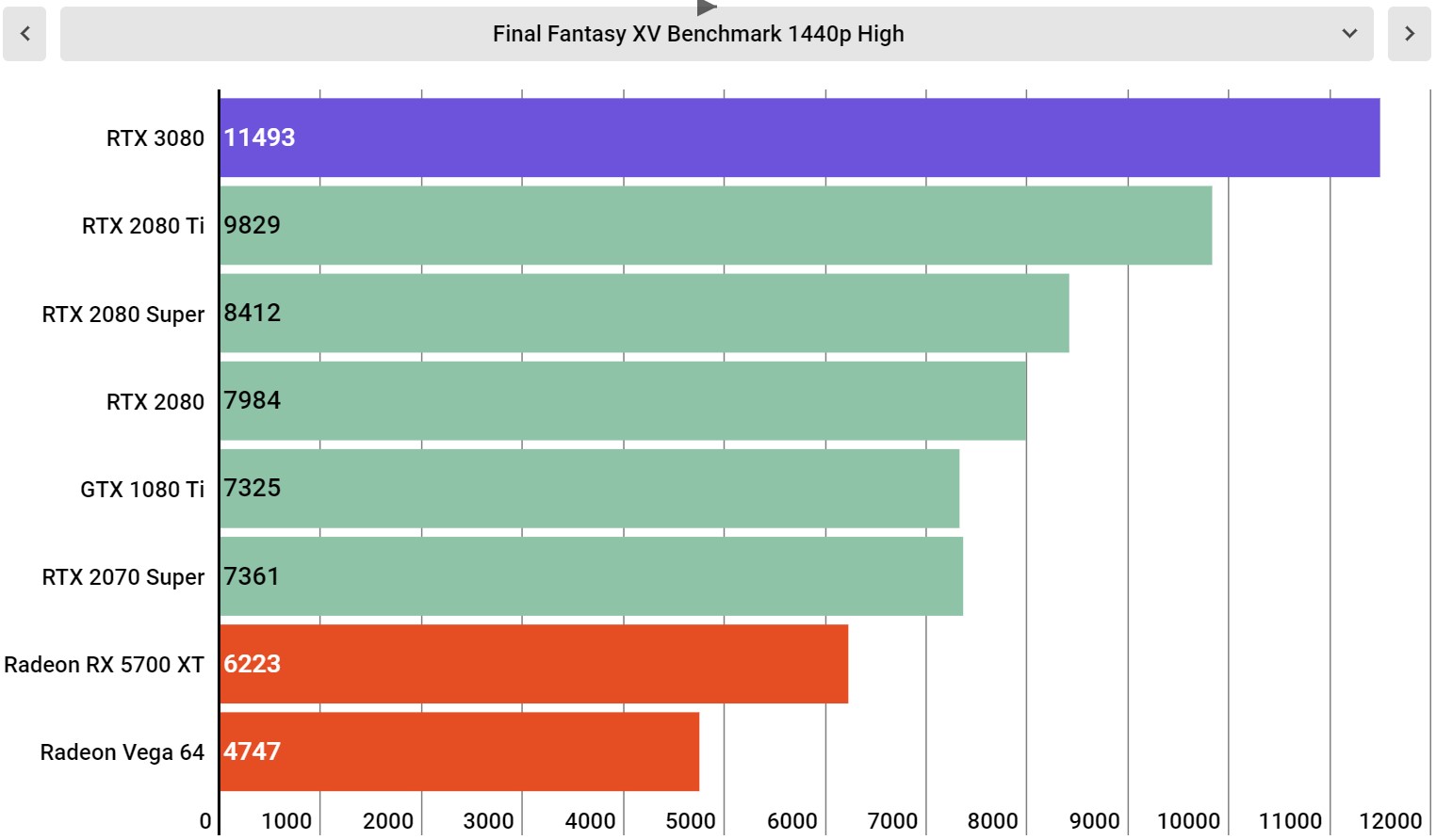
Final Fantasy XV canned benchmark, High settings at 1440p

Image 24 of 34

(Image credit: Infogram; Future)

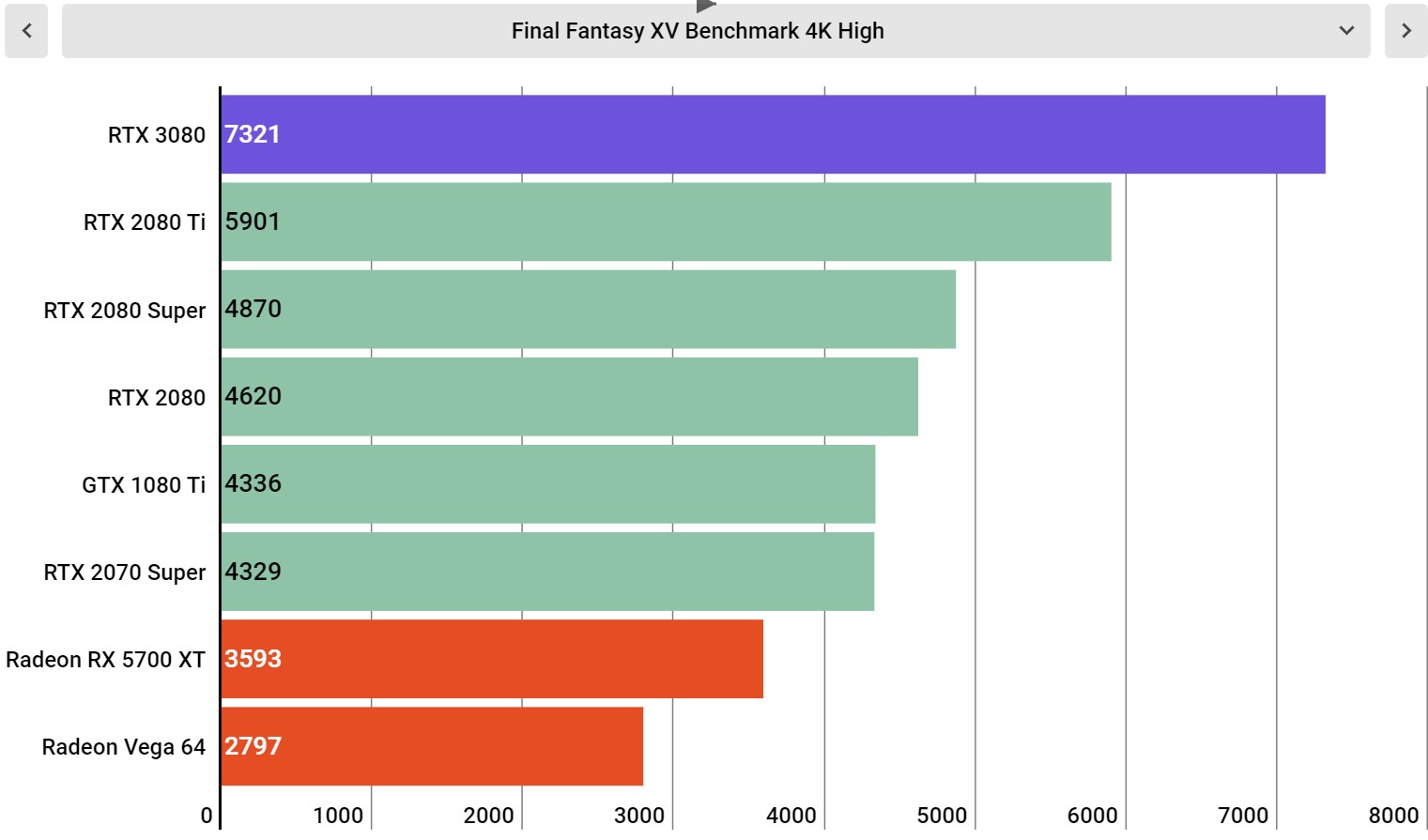
Final Fantasy XV canned benchmark, High settings at 4K

Image 25 of 34

(Image credit: Infogram; Future)

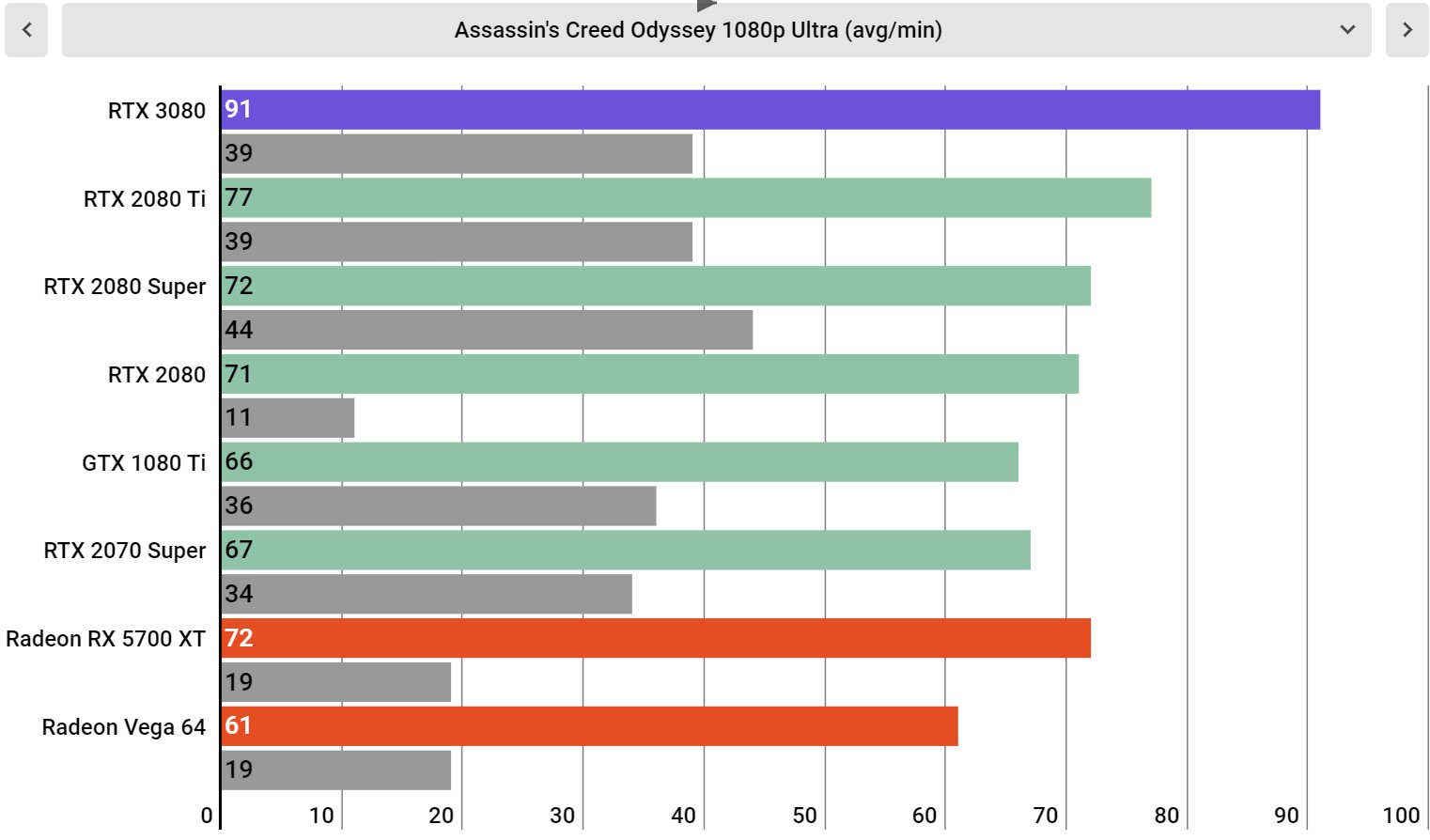
Assassin's Creed Odyssey Ultra Settings at 1080p

Image 26 of 34

(Image credit: Infogram; Future)

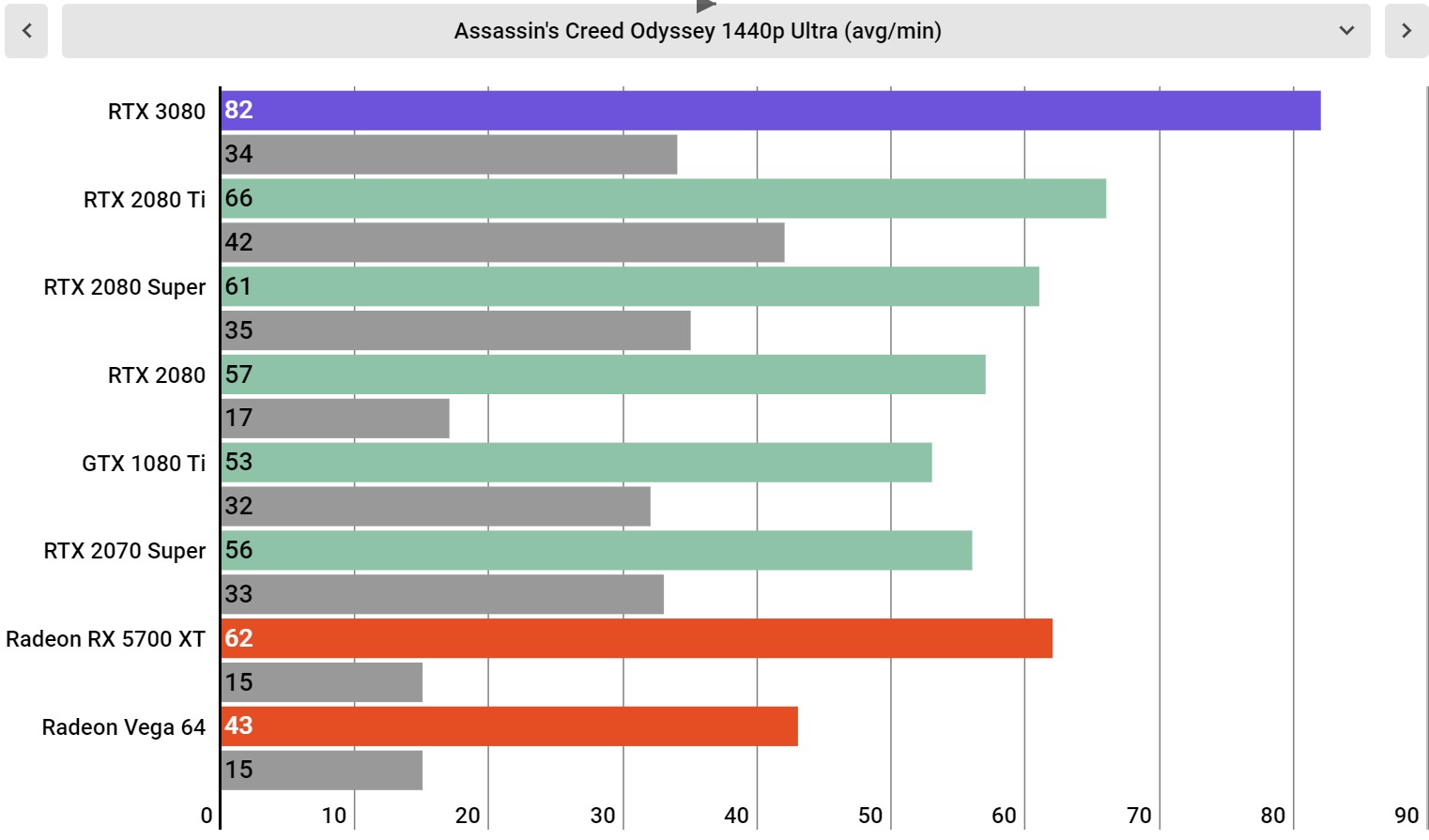
Assassin's Creed Odyssey Ultra Settings at 1440p

Image 27 of 34

(Image credit: Infogram; Future)

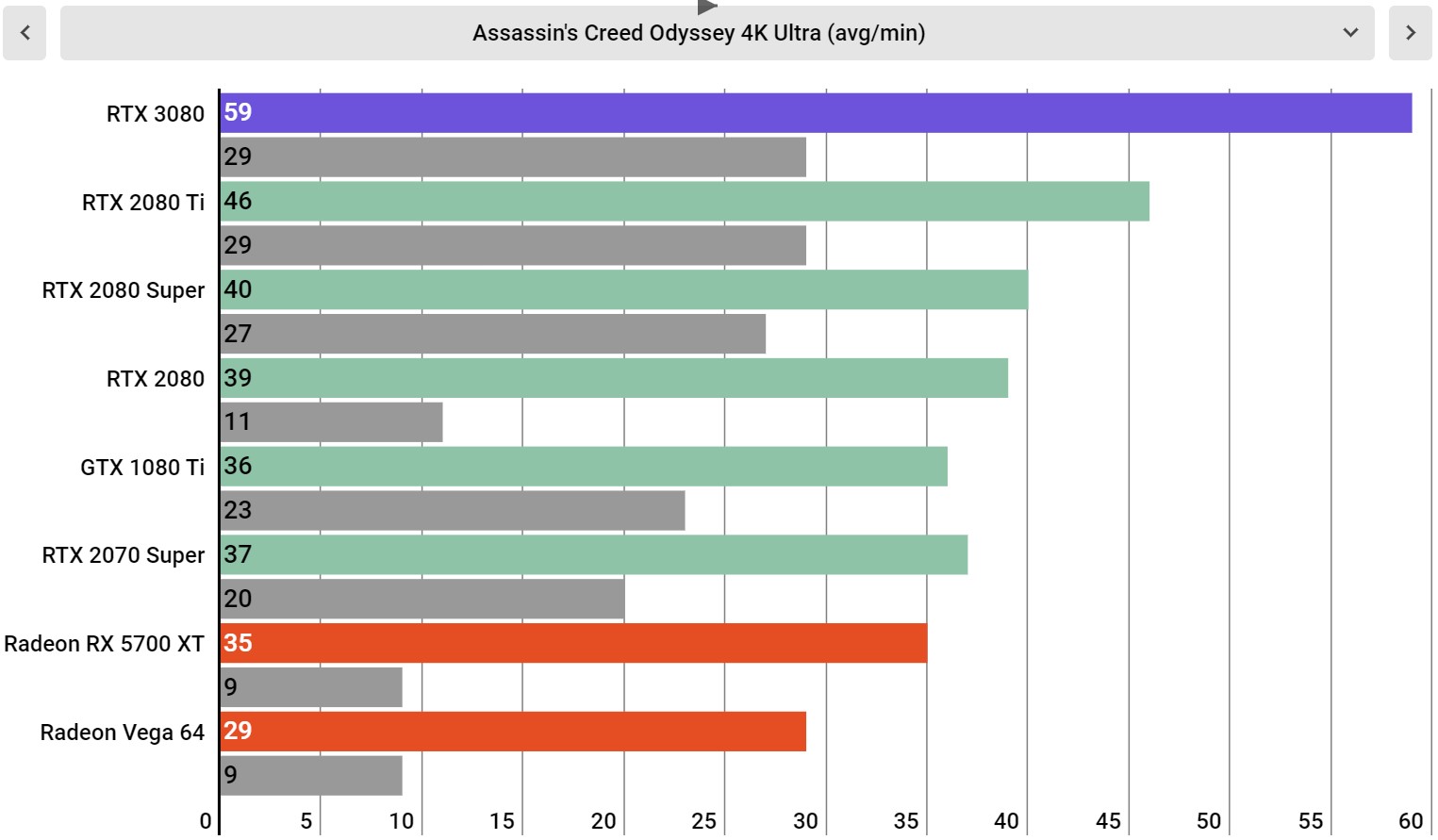
Assassin's Creed Odyssey Ultra Settings at 4K

Image 28 of 34

(Image credit: Infogram; Future)

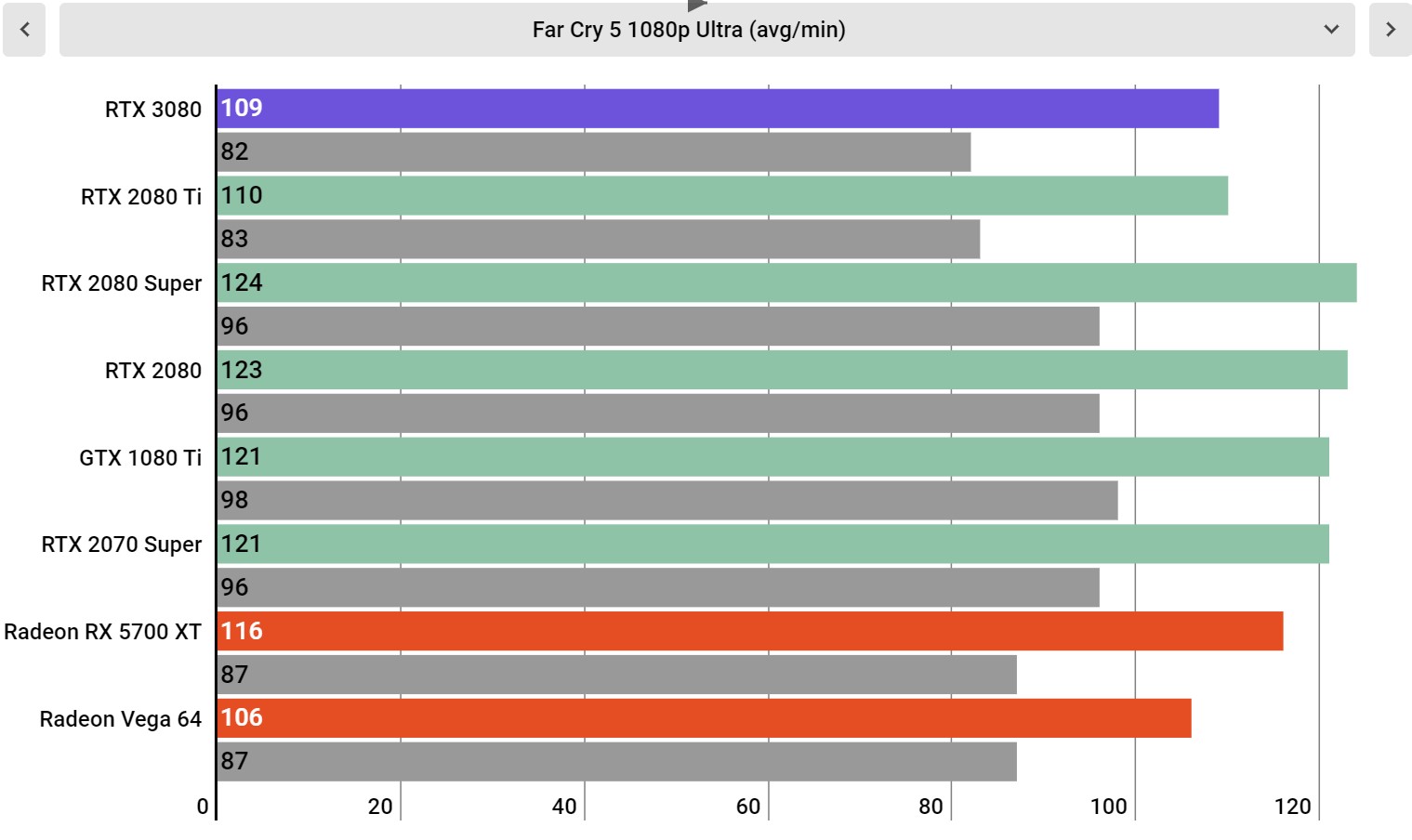
Far Cry 5 Ultra Settings at 1080p

Image 29 of 34

(Image credit: Infogram; Future)

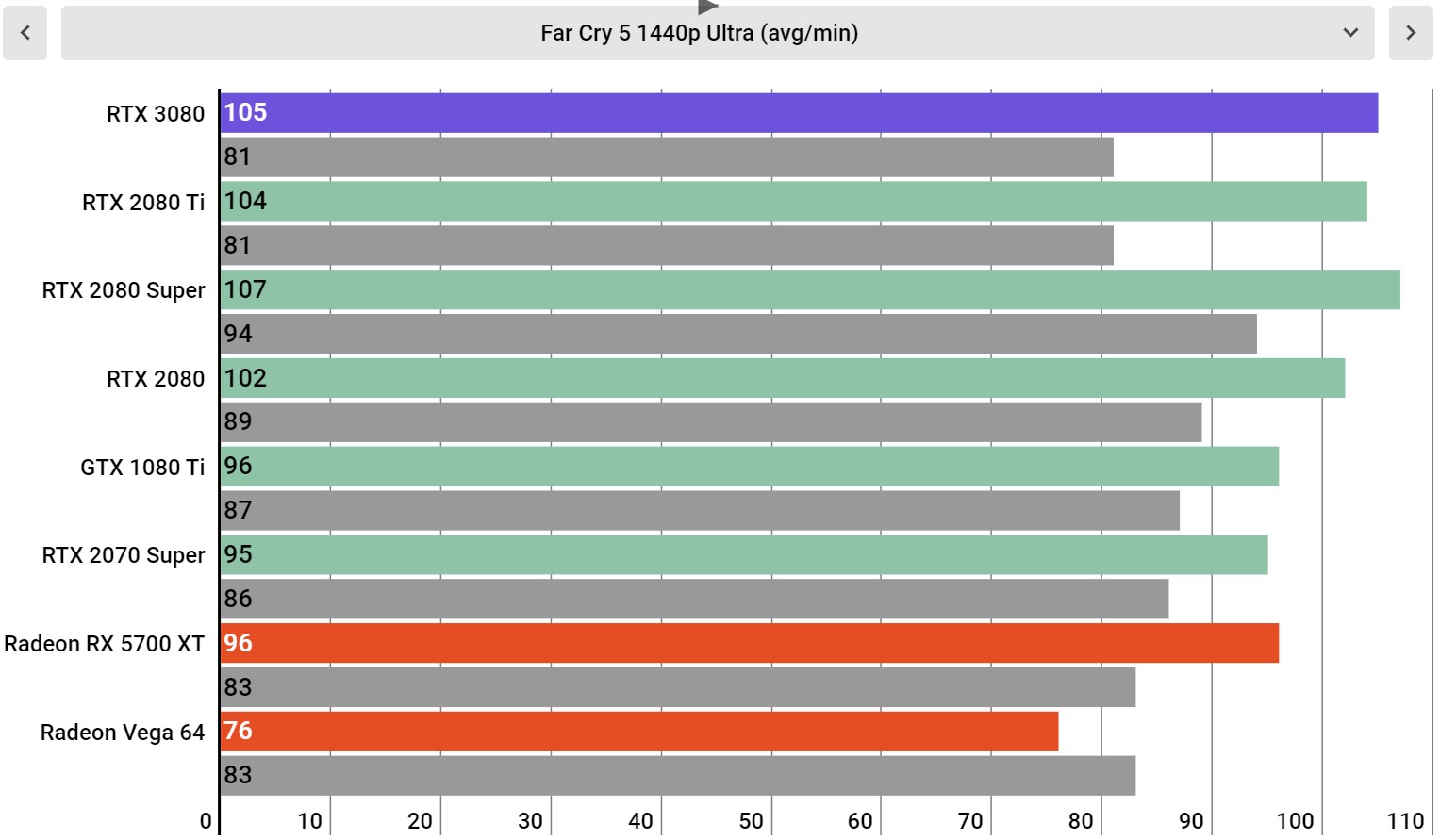
Far Cry 5 Ultra Settings at 1440p

Image 30 of 34

(Image credit: Infogram; Future)

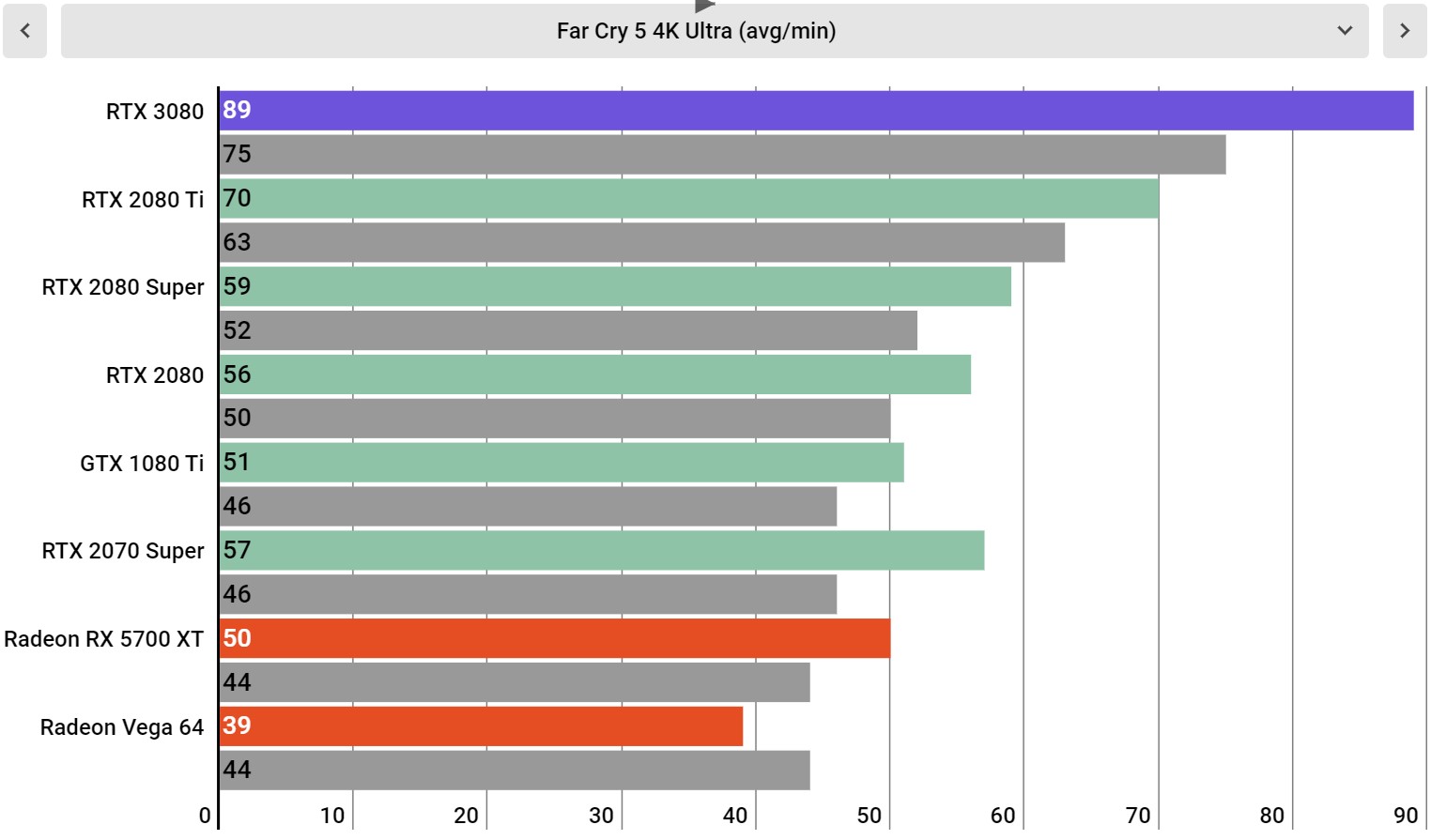
Far Cry 5 Ultra Settings at 4K

Image 31 of 34

(Image credit: Infogram; Future)

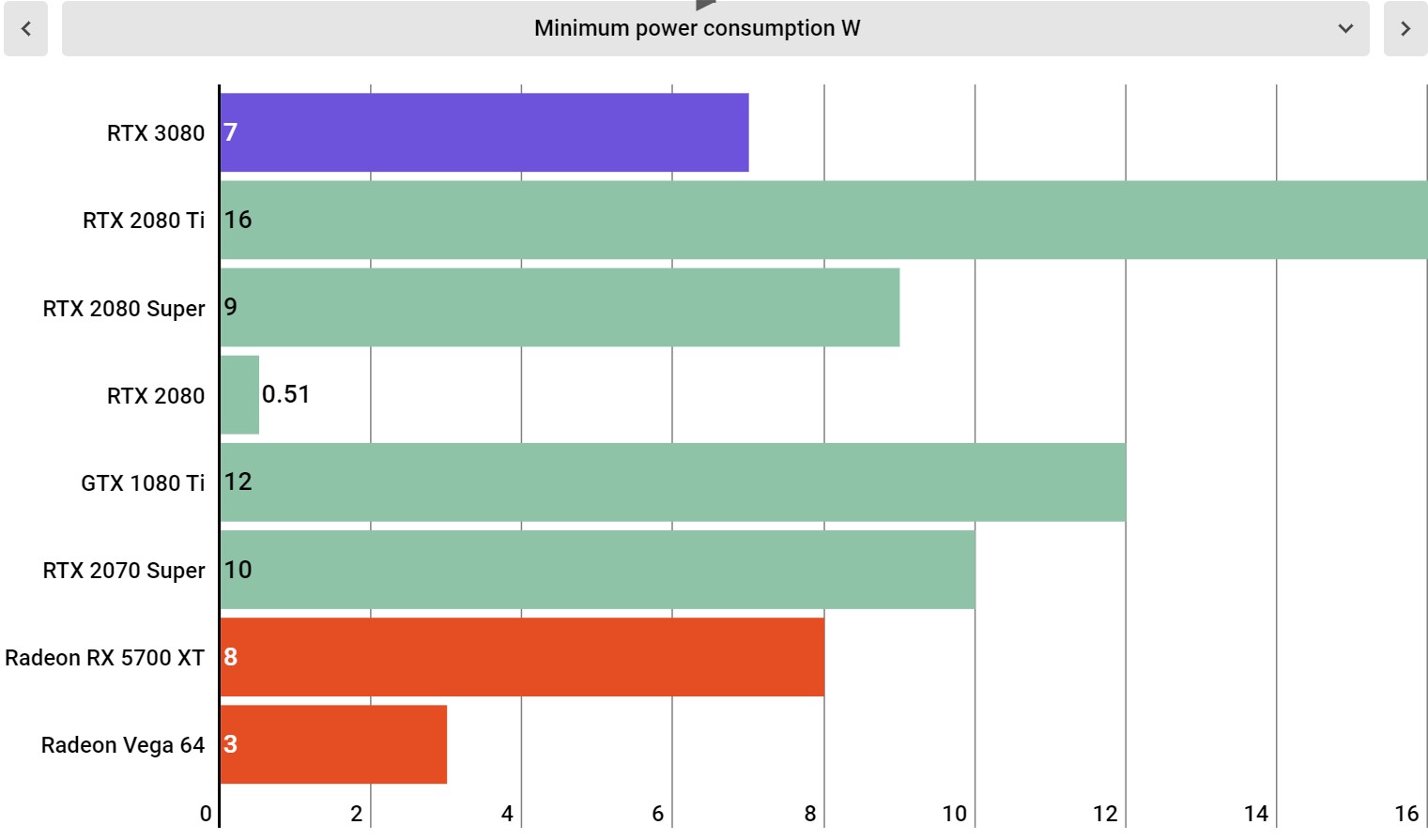
Minimum power consumption

Image 32 of 34

(Image credit: Infogram; Future)

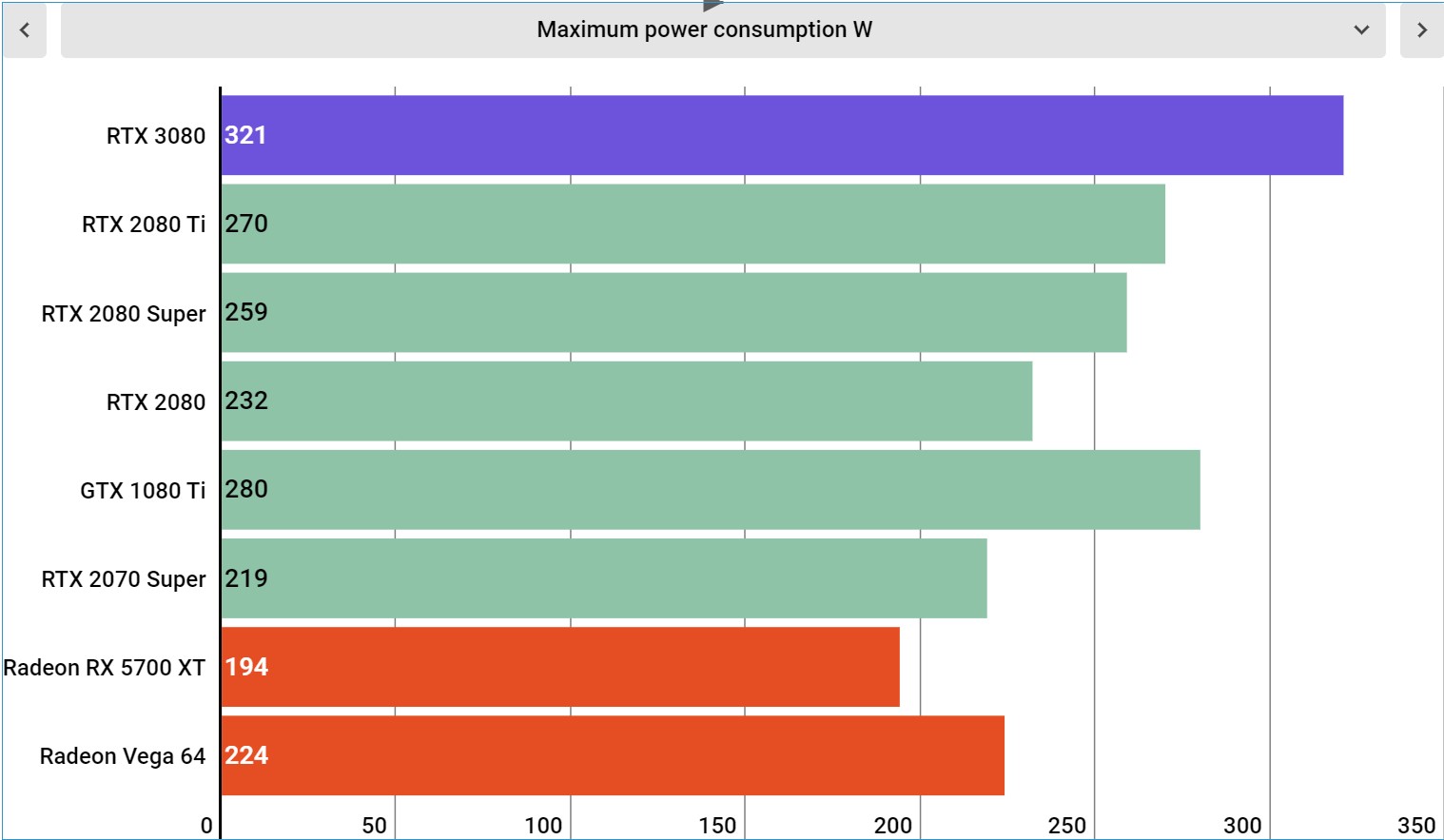
Maximum power consumption

Image 33 of 34

(Image credit: Infogram; Future)

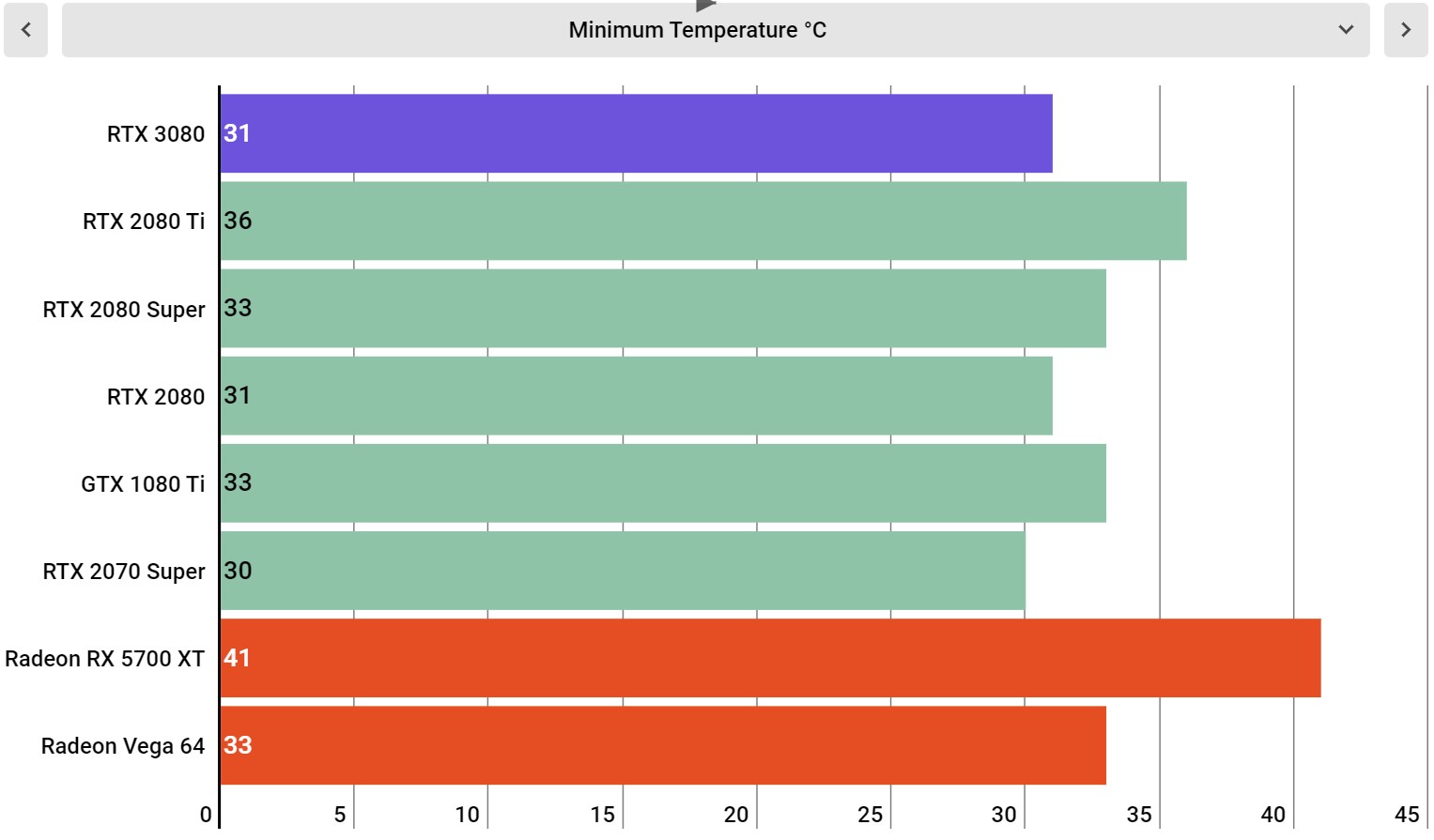
Minimum temperature

Image 34 of 34

(Image credit: Infogram; Future)

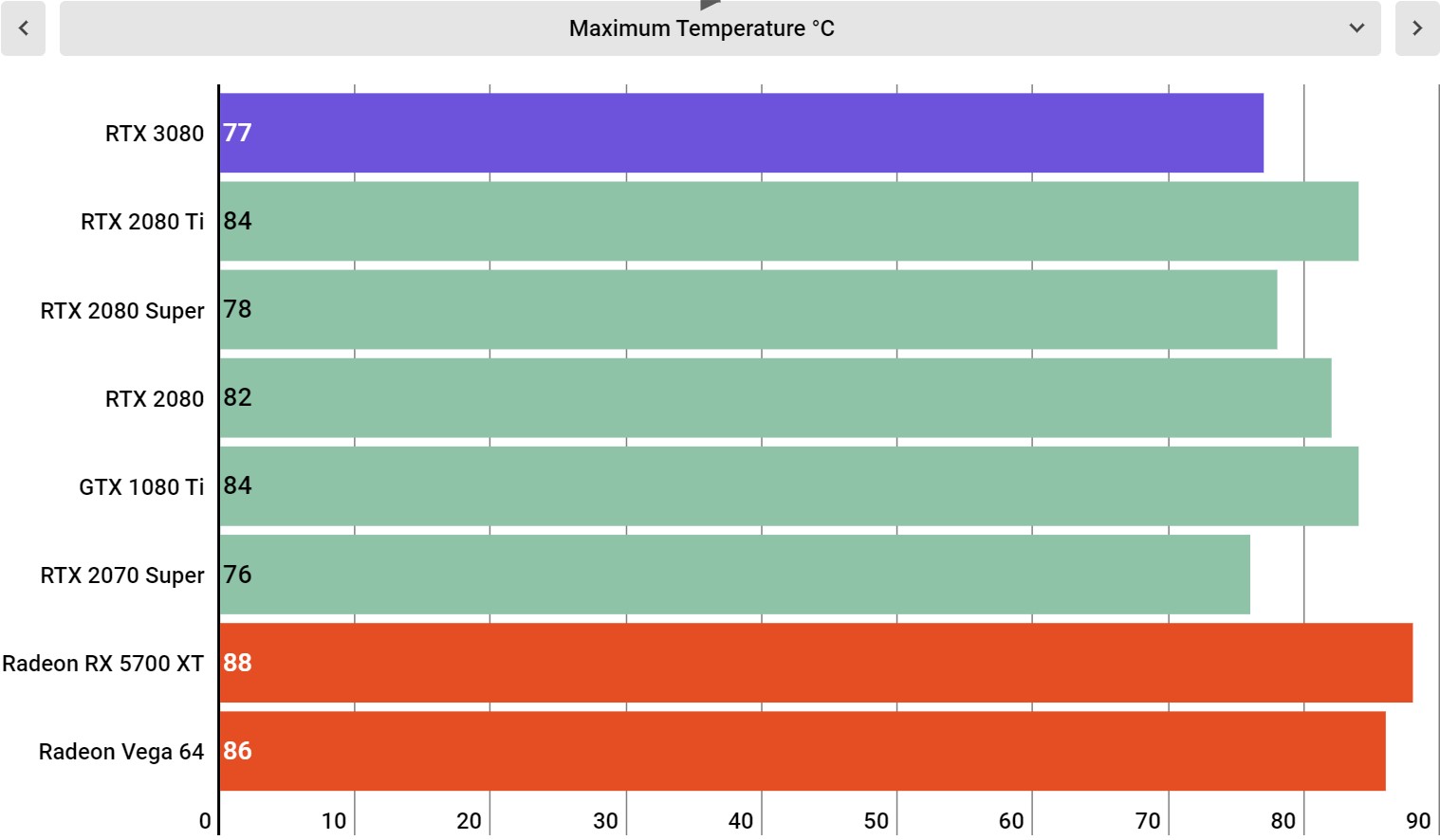
Maximum temperature

Performance

Test system specs

This is the system we used to test the Nvidia GeForce RTX 3080 Founders Edition:

CPU: AMD Ryzen 9 3950X (16-core, up to 4.7GHz)
CPU Cooler: Cooler Master Masterliquid 360P Silver Edition
RAM: 64GB Corsair Dominator Platinum @ 3,600MHz
Motherboard: X570 Aorus Master
SSD: ADATA XPG SX8200 Pro @ 1TB
Power Supply: Phanteks RevoltX 1200
Case: Praxis Wetbench

Just from Nvidia's own (overblown) marketing, we were already expecting the RTX 3080 to be a fast graphics card, but calling it "fast" is a bit of an understatement. From the moment we opened the box, it's been in our personal machine, running everything from Final Fantasy XIV to Control, only coming out of our personal rig to be plugged into our test bench for actual benchmarking. 

Before the 3080, we had an Nvidia GeForce RTX 2080 Ti in that machine, and the difference was immediately apparent before we even start measuring performance in a quantifiable way. For instance, one of the games we play the most is Final Fantasy XIV – it's a problem – and in that game, particularly in the latest expansion, there were moments where the RTX 2080 Ti would drop below 60 fps at 4K. That doesn't happen with the RTX 3080. In fact, the game is typically running anywhere from 75-100 fps at 4K with Maximum graphics settings, where the RTX 2080 Ti typically chilled around the 60 fps mark – a massive jump in performance at around half the price. 

This story just kept repeating itself over and over no matter what game we played. Metro Exodus maxed out with Ray Tracing and DLSS? Smooth locked 60 fps at 4K. Control with the myriad ray tracing effects? Silky smooth. Even Final Fantasy XV with all the weird optional graphics effects sits pretty at a steady 60 fps at 4K. Accessible 4K60 gameplay is here – even if we are using the term "accessible" very loosely here.

While the thermals in our benchmarks aren't too exciting, you should keep in mind that those were recorded on an open-air test bench. In our closed tower, with two 240mm fans serving as intake, temperatures peaked around 60°C – way cooler than the mid-80°C temperatures we would typically see with the RTX 2080 Ti Founders Edition. 

When looking at the actual benchmark results, it's clear that the Nvidia GeForce RTX 3080 is in a class of its own, standing head and shoulders above even the RTX 2080 Ti. Right off the bat in 3DMark Time Spy Extreme, the RTX 3080 is a whopping 63% faster than the RTX 2080 and 26% faster than the 2080 Ti – a massive generational leap when you consider that the RTX 2080 was only 40% faster than the GTX 1080 when we reviewed it back in 2018. 

But Time Spy Extreme isn't even even the best-case scenario for the RTX 3080's gains. In Red Dead Redemption 2, where we basically maxed out every single option that wasn't MSAA – multi-sample anti aliasing is very expensive and not worth it – we saw a massive 87% improvement gen-on-gen.

This falls short of that 2x performance leap that was teased at the RTX 3080 reveal, but it's definitely closer than we thought it would actually get. The RTX 3080, all told, is between 50-80% faster than the RTX 2080, while only falling below that in Fire Strike Ultra, where it only managed a 29% lead – but that's still a meaty advantage. 

That wide gap in performance is only really present at 4K, however, when the graphics card is free of bottlenecks. There are many titles in our testing suite where even the AMD Ryzen 9 3950X, paired with 64GB of RAM at 3,600MHz, held back the RTX 3080. This is why, for instance, the RTX 2080 Ti and the RTX 3080 are virtually identical at 1080p in Metro Exodus, but opens up to a 19% performance advantage at 4K. 

For this reason, we really don't recommend anyone actually buy the Nvidia GeForce RTX 3080 unless they're going to be playing at 4K, or possibly 3,400 x 1,440 Ultrawide. The gains are just not going to be there at lower resolutions, so you're better off just waiting for the Nvidia GeForce RTX 3070. 

The performance on offer with the Nvidia GeForce RTX 3080 even further widens the gap that exists between Nvidia and AMD on the high end, more than doubling the performance of AMD's most powerful consumer graphics card, the Radeon RX 5700 XT in many tests. AMD Big Navi is going to have a big fight on its hands if it wants to try to claim the 4K crown that the RTX 3080 just won. 

(Image credit: Future)

Buy it if...

You want the best 4K performance
4K gaming is incredibly difficult to run, but the RTX 3080 is the best graphics card yet for handling it. You'll be able to max out every game under the sun at this resolution at or very near 60 fps. 

You want next-gen ready performance
With the next generation of games on the horizon, performance requirements are about to skyrocket. The RTX 3080 is significantly more powerful (at least on paper) than the GPUs in either the PS5 or Xbox Series X. 

You have an older graphics card
Because the generational gains between Nvidia Pascal and Nvidia Turing graphics cards were pretty minor, many folks held on to their 10-series cards. If you have one of these older cards, however, you'll get absolutely massive gains with the RTX 3080.

(Image credit: Future)

Don't buy it if...

You play games at a lower resolution
The Nvidia GeForce RTX 3080 is a 4K graphics card, and as such, you really shouldn't pick this graphics card up for gaming at a lower resolution, you'll run into bottlenecks with even the most powerful CPUs on the market. 

You're on a budget
When Nvidia Turing launched, the RTX 2080 saw a significant price increase over the GTX 1080. And, while Nvidia didn't raise the price, it didn't lower the price back to pre-Turing levels. If you want to get your hands on the RTX 3080, you're going to be paying a high price – even if it is worth it.


from TechRadar - All the latest technology news https://ift.tt/3hBM0IC
via IFTTT